
Gigpie vs Acuity Scheduling for Tutoring Businesses
Compare Gigpie and Acuity Scheduling with verified 2026 facts: where Acuity's packages and apps genuinely deliver, and where family billing, payroll, and CRM take over.
Acuity Scheduling is Squarespace's appointment platform, and it deserves more credit than tutoring software comparisons usually give it: as of August 2026 it sells prepaid session packages with automatic balance tracking, recurring subscriptions, built-in invoicing, true two-way calendar sync, and a native mobile app that takes tap-to-pay, starting at $20 a month. Gigpie books sessions too, then runs the parts of a tutoring business Acuity leaves outside the calendar: billing that belongs to the household rather than one client, payroll runs for your tutors, a CRM with campaigns, and progress notes parents can read. Acuity's unit of work is an appointment with one person; a tutoring company's unit of work is a family, and that difference decides most of what follows.
Quick Comparison
| Feature | Gigpie | Acuity Scheduling |
|---|---|---|
| Pricing model | Flat 2% of collections | $20 to $61/month tiers |
| Cost before you have revenue | Free until you collect revenue | 7-day free trial, then paid |
| Prepaid session packages | Yes | Standard plan and up |
| Automatic package balance tracking | Yes | Yes |
| One balance shared across siblings | Yes | No |
| Family / household accounts | Yes | No |
| Recurring subscription billing | Yes | Yes |
| Online payments | Stripe cards + pay by bank | Stripe, Square, or PayPal |
| Calendar sync | Push + conflict check | Two-way: Google, Outlook, iCloud |
| Native mobile app | No | Admin app + client app |
| Group classes | Yes | Standard plan and up |
| Client portal | Family-wide portal | Individual client accounts |
| Progress notes parents can read | Yes | No |
| Multi-tutor payroll runs | Yes | Reports only |
| CRM with campaigns and journeys | Yes | No |
| AI phone agent for inbound calls | Yes | No |
| Support channels | Live chat + email, no phone |
Every Acuity cell reflects acuityscheduling.com's pricing, feature pages, and help center as of August 2026. Where a cell says false for something Acuity doesn't publish anywhere, that's what false means here: nothing in their documentation or marketing describes it, so we won't claim they secretly have it, and we won't pretend the absence is confirmed by Acuity either.
Pricing: Acuity Wins the Line Item
Gigpie
- Platform fee: flat 2% of what you collect - no seat limits, ever
Nothing is due until you collect revenue, and there are no tiers to outgrow. Stripe's processing fees are separate, as they would be on any platform; pay by bank (ACH) carries Stripe's 0.8% fee, capped at $5 per transaction.
Acuity Scheduling
If you last priced Acuity when its tiers were called Emerging, Growing, and Powerhouse, the names changed; the plans are now Starter, Standard, and Premium, with the same dollar figures. As of August 2026:
- Starter: $20/month, or $16/month billed annually. One calendar.
- Standard: $34/month, or $27/month annually. Up to 6 calendars, and the first tier with packages, memberships, gift certificates, group classes, and SMS reminders.
- Premium: $61/month, or $49/month annually. Up to 36 calendars, plus HIPAA BAA signing, removal of Acuity branding, and multi-timezone staff.
- Enterprise: custom pricing, unlimited calendars.
Every plan starts with a 7-day free trial, no card required. One fine-print item: refunds apply only to annual subscriptions canceled within 14 days; monthly plans are not refundable (support.squarespace.com, August 2026).
Break-even, three ways. A solo tutor collecting $3,000/month pays Acuity Standard $34 and Gigpie $60. A five-tutor center collecting $20,000/month pays Acuity $34 and Gigpie $400. A twelve-tutor operation collecting $60,000/month pays Acuity Premium $61 and Gigpie $1,200. Gigpie's 2% beats the Standard plan only below $1,700/month in collections, and Premium only below $3,050/month. At any healthy revenue level, Acuity is the cheaper subscription.
That math is worth stating plainly because the comparison was never subscription versus subscription. Acuity's price covers scheduling and payments. The per-family hour ledger your front desk keeps, the payroll spreadsheet, the email tool, and the inbound calls that ring out all live somewhere else in your budget. Gigpie's 2% is priced against that whole pile. If the pile doesn't exist in your business, keep Acuity's number.
What Acuity Does Well
Credit where it's due, all verified on Acuity's own pages as of August 2026. The Packages feature is real and well built: you choose exactly which appointment types a package can be redeemed for, set an expiration date or let it run forever, and Acuity tracks the remaining balance automatically for both sides. Clients see their codes and balances in their account; you can view and edit the same numbers from their profile. Subscriptions handle recurring billing with a card on file. Invoicing is built in, with automated reminders on unpaid invoices. Calendar sync is genuinely two-way across Google, Outlook, and iCloud. And the mobile story is ahead of ours: a native admin app with drag-and-drop rescheduling and tap-to-pay for in-person payments, plus a separate client app for booking. For a business made of individual appointments, that's a complete toolkit.
Where the Individual-Client Model Runs Out
Now put a family into that toolkit. A seventh grader in algebra, a tenth grader in SAT prep, one parent paying for both. An Acuity client account is one person with one login, and a package code lives with the account that bought it. No family grouping, dependent profile, or shared household view appears anywhere in Acuity's help center or marketing as of August 2026. So the parent either runs both kids through one account, which blurs two schedules and two histories into one record, or keeps two accounts with two balances and asks you which child has hours left. That question arrives by email, usually on a Sunday.
Gigpie's answer is architectural rather than a workaround: every package belongs to the family. Either sibling's session draws from the same balance, the parent portal shows one number, and your front desk sees the same number on the family's profile. Sessions carry the operational detail a tutoring business runs on: which package is being drawn against, which coach is teaching, and what happens financially when someone doesn't show. A student no-show still consumes the hour and still pays the coach; a coach no-show reverses both. The system enforces those rules so nobody has to relitigate them per incident.
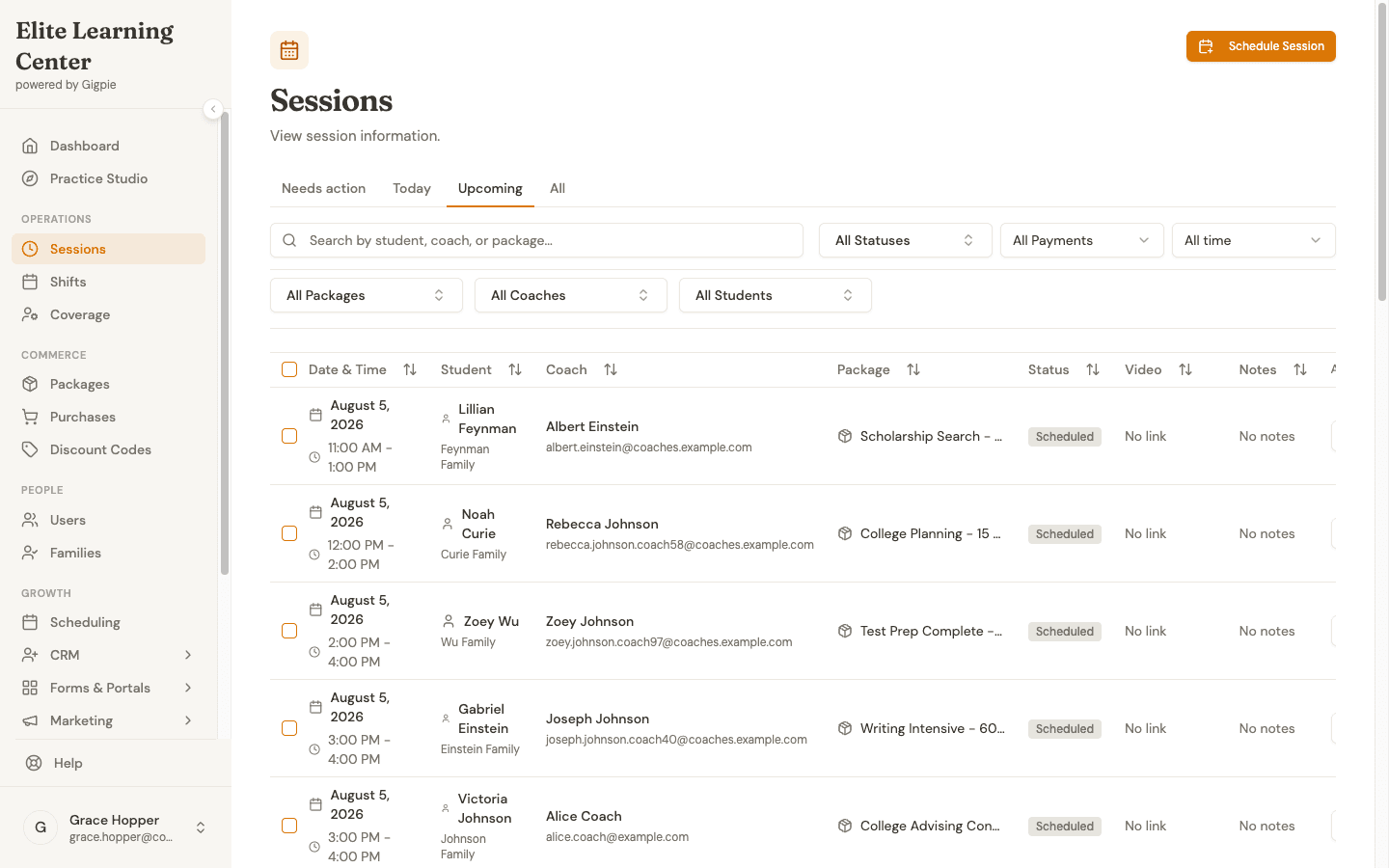 Upcoming sessions across every coach, with the student, the package being drawn against, and the status in one list.
Progress notes follow the same pattern. Acuity's client notes and intake forms are internal to the business; its help center is explicit that clients don't see them. In Gigpie, the note a coach writes after a session is visible in full to the family from the parent portal, which answers the other recurring parent email: what did you work on this week?
Payroll, Marketing, and the Rest of the Stack
Acuity's education marketing suggests handling tutor pay by filtering reports by staff member and calculating from completed session counts. That's an accurate description of what exists: reports, and a spreadsheet you maintain. No commission engine, pay run, or payout workflow appears in Acuity's public documentation as of August 2026. Gigpie treats payroll as its own system: pay groups, pay schedules, runs that snapshot each coach's rate, an approval step, and CSV exports, including a Justworks timecard, for the processor that moves the money. To be clear about the boundary, Gigpie doesn't transfer money to tutors either; it does the calculation and the audit trail so your processor can.
For marketing, Acuity connects natively to Mailchimp, Constant Contact, QuickBooks, and FreshBooks, with Zapier beyond that. Gigpie builds the layer in: leads from web forms and ads land in a pipeline, one inbox threads email, SMS, and calls together, campaigns run as one-off broadcasts or multi-step journeys, and an AI phone agent takes the inbound call you'd otherwise miss mid-session, leaving a recording and transcript. Acuity isn't trying to be a CRM, which is fair. It does mean a growing center buys and stitches those tools separately.
The Same Booking, Two Ways
Watch one parent book one session on each platform. In Acuity, the parent logs into their client account, picks the appointment type their package is redeemable for, and the booking flow surfaces their active code; the balance is theirs to check under Manage codes. Clean, and built around one person booking for themselves.
In Gigpie, the parent picks which child the session is for, or adds a new student inline, then chooses duration and cadence, then a coach and a time. The family's remaining hours stay on screen the whole way through, and a weekly cadence turns the Tuesday slot into a series without rebooking.
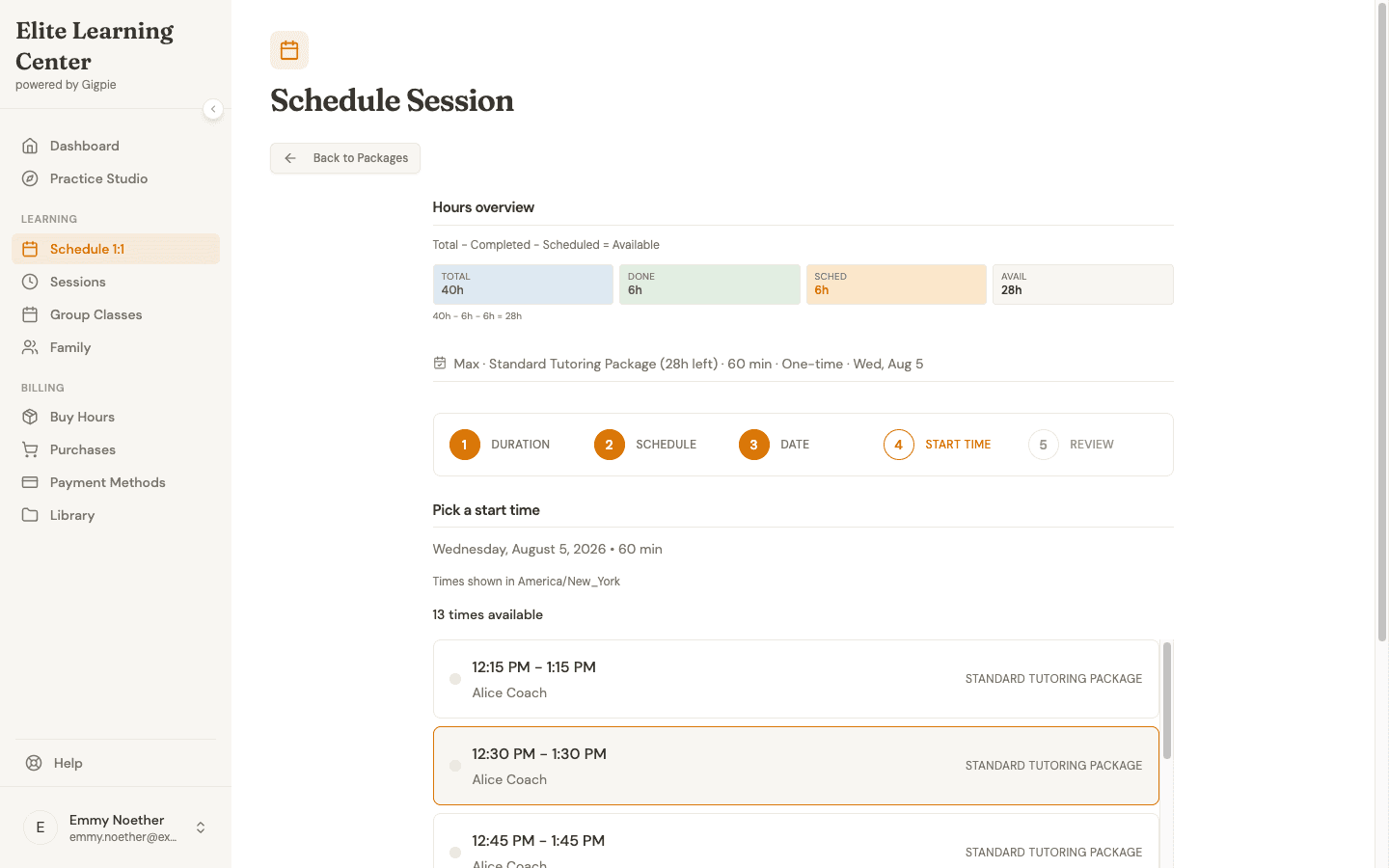 Step four of a parent booking: the family's remaining hours sit right above the open time slots.
Verdict by Use Case
A solo practitioner with adult clients, or any appointment-only business
Acuity, plainly. If clients book for themselves, there's no household in the picture, and staff means you, Acuity Standard at $34 a month covers scheduling, packages, subscriptions, and invoicing, with stronger calendar sync and a native app that Gigpie doesn't have. Two percent of a healthy practice's revenue would buy family architecture you'd never use.
A tutoring center serving families with a team of tutors
Gigpie. The moment one purchase serves two children, the individual-client model starts leaking: shared logins, duplicate balances, balance questions by email. Add tutor payroll and lead follow-up and you're maintaining three systems around the calendar. This is the shape of business Gigpie's 2% is priced for.
An operation between those two
Split it by trajectory. If growth means more adult one-on-one clients, stay with Acuity; Standard scales to six calendars, Premium to 36, and the prices are modest. If growth means families, siblings, and hired tutors, the workarounds compound with every enrollment, and it costs less in admin hours to move before the roster gets big.
Migrating From Acuity
Acuity exports two clean CSVs: your client list and your appointments, with intake form answers included if you select them (help.acuityscheduling.com, August 2026). Package balances need extra care: no balance export appears in Acuity's documentation, so record each client's remaining sessions from their profile before you cancel.
On the Gigpie side there is no Acuity-specific importer today, so an Acuity migration means re-entering families, packages with remaining hours, and schedules by hand. Adding a family, its package, and a coach assignment happens on one screen, which keeps re-entry moving, but plan for admin time that scales with your roster, and keep Acuity around read-only until the last prepaid hours are honored. Your exported CSVs hold the history either way.
Frequently Asked Questions
Does Acuity Scheduling support tutoring session packages?
Yes, and older comparisons that say otherwise are wrong, including an earlier version of this page. On the Standard plan and up, Acuity sells prepaid packages that can be restricted to specific appointment types, given optional expiration dates, and tracked automatically, with clients able to see their remaining balance in their account. What differs is who owns the package: one Acuity client, or the whole family in Gigpie.
Can two siblings share one package in Acuity?
Nothing in Acuity's help center or marketing documents a family or household account as of August 2026. Client accounts are individual, and a package code lives with the account that bought it, so a family with two students either shares one login or maintains two separate balances. In Gigpie every package is family-owned from the start, and any student in the household draws from the same balance.
Is Acuity cheaper than Gigpie?
On subscription price, almost always. Acuity Standard is $34/month as of August 2026 while Gigpie charges 2% of collections, so a center collecting $20,000/month pays Gigpie $400. Gigpie's fee is lower only below $1,700/month in collections against Standard, or $3,050 against Premium. You choose Gigpie for the family billing, payroll, and CRM scope, not to save on software.
Which Acuity plan does a tutoring business need?
Standard, at $34/month ($27 billed annually), because packages, group classes, and SMS reminders start at that tier, and it covers up to 6 calendars. A team with more than six tutors needs Premium at $61/month, which covers up to 36.
Does Acuity have a mobile app?
Yes, two. The admin app handles schedule changes, in-person payments with tap-to-pay, invoices, and client history; a separate client app lets clients book and manage their own appointments. Gigpie has no native app; it runs in any mobile browser as a responsive web app. Acuity is stronger here, no contest.
How does Acuity handle tutor payroll?
Manually. Acuity's education marketing points to filtering its reports by staff member so you can calculate pay from completed session counts; no commission engine, pay run, or payout workflow appears in its documentation as of August 2026. Gigpie runs payroll in pay groups with rate-snapshotted earnings and an approval step, then exports CSVs, including a Justworks timecard, for your payroll processor. Neither platform transfers money to tutors itself.
Can parents see session notes in Acuity?
No. Acuity's client notes and intake forms are internal to the business per its help center as of August 2026. In Gigpie, the coach's progress note is visible in full to the family as soon as the session is completed.
Does Acuity do recurring billing?
Yes. Acuity Subscriptions bill on a fixed cadence with a card on file, for up to 23 cycles or until canceled, with renewal reminder emails. Gigpie handles recurring collection through installment plans and autopay against saved payment methods, including pay by bank.
What data can I export from Acuity?
Your client list and your appointments, both as CSVs; the appointment export can include intake form answers. No package balance export appears in Acuity's help center as of August 2026, so record remaining balances from each client's profile before you cancel.
Can Gigpie import my Acuity data automatically?
No. Gigpie doesn't have an automated importer for Acuity data. Coming from Acuity, you re-enter families, packages with their remaining hours, and schedules by hand; the one-screen flow for adding a family, package, and coach assignment speeds up the re-entry but doesn't eliminate it.
Will Acuity stop a client from booking once their package is used up?
Acuity's documentation doesn't say either way as of August 2026. Booking against a package requires redeeming an active code, but whether the system hard-blocks a booking once codes run out isn't documented, so we won't claim it in either direction. In Gigpie, the parent booking flow shows the family's remaining hours before a time is picked, and every session draws down that one balance.
Do I need Squarespace to use Acuity?
No. Acuity is owned by Squarespace but sold as a standalone product, and it pairs naturally with a Squarespace site if you have one. One billing detail worth knowing: only annual subscriptions canceled within 14 days are refunded; monthly plans aren't eligible.
What support does each company offer?
Acuity offers live chat Monday to Friday, 4am to 8pm Eastern, email support around the clock, a help center, and a community forum. It does not offer phone support, and says so explicitly. Gigpie offers email support. Nobody is picking up a phone at either company.
Whose calendar sync is stronger?
Acuity's. It offers true two-way sync with Google Calendar, Outlook (through Cronofy), and iCloud, so events created in your personal calendar block Acuity availability. Gigpie pushes sessions to Google and Outlook calendars and checks for conflicts at booking time, but doesn't monitor for edits made directly in the external calendar afterward. If calendar sync is your deciding feature, Acuity wins it.
One balance per family, one system behind it
Scheduling, family billing, payroll runs, and a CRM for a flat 2% of collections. Free until you collect revenue.
Get started freeRelated Resources
- Family Management - What changes when the package belongs to the household, and why sibling hour-sharing can't be bolted onto an individual-client model.
- Educator Payroll - Pay groups, payroll runs, and the processor export, including who doesn't need any of it.
- Gigpie vs Calendly - The same evaluation against a pure booking link tool, where the gap is wider.