
Gigpie vs Calendly: Scheduling Link or Business Platform?
Compare Gigpie and Calendly for tutoring and coaching businesses: verified August 2026 pricing, Calendly's Meeting Packages, family billing, payroll, and migration.
Calendly is the best-known scheduling link on the internet, and at the job it was built for it is genuinely hard to beat: a client picks a slot, the calendar fills itself, reminders go out. Gigpie is a different category of tool, a business platform for tutoring and coaching companies that handles scheduling and then everything attached to it, from package billing and family accounts to a parent portal, payroll runs, and a CRM, for a flat 2% of what you collect. A solo coach charging by the hour is usually better off with Calendly; this comparison is about what changes once packages, siblings, and a second tutor show up.
Quick Comparison
| Feature | Gigpie | Calendly |
|---|---|---|
| Pricing model | Flat 2% of collections | $10 to $20/seat/month |
| Cost before you have revenue | Free until you collect revenue | Free plan (1 event type) |
| Self-serve booking page | Yes | Yes |
| Native mobile app | No | Yes |
| Automated reminders | Email + SMS, 28h + 1h before | Workflows: email/SMS (paid plans) |
| Calendar conflict checking | Google + Outlook, at booking | Up to 6 calendars (paid) |
| Payment collection | Stripe, built in | Stripe/PayPal (Standard+) |
| Multi-session packages | Yes | Meeting Packages (paid plans) |
| Hour balance shared across siblings | Yes | No |
| Family billing account | Yes | No |
| Installment plans with autopay | Yes | Partial |
| Client/parent portal | Yes | Booking page only |
| Progress notes for families | Yes | No |
| Multi-tutor payroll runs | Yes | No |
| CRM with campaigns and journeys | Yes | No |
| Business analytics | Revenue + operations | Booking metrics (paid plans) |
| Public API / Zapier | No | Yes |
| Support | 24/7 email + chat (Standard+) |
The Calendly column reflects calendly.com's pricing page, help center, and product blog as of August 2026. The "partial" on installments is Calendly's Payment Links, which can take deposits and installment payments as individual links but have no documented auto-charge schedule. Where Calendly's public materials don't settle a detail, the table says so instead of guessing. One note on the Gigpie column: reminder texts send from your own connected business number, and reminders run on email alone until one is connected.
The Typical Journey off Calendly
Tutoring businesses rarely quit Calendly because the scheduling broke. They quit because of everything bolted on around it.
The stack assembles itself one reasonable decision at a time. You start with a Calendly link because it kills the when-are-you-free email thread, and the Free plan costs nothing. A parent asks to pay by card, so you upgrade and connect Stripe. A family buys a ten-hour package, and since a scheduling link has no idea what an hour balance is, you open a Google Sheet with a column per child. Another parent finds Venmo easier, and now part of your revenue lives outside Stripe. No single step was a mistake; each was the cheapest fix for that week's problem. But before long you are the integration layer, and every email asking how many hours a family has left gets answered by a human cross-referencing three tabs, usually at night.
Calendly has patched the most painful seam itself. Meeting Packages, available on paid plans with a connected Stripe account, lets a host sell a bundle of sessions upfront; the client books them one at a time from a link, and package statuses appear in Calendly's Payments view instead of a spreadsheet. For a solo host, that really does retire the Google Sheet. What it leaves untouched is the rest of the pile: the family with two kids drawing on one balance, the Venmo backchannel, the second tutor's pay, and the parent who wants one place to see all of it.
What Calendly Does Well
All of it is on Calendly's own pricing page and help center as of August 2026. The native mobile apps are real, iOS and Android, on every plan including Free; Gigpie has no native app, only a responsive web app, so Calendly wins the mobile-app comparison outright. Workflows automate email and text reminders and follow-ups on paid plans. Routing Forms on the Teams plan screen inquiries and send each one to the right booking page, and Round Robin spreads meetings across a team. Conflict checking reads busy time across up to six connected calendars per user on paid plans, spanning Google, Office 365, Outlook.com, and Exchange. There is a published REST API and a Zapier integration, and Gigpie currently offers neither. If your bottleneck is meetings, Calendly is excellent.
The part of Calendly that Gigpie mirrors most directly is availability: a coach sets weekly hours once and sees a live preview of what families can book.
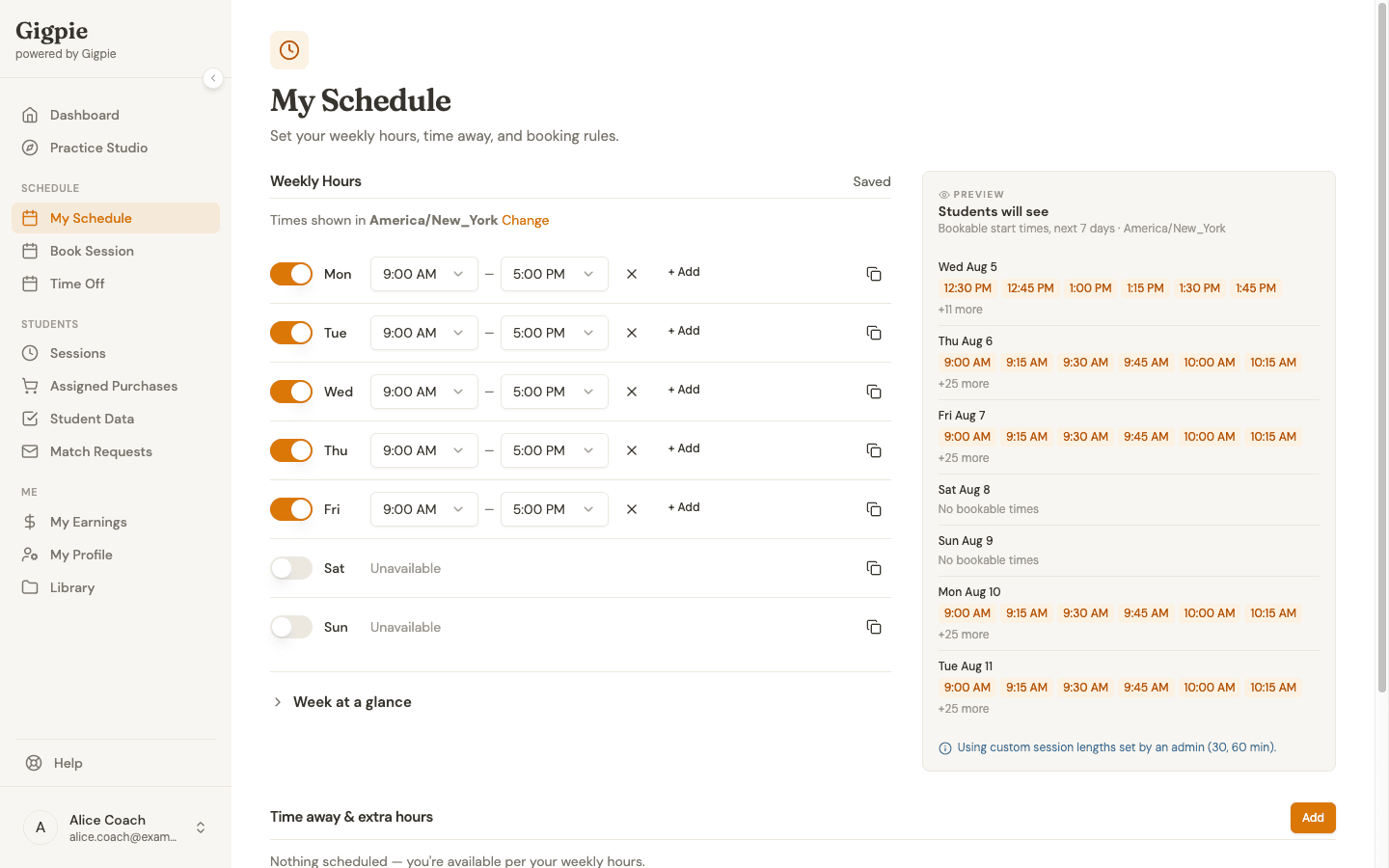 Set weekly hours once and the preview shows what students can book: the one Calendly habit that transfers to Gigpie unchanged.
Where the Scheduling Link Stops
Calendly's unit is the invitee: one person, one event type, one booking. Nothing in its product materials describes a household as of August 2026: no family object, and no login where a parent sees two children's sessions and one shared balance side by side. A Meeting Package belongs to the individual who bought it; whether a client can book past their bundle or watch a running balance isn't documented, so we won't claim they can't. The family case, though, has no home there at all.
In Gigpie the family is the billing unit. A package belongs to the household, and any student in it draws from the same hour balance, so one purchase can cover a seventh grader's math sessions and her brother's reading sessions without anyone keeping a ledger. Hours deduct as sessions complete, and the parent portal shows every balance, payment plan, and progress note under one login. No-show handling has financial rules attached: a reported student no-show still draws down the family's hour and still pays the coach, while a coach no-show reverses both.
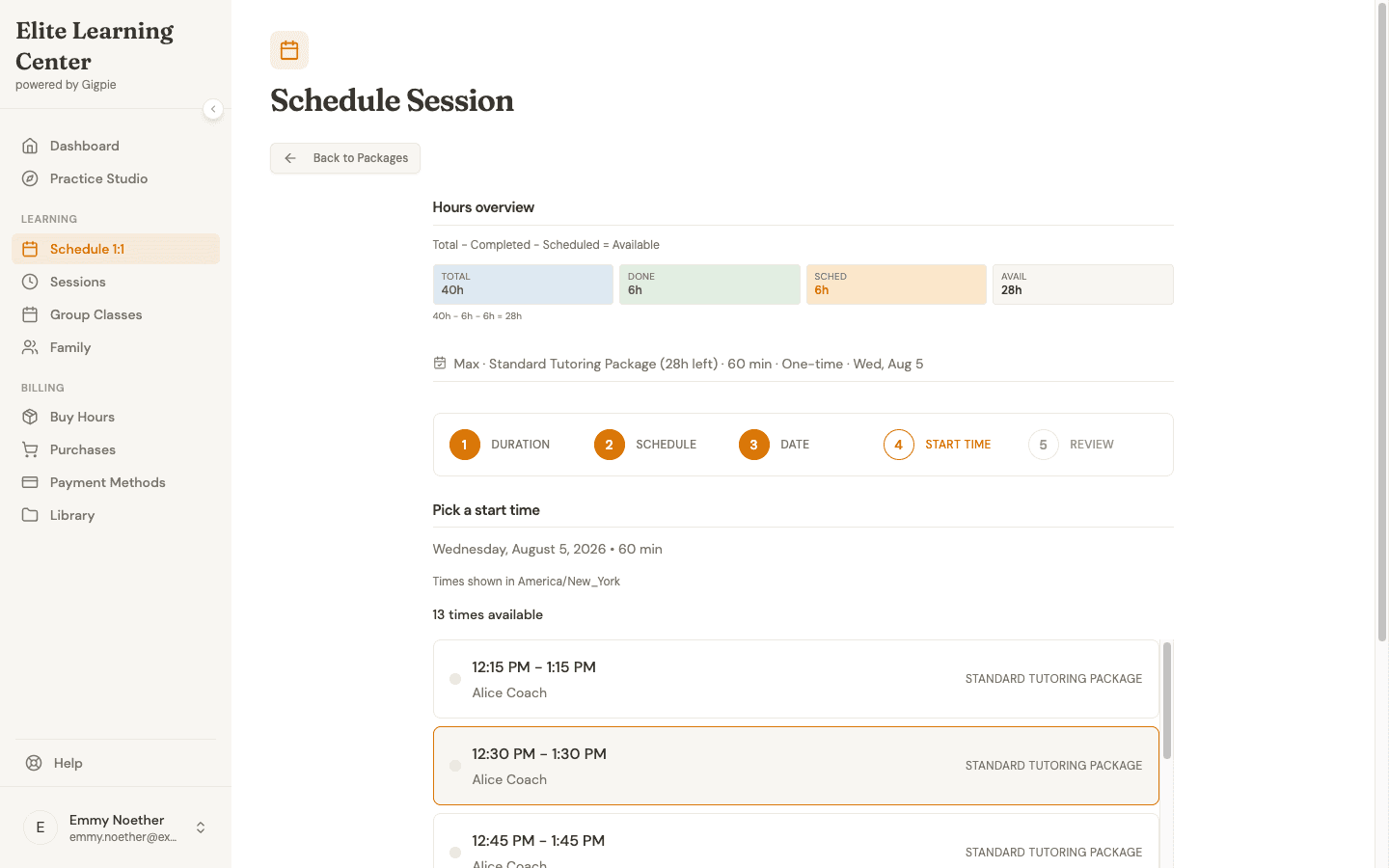 A parent picks a time while the family's remaining hours ride along the top of the screen, no spreadsheet required.
The other structural gap is the team. Calendly's Round Robin balances how many meetings each teammate receives, which evens out workload rather than pay; no earnings or payroll feature appears anywhere in its materials. Gigpie runs payroll in pay groups on a schedule, snapshots each coach's rate, routes runs through an approval step, and exports CSVs, including a Justworks timecard, for your payroll processor. It does not move the money itself: "mark paid" flips a status, it doesn't wire funds.
Pricing: Seats vs the 2%
Gigpie charges a flat 2% of what you collect. There are no seat fees and no tiers, and nothing is due until you collect revenue. Stripe's processing fees are separate, exactly as they would be with Calendly.
Calendly's Free plan covers one event type and one calendar connection, without payment collection. Standard is $12 per seat per month billed monthly, or $10 billed annually, and adds Stripe/PayPal payments, Workflows, and Zapier. Teams is $20 per seat monthly, or $16 annually, and adds Routing Forms, Round Robin, and the Salesforce integration. Enterprise starts around $15,000 a year. New accounts get a 14-day Teams trial that downgrades automatically to Free when it ends.
Break-even at three revenue levels. A solo tutor collecting $2,500/month pays Calendly Standard $12 and Gigpie $50. A five-tutor center collecting $20,000/month pays Calendly $60 on Standard (or $100 on Teams) and Gigpie $400. A ten-tutor operation collecting $50,000/month pays Calendly Teams $200 and Gigpie $1,000. Gigpie's 2% undercuts a single Standard seat only below about $600/month in collections.
If a scheduling link is the only thing you'd be replacing, Calendly is the cheaper product and it isn't close. Gigpie's fee assumes it is replacing more than the link: the package spreadsheet, the payment chasing, the payroll math, and the reconciliation hours that hold the stack together. If those aren't your problems yet, keep Calendly and keep the difference.
Verdict by Use Case
Solo tutor or coach billing hourly
Calendly. Start on the Free plan, move to Standard when you want card payments at booking, and let Meeting Packages handle your first bundles. Gigpie's family accounts and payroll runs do nothing for a roster of one, and 2% of your revenue is real money for features you won't open. Until roughly your third student, or your first package sold to a family with more than one child, the link is the right tool.
Tutoring or coaching center selling packages to families
Gigpie. The moment one purchase needs to cover two siblings, or a parent asks for an installment plan, or you owe a second tutor their cut, you have outgrown what a booking page models. One shared balance per family, autopay on payment plans, and payroll runs replace the sheet-and-Venmo layer rather than adding another tab to it.
Team that books lots of meetings but bills elsewhere
Calendly, specifically Teams. If your calendar problem is consultations, interviews, or sales calls, and invoicing already lives in another system, Routing Forms and Round Robin solve exactly that, and nothing about tutoring packages applies. Gigpie has no equivalent of routing inbound meetings across a team of closers.
Migrating from Calendly
Calendly holds surprisingly little of your business data, which cuts both ways. Contacts export as a CSV on any plan, Standard and up can export analytics data, and a developer can pull more through the REST API. But event types, availability schedules, and booking history have no self-serve export, so your session history stays behind. In practice, the real migration source isn't Calendly at all. It's the Google Sheet next to it: remaining package hours, who paid by Venmo, and which family the balance actually belongs to.
Gigpie has no Calendly-specific importer, so a Calendly move is manual re-entry. You recreate your packages, add each family with its remaining hours from the spreadsheet, set coach availability, and rebook upcoming sessions. A solo host with one event type can do this in an evening; a multi-tutor roster takes admin time proportional to its size, so keep your Calendly link live until families are actually booking through Gigpie.
Frequently Asked Questions
Is Calendly cheaper than Gigpie?
At almost any revenue level, yes. Calendly Standard costs $12 per seat per month ($10 billed annually) as of August 2026, while Gigpie charges 2% of collections, so a solo tutor collecting $2,500 a month pays Calendly $12 and Gigpie $50. Gigpie's fee is only the smaller number below roughly $600 a month in collections. The case for Gigpie is scope, not price: it replaces the package tracking, billing, and payroll tools that accumulate around the link.
Doesn't Calendly support packages now?
Yes. Meeting Packages, available on paid plans with a connected Stripe account, lets a host sell a multi-session bundle that the client books one session at a time, with package statuses shown in Calendly's Payments view. Calendly's public materials don't document whether clients can book past their bundle or see a running balance, and there is no household concept, so a package belongs to one invitee rather than to a family.
Can two siblings share one Calendly package?
Nothing in Calendly's product materials describes a family or household unit as of August 2026; a Meeting Package belongs to the individual client who bought it. In Gigpie every package belongs to the family, so any student in the household draws from the same hour balance automatically.
Does Calendly collect payments?
On paid plans, yes. Stripe and PayPal payment collection is included from Standard up, Calendly adds no fee of its own, and funds go directly to your Stripe or PayPal account with their normal processing fees. The Free plan doesn't include payment collection.
Does Gigpie have a free plan like Calendly's?
Gigpie is free until you collect revenue: you get the whole product with no card required, and the 2% platform fee applies only once money actually moves. Calendly's Free plan is free forever but limited to one event type and one calendar connection, with no payment collection.
Can I use Calendly and Gigpie together?
You can keep a Calendly link for meetings Gigpie doesn't manage, like sales calls or podcast interviews. Lesson booking should live in one system, though: a session booked through Calendly never touches the family's package balance in Gigpie, which puts you right back to reconciling by hand.
Does Calendly have a mobile app? Does Gigpie?
Calendly has native iOS and Android apps on every plan, including Free, as of August 2026. Gigpie has no native app; parents, coaches, and admins use a responsive web app that works in any mobile browser.
How does calendar sync compare?
Calendly connects Google, Office 365, Outlook.com, and Exchange calendars, reads busy time across up to six connected calendars per user on paid plans, and pushes each booking into one chosen calendar. Gigpie pushes sessions to Google and Outlook calendars and checks for conflicts at booking time, but doesn't continuously watch for edits made directly in the external calendar. On calendar plumbing, Calendly is stronger.
Does Calendly still work with Apple's iCloud Calendar?
Not for new connections. Calendly discontinued new iCloud Calendar connections on August 20, 2024. Existing iCloud connections keep working, but a new account can't add one.
What can I export if I leave Calendly?
Contacts export as a CSV on any plan, and Standard and up can export analytics data. Event types, availability schedules, and booking history have no self-serve export, though a developer can pull data through Calendly's public REST API.
Does Gigpie import my Calendly data?
No. Gigpie doesn't have an automated importer for Calendly data. A Calendly migration is manual: recreate your packages, enter each family with its remaining hours, and rebook upcoming sessions. The remaining-hours data usually comes from your tracking spreadsheet rather than from Calendly itself.
Does Calendly integrate with Zapier or have an API?
Yes to both: Zapier is included from the Standard plan and Calendly publishes a public REST API. Gigpie has neither a public API nor a Zapier integration today; the closest thing it offers is token-authenticated lead webhooks that capture inquiries from external forms and ad campaigns.
What support does each company offer?
Calendly's Free plan gets help-center and community access, Standard adds 24/7 email and chat support, and Teams adds phone support, as of August 2026. Gigpie offers email support. That comparison favors Calendly.
Can Calendly pay my tutors?
No. Calendly's team features distribute meetings, not money: Round Robin balances how many bookings each teammate receives, and no earnings or payroll capability appears in its materials as of August 2026. Gigpie runs payroll in pay groups with an approval step and exports CSVs, including a Justworks timecard, for your payroll processor; it doesn't transfer money to tutors itself.
Replace the whole stack
Scheduling, family billing, payroll, and CRM in one system for a flat 2% of collections. Free until you collect revenue.
Get started freeRelated Resources
- Family Management - The household object Calendly doesn't have: one package, one balance, every sibling drawing from it.
- Billing & Payments - Packages, installment plans, and autopay, including checkout that works without a client login.
- Best Tutoring Software 2026 - Where Calendly, Gigpie, and the tutoring-specific platforms each make sense.