
Software for Coaching Companies
How a multi-coach coaching company runs on Gigpie: client intake, pooled engagement hours, roster scheduling, and payroll exports for contractor coaches. Flat 2% of collections, no seat fees.
You run nine coaches: executive engagements, career-change clients, and one corporate contract covering coaching for five managers on a single retainer. This morning that client's ops lead emailed to ask how many retainer hours are left, and the honest answer lives in Stripe, a shared calendar, and a spreadsheet with one tab per coach. Your most senior coach gave notice on Friday, and her twelve active engagements need new homes.
Most coaching software is built for a practice of one. Gigpie is for the company around the coaches: client accounts, engagement hours, the roster's schedule, and what you owe each coach, in one system that charges a flat 2% of what you collect. There are no seat fees, so the tenth coach costs the same to add as the first.
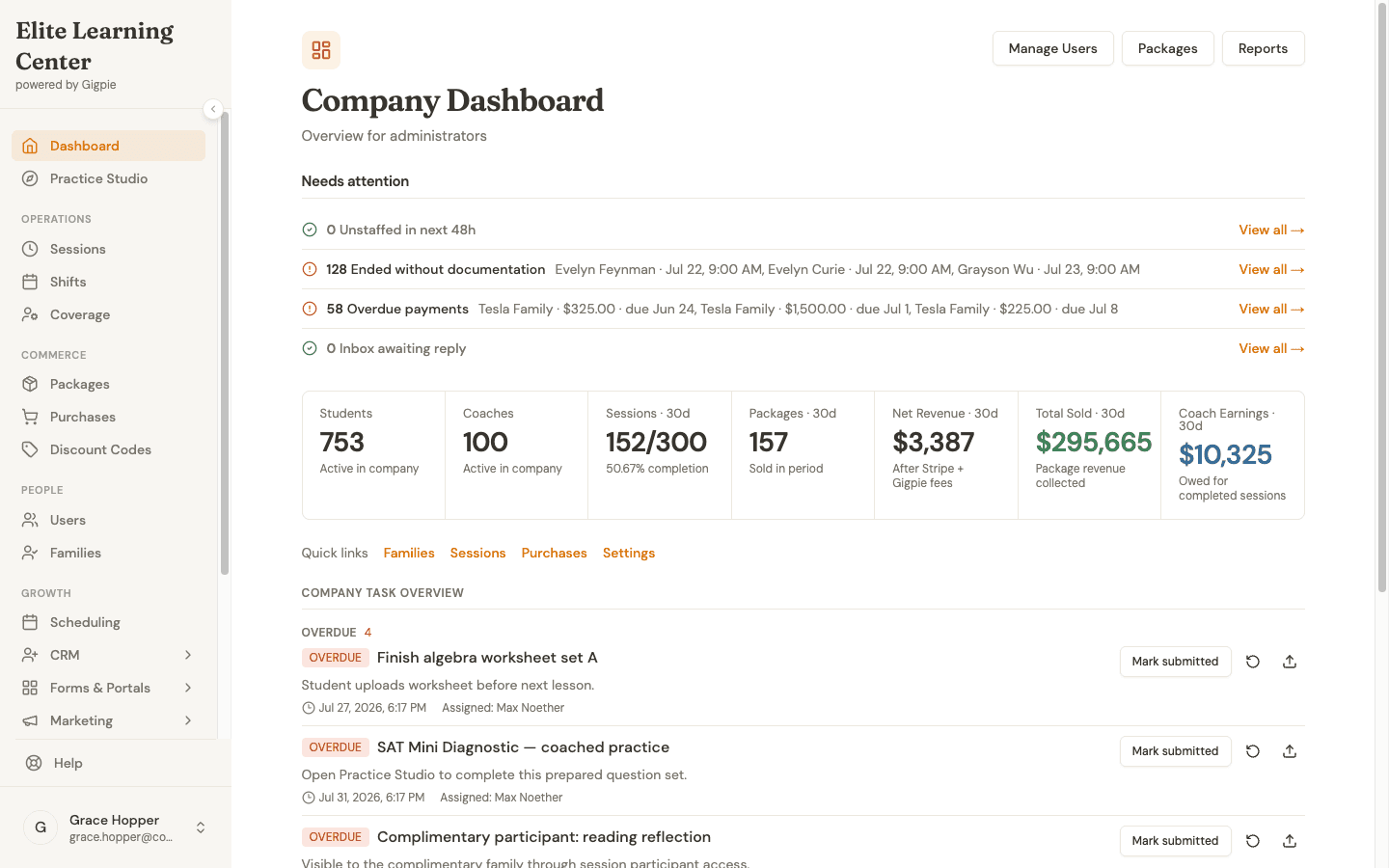 The admin home screen: a needs-attention queue for overdue payments and undocumented sessions, with the last 30 days of revenue underneath.
Where Coaching Work Differs
Gigpie also runs tutoring centers and test-prep companies, so it is fair to ask whether coaching fits. The work is shaped differently:
| Academic support | Professional coaching | |
|---|---|---|
| The client | A student, with a parent paying | An adult, or an employer paying for them |
| Duration | Ongoing, sometimes years | Engagements of 3 to 12 months |
| What is sold | Hours of instruction | A package with a defined arc |
| The outcome | Grades and test scores | A goal reached, a behavior changed |
These rows matter more than any price tag: coaching sells a bounded engagement at a premium, usually as a package, often paid for by someone other than the person being coached. That is the exact shape of Gigpie's account model, with one vocabulary quirk. The product grew up in education, so the account that owns purchases is called a family. Read "client account" wherever you see it: the buyer sits in the parent seat, the coachee in the student seat, and one purchase can cover several people.
When a Lead Becomes a Client
Agency intake usually starts with a form fill or a referral, then leaks somewhere between the discovery call and the signed engagement. Gigpie's CRM catches the front end. Website forms and ad leads arrive through an intake webhook that deduplicates against existing records, a text from an unknown number becomes a lead automatically, and an AI phone agent can answer the call and log a transcript when nobody picks up. Leads move through a pipeline board, and one inbox holds each lead's email, SMS, and call history.
Follow-up does not depend on memory: one-off broadcasts and multi-step journey automations run from the same screen, so the lead who went quiet after a discovery call still gets the nudge sequence.
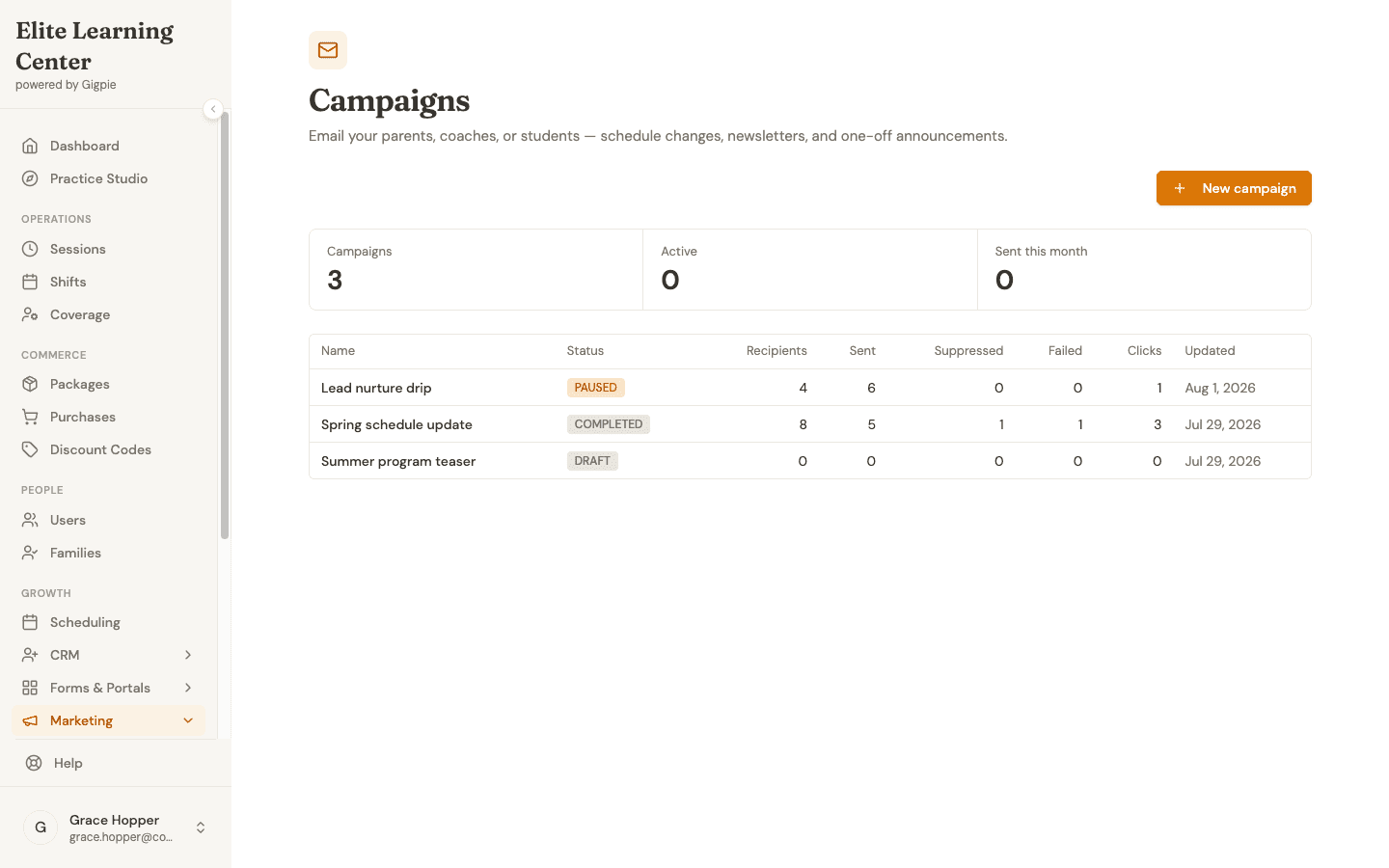 Broadcast emails and multi-step journeys, with recipients, sends, and clicks tracked per campaign.
When the client says yes, they can buy without creating an account: the purchase flow verifies their email with a six-digit code, takes payment, and can send your intake form automatically once the purchase completes.
One Engagement, One Balance
An engagement in Gigpie is a package: a block of hours or a subscription, with its own price and payment plan, owned by the client account. The tiers are yours to define. As examples rather than benchmarks: 6 sessions over three months at $1,500 to $2,500, 12 over six months at $3,000 to $6,000, or an intensive 20 at $6,000 to $12,000.
The corporate contract is where the account model matters most. A company buying coaching for five managers is one client account holding one purchase, and all five coachees draw on the same pooled balance. When the ops lead asks how many hours are left, the answer is a number on a screen. One honest caveat: the pool has no per-coachee caps, so if a manager must be held to ten hours, the system will not police it.
High-ticket packages can run on installment plans with due dates and autopay that retries failed charges. Corporate-size invoices can be paid by bank (ACH) through Stripe at 0.8% capped at $5, so a $10,000 retainer costs $5 to process instead of card rates. An executive report rolls the money side up: cash collected, delivery rate, and a receivables ledger that flags what is overdue.
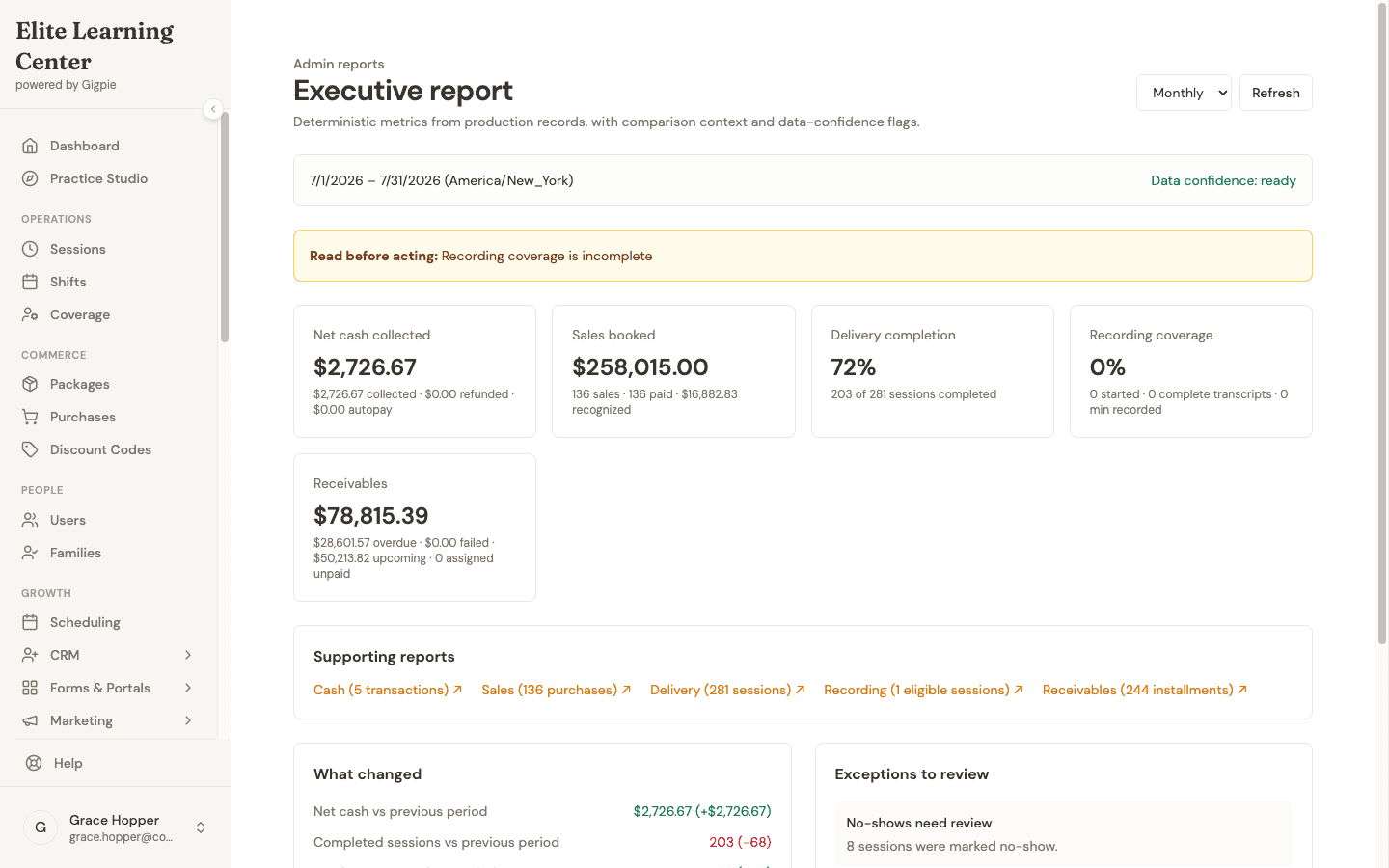 The month rolled up: $258,015 booked, 72% of booked sessions delivered, and receivables with the overdue portion flagged.
The platform fee is a flat 2% of what you collect. A month where clients pay you $30,000 costs $600; a month where a corporate contract pauses and you collect nothing costs nothing.
Scheduling a Roster, Not a Calendar
Weekly-cadence clients sit in real recurring series, Tuesdays at 10 until the engagement ends, with nobody re-booking them by hand. Each coach sets their own availability with a live preview of what clients can book, and every user has their own timezone, so a client in London and a coach in Denver each see local times.
The roster view is a sessions list you can filter by coach, client, package, or status. The more important view is the gap. Filter purchases to "no coach assigned" and you get the queue of clients who have paid for engagements nobody is delivering yet. When a coach requests time off, or resigns, Gigpie counts the affected sessions, and you can post them as open shifts that other coaches claim from a list already filtered against their own conflicts. Twelve orphaned engagements stop being a crisis and become a queue.
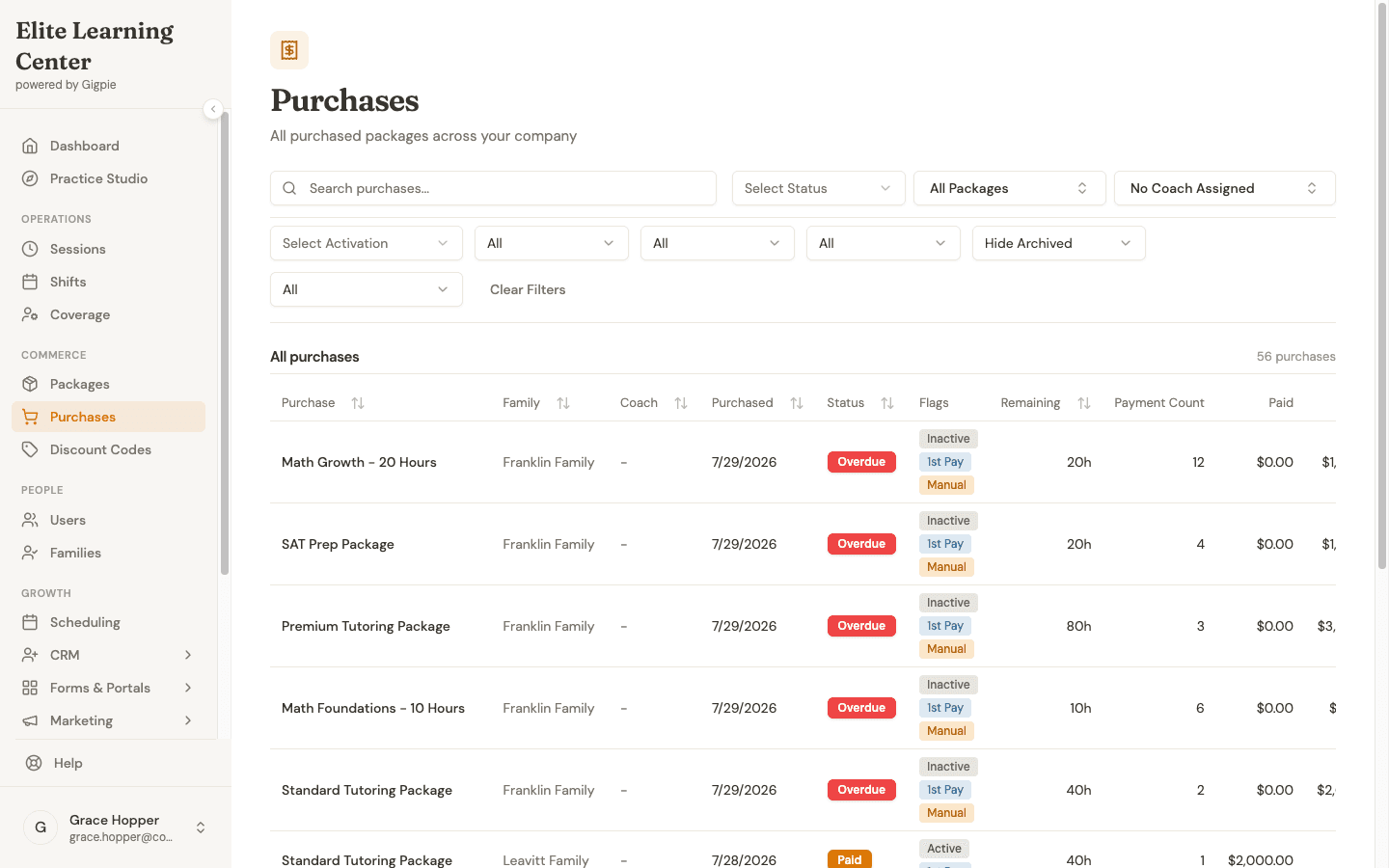 56 paid packages with no coach assigned: the queue that turns a resignation into a staffing task instead of churn.
No-shows follow rules with money attached. A client no-show still consumes the package hour and still pays the coach; a coach no-show reverses both, so the client is not charged and the coach is not paid. Nobody has to relitigate each incident from memory.
From Session Note to Payroll Export
A coach ends a session, marks it complete, and writes the note in the same step. The client reads the full note in their portal, and the same session record carries the coach's earnings, so delivery and pay never drift apart. After every completed session, Gigpie also asks the client for a rating, one to five stars plus a comment, and points five-star respondents at your Google or Trustpilot review page before the feeling fades (a settings dropdown can widen that to four).
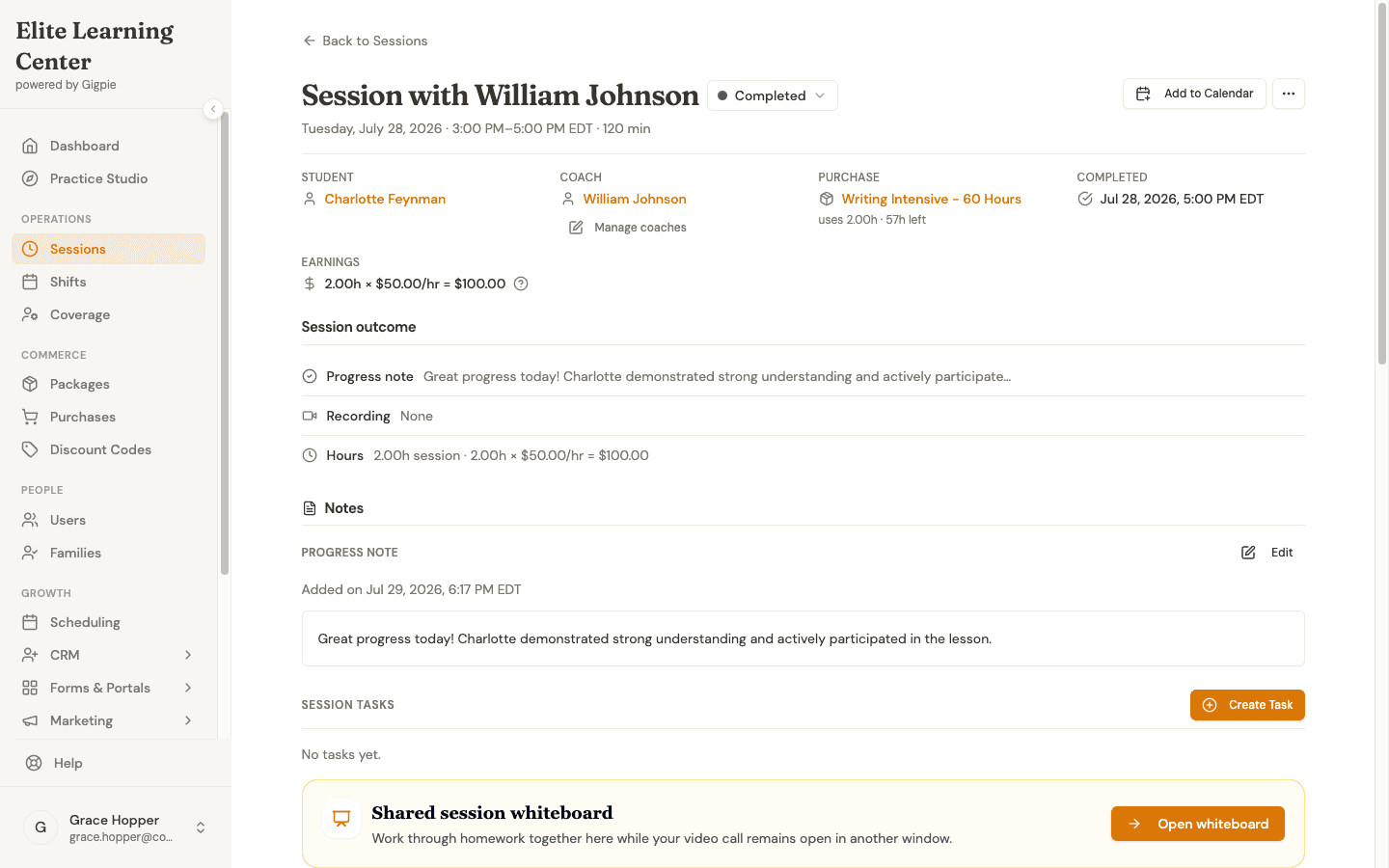 One completed session: the coach's $100 in earnings (2 hours at $50) and the progress note the client reads, on the same record.
Payroll is a run, not a weekend. Pay groups and schedules handle coaches on different cadences and rates, each run snapshots per-session pay, and a run locks against edits once paid. Approving one produces CSVs for your payroll processor: a summary, session-level detail, and a Justworks-formatted timecard. Gigpie does not move money to your coaches. Stripe deposits client payments into your company account, and the payroll run tells your processor exactly what each contractor is owed and why.
Who This Is For
Gigpie fits coaching companies with roughly three or more coaches, where the pain is coordination: pooled engagement hours, a roster to schedule, contractors to pay. A solo practice gets little from any of that today; the fit begins when the second coach joins and scheduling, payroll, and client records stop living in one person's head.
Getting Started
- Create your account and connect Stripe. Onboarding runs through Stripe Connect, and Gigpie is free until you collect revenue.
- Build your packages. Your tiers, your prices, fixed-hour or subscription.
- Invite your coaches. Each sets weekly availability once, with a live preview of what clients can book.
- Add clients. Enter them yourself or send the purchase link; no client account required.
These guides show the day-to-day workflows, recorded from the product:
For coaches:
- Claim Open Shifts - Pick up coverage from the open-shift list
- Request Time Off - Book time away with affected sessions counted
- Mark Session Complete & Add Notes - Close out a session and write the note
For clients (Gigpie's docs call them parents):
- Purchase a Package - Buy an engagement online, no account needed
- Schedule an Appointment - Self-service booking
- Review Progress Notes - Read the full note after each session
Frequently Asked Questions
We're a coaching company, not a tutoring center. Will the vocabulary fit?
Mostly, with one quirk: Gigpie grew up in education, so the account that owns purchases is labeled a family, buyers appear as parents, and coachees as students. The mechanics map cleanly to coaching, but you will see those words on screens and in the client portal.
Can one corporate client pay for several employees' coaching?
Yes. The company is one client account holding the purchase, and every coachee attached to that account draws on the same pooled balance of hours. The caveat: the pool has no per-coachee caps, so Gigpie will not enforce a limit like ten hours per manager.
Can we run group sessions or cohorts?
Yes. Group sessions support open enrollment, invitation-only, and package-only access, with per-class capacity limits and drop-in pricing alongside package-based enrollment.
How are time zones handled for remote coaching?
Every session is stored against a real timezone, and each user has their own timezone setting, detected from their browser. A client in London and a coach in Denver each see the session in their own local time.
What happens when a client wants to extend mid-engagement?
Sell them another package. It can be purchased through the portal, it lands on the same client account, and its hours are available as soon as payment clears. Installment plans work on the add-on too.
Does Gigpie pay our coaches?
No. Stripe deposits client payments into your company account. Payroll runs calculate each coach's pay from delivered sessions at snapshotted rates and export CSVs, including a Justworks-formatted timecard, for whatever payroll processor you use.
What does Gigpie cost?
A flat 2% of what you collect from clients. No monthly fee, no per-coach seat fee, and it is free until you collect revenue, so setup and migration cost nothing.
I'm a solo coach. Should I use Gigpie?
Probably not yet. The roster scheduling, pooled balances, and payroll runs that justify Gigpie need a team behind them. If a second coach is on the horizon, starting is free until revenue moves through the account, and the setup you do now is the setup you would otherwise redo later.
Run your coaching company on one system
Free until you collect revenue, then a flat 2% of what clients pay you. No seat fees, no per-coach pricing.
Get startedRelated Resources
- Educator Payroll - The payroll-run engine this page summarizes: pay groups, rate snapshots, and processor-ready CSVs
- Family Management - The shared-balance account architecture, explained on its home turf