
Music School Management Software
Run a multi-teacher music school on Gigpie: sibling-shared lesson packages, weekly recurring lessons, teacher payroll exports, and a review funnel. Flat 2% of collections.
Saturday at a music school is the whole week compressed: half-hour lessons stacked back to back from nine to two, eight teachers going at once, and a parent at the front desk with a question you cannot answer without opening three tabs. Her son takes piano, her daughter takes violin, and she wants to know how many lessons the family has left. The booking tool knows the schedule, Stripe knows the payments, and the spreadsheet that ties them together is on the laptop in your office.
Gigpie keeps all three answers on one record, and the record is the family. A lesson package belongs to the household, both kids can draw from it, and every lesson, payment, and progress note attaches to the same account. Here is what a normal week looks like on it.
Two Kids, Two Instruments, One Balance
Monday morning, a parent calls to add her second child. In most systems that means a second student record with its own package and its own invoices to reconcile against the first. In Gigpie the purchase already belongs to the family, so the only decision is how the money should work: one shared package both kids draw from, or a separate line for each, say a 30-minute beginner piano package and a 60-minute violin package at different prices, tracked side by side under one account. Balances are counted in hours, so mixed lesson lengths can live on the same ledger.
One caveat worth knowing before you promise it to a parent: a shared package is genuinely pooled. Gigpie does not enforce per-child limits inside it, so if the violinist tends to eat the pianist's hours, sell each child their own package. The family still sees everything, and pays for everything, in one place. Semester tuition can be split into scheduled installments with autopay, and families can buy online without creating an account, using just an email address and a verification code.
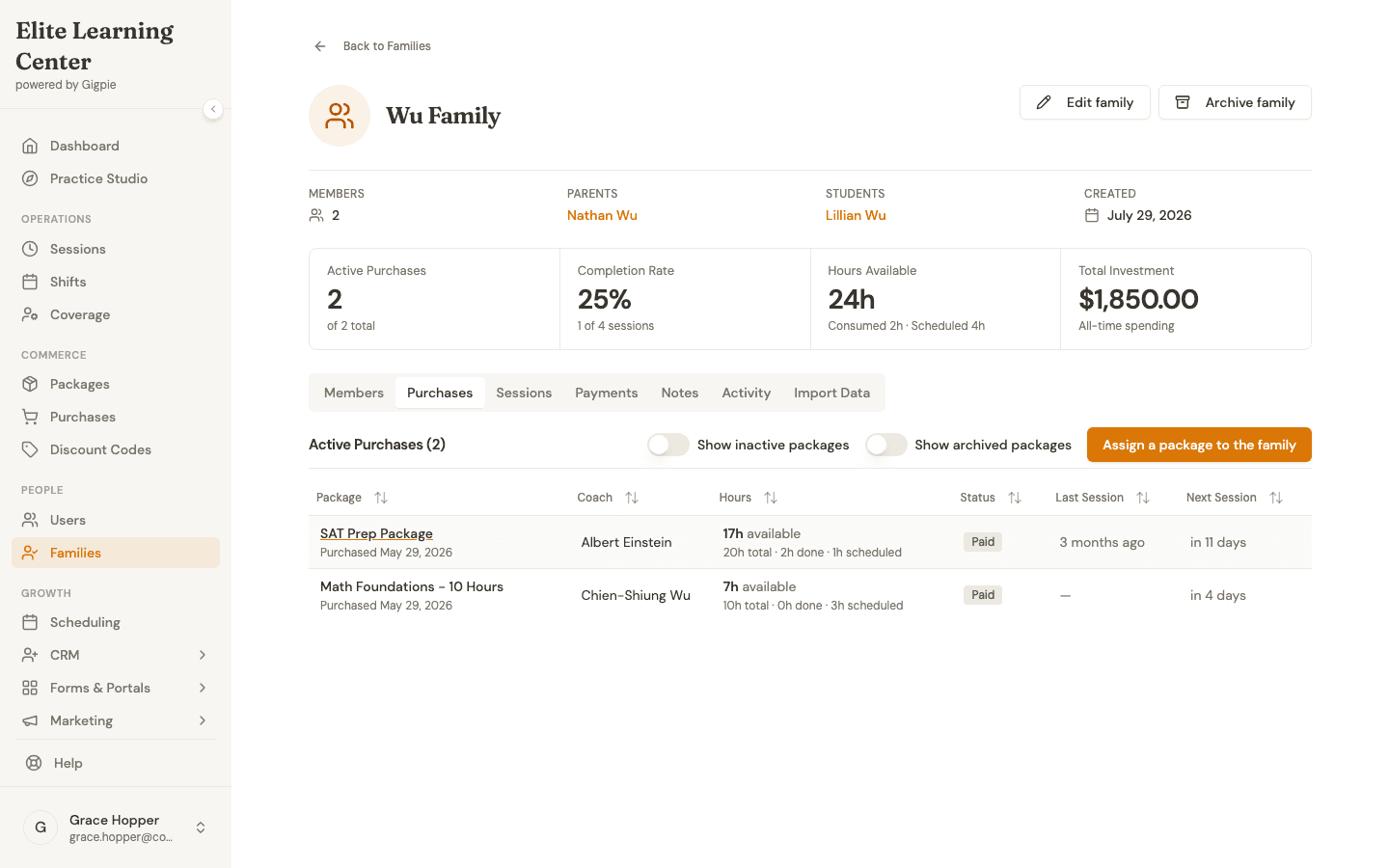 One family, two members, one pooled balance: 24 hours across every package the household has bought, drawn down automatically as lessons happen.
Weekly Lessons That Stay Booked
Music teaching runs on the standing slot. Tuesday at 4:15 is a fixture, not an appointment, and re-booking it by hand every week is where mistakes come from. In Gigpie a weekly lesson is a recurring series: weekly on Tuesdays, for a set number of weeks, until a date you pick, or indefinitely. Families can choose the cadence themselves when they book from the portal, and rescheduling one occurrence leaves the rest of the series alone.
Teachers set their weekly availability once, with a live preview of exactly what families will see as bookable. You control which lesson lengths the school offers, 30, 45, or 60 minutes, with per-teacher overrides when someone teaches differently. Group theory and ensemble classes run as group sessions with a capacity limit; enrollment can be open, invitation-only, or restricted to package holders, with drop-in pricing for the occasional visitor.
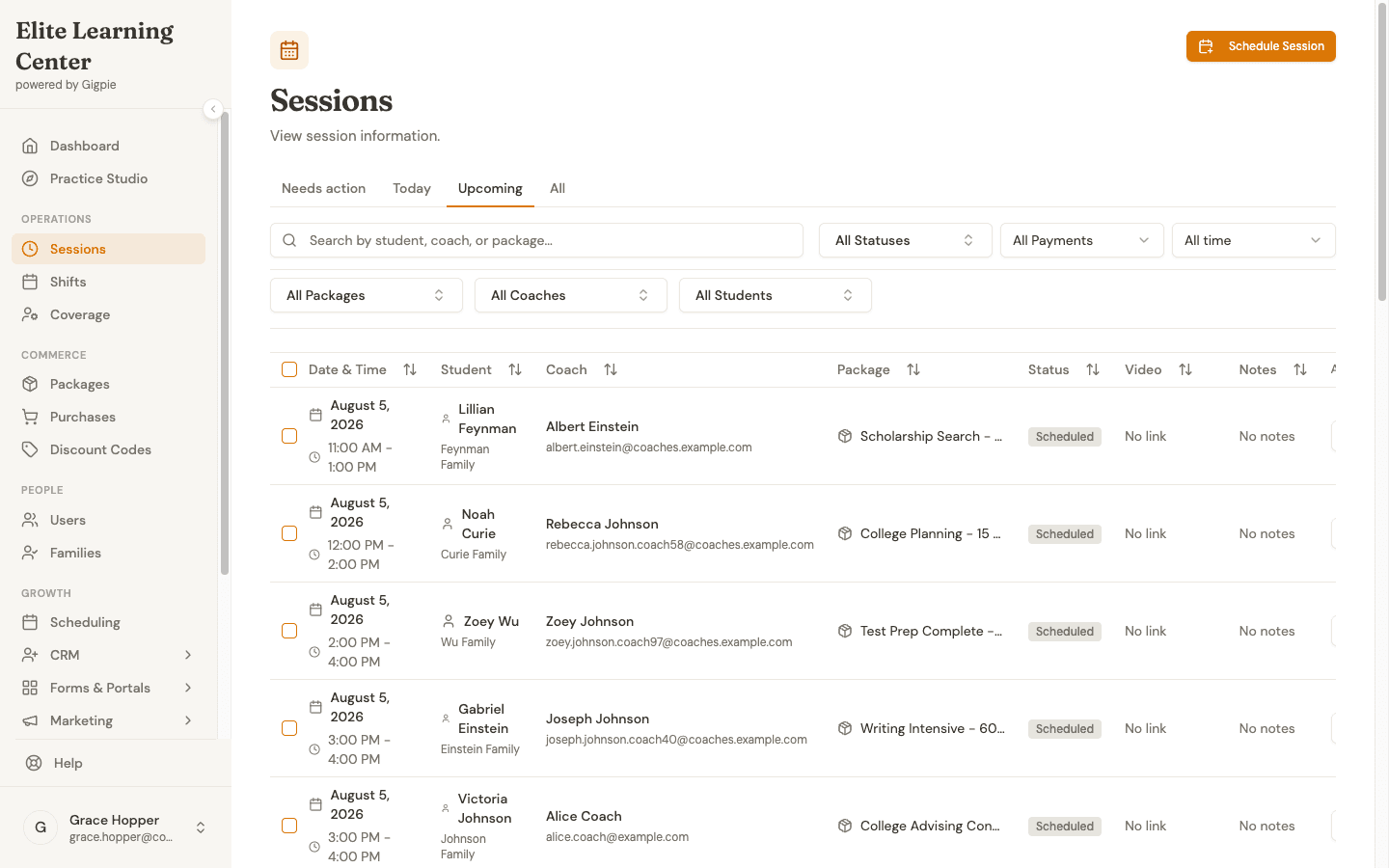 The day across the whole school: every lesson with its student, teacher, package, and status in one filterable list. A standing Tuesday slot lives here as a single series rather than fifty-two separate bookings.
The Lesson Note That Becomes a Google Review
After Thursday's lessons, each teacher marks the session complete and writes the note in the same step: what they worked on, what to practice before next week. Parents read the whole note in the portal, word for word, and the admin dashboard flags any session that ended without one.
Then the note does marketing work. Once a session is complete, Gigpie asks the family for a rating, one to five stars plus a comment. Responses feed a reputation report, and families who answer with four or five stars are pointed at your Google, Trustpilot, or Thumbtack review page while the goodwill is fresh. Music schools live on local reviews, and this turns collecting them from an annual begging email into a background process.
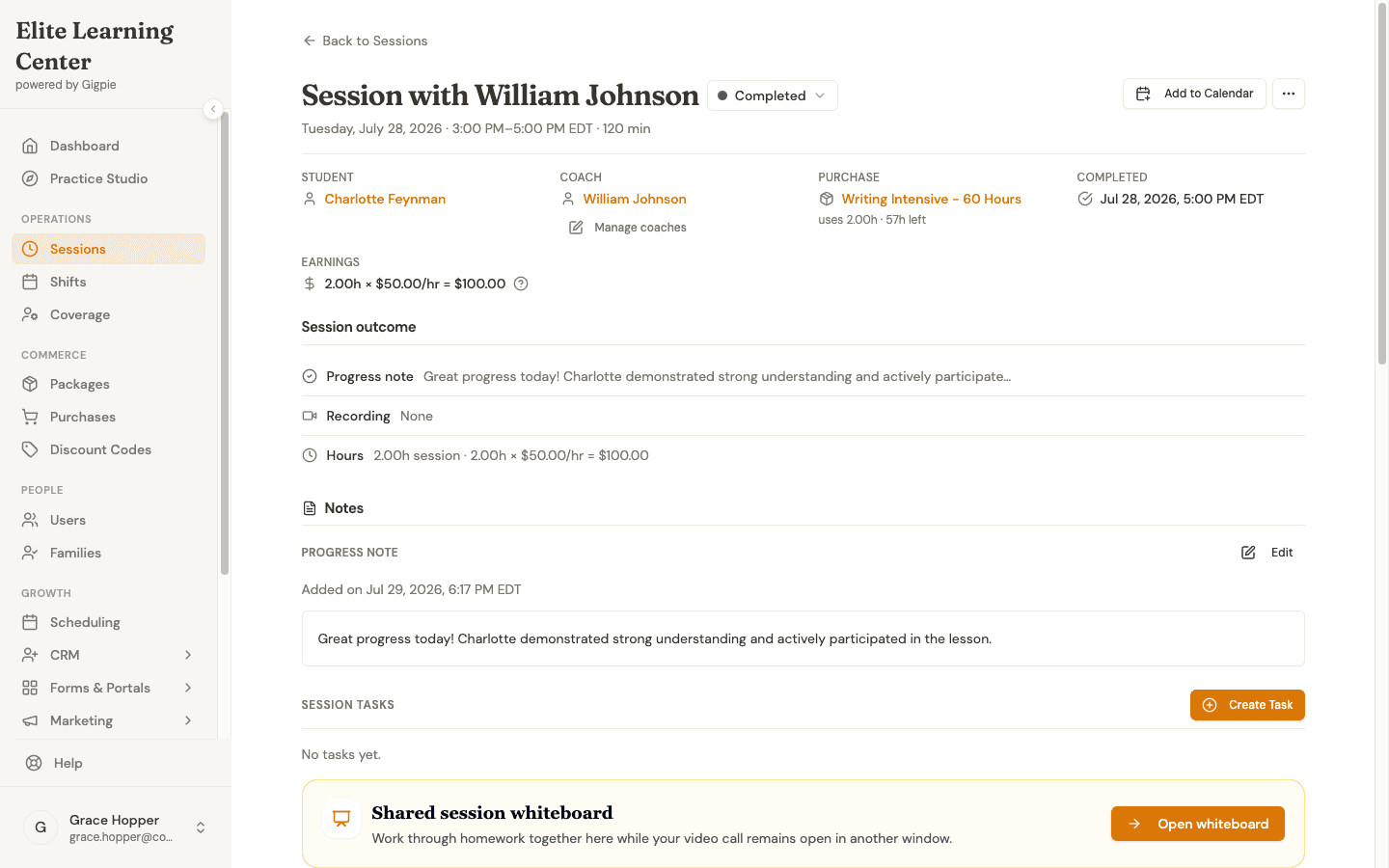 One completed lesson, one record: the teacher's pay ($100 for two hours at $50/hr) next to the progress note the family reads.
Paying Eight Teachers Without the Spreadsheet Weekend
By month's end, payroll is already computed, because it is built from the lessons that actually happened. Pay groups and pay schedules handle teachers on different rates and cadences, each run snapshots the rate every session was taught at, and a paid run locks against edits. From an approved run you export CSVs, including a summary, session-level detail, and a Justworks-formatted timecard, for whatever payroll processor actually moves the money. Gigpie calculates teacher pay; it does not transfer it.
Missed lessons follow rules with teeth instead of case-by-case mercy. A student no-show still consumes the family's hour and still pays the teacher who showed up. A teacher no-show reverses both: the family is not charged and the teacher is not paid. The policy lives in the software, so you stop being the referee.
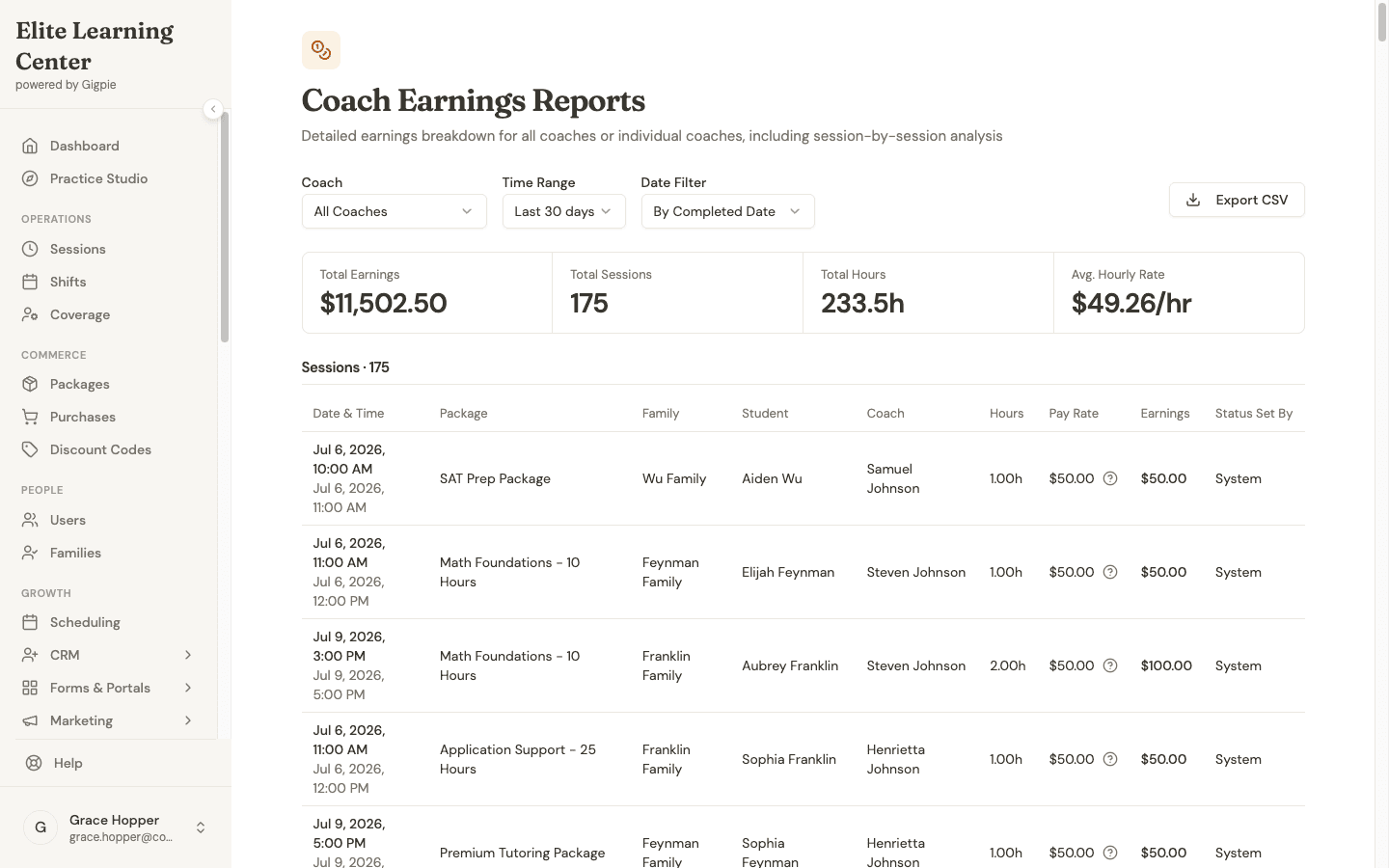 A month of teacher pay: $11,502.50 across 175 sessions, broken out by teacher, family, and rate, ready to export.
The platform fee is flat: 2% of what families pay you. Collect $12,000 in October and it costs $240; collect $3,000 in a quiet July and it costs $60. There are no per-teacher seat fees, so your ninth teacher costs the same to add as your first, and Gigpie is free until you collect revenue.
Where Gigpie Stops
Gigpie is not music software. There is no repertoire tracking, no practice log, and no recital tooling (no RSVP lists or program builder). The lesson record is a free-text note, which teachers use for repertoire and practice assignments, but nothing structures or reports on it. A solo teacher who wants music-specific features is honestly better served by My Music Staff. The case for Gigpie starts when you have several teachers and the hard problems shift to family billing, staffing, payroll, and reviews. The full comparison draws that line in detail.
Getting Started
- Create your account and connect Stripe. Onboarding runs through Stripe Connect, and Gigpie is free until you collect revenue.
- Build your packages. One per instrument and lesson length, fixed-hour or subscription, at whatever prices you charge today.
- Invite your teachers. They set weekly availability once, with a live preview of what families can book.
- Add families. Enter them yourself, or send the purchase link and let parents buy without creating an account.
These guides walk the day-to-day workflows, recorded from the product:
- Managing Recurring Sessions - How families set up and adjust a weekly lesson series
- Purchase a Package - Buying lesson hours online, no account needed
- Mark Session Complete & Add Notes - How teachers close out a lesson and write the note
- Enroll in a Group Class - Joining a theory or ensemble class from the portal
Frequently Asked Questions
Can I charge different rates for different instruments or lesson lengths?
Yes. Create a package per instrument and length at its own price, for example 'Piano - 30 min' and 'Violin - 60 min'. Each package tracks its own balance and revenue, and a family can hold several at once.
Do siblings share one package or buy separate ones?
Either. A package belongs to the family, so two kids can draw from one pooled balance of hours. Pooled means pooled, though: Gigpie does not enforce per-child limits inside a shared package. If you want each child's hours kept separate, sell each their own package; both still sit under the same family account and payment methods.
Do parents have to rebook their weekly lesson every week?
No. A weekly lesson is a recurring series: same day and time each week, for a set number of weeks, until a date, or indefinitely. Families can set this up themselves from the portal, and rescheduling one occurrence leaves the rest of the series alone.
Can I run group theory or ensemble classes?
Yes. Group sessions have a capacity limit and support open enrollment, invitation-only, and package-only access, with drop-in pricing for students who are not on a package.
Does Gigpie track repertoire or home practice?
No. The lesson record is a free-text progress note that parents see in full. Many teachers use it for repertoire and practice assignments, but there is no structured repertoire library or practice log. If a practice log is a must-have, see how Gigpie compares to My Music Staff, which has one built into its student portal.
What happens when a student misses a lesson?
A student no-show still consumes the family's package hour and still pays the teacher. A teacher no-show reverses both: the family is not charged and the teacher is not paid. The policy is enforced by the software rather than renegotiated for every incident.
Does Gigpie pay my teachers directly?
No. Stripe deposits what families pay into your school's account. Payroll runs calculate each teacher's pay from taught lessons and export CSVs, including a Justworks-formatted timecard, for the payroll processor that actually moves the money.
What does Gigpie cost?
A flat 2% of what you collect from families. No monthly fee, no per-teacher seat fees, and it is free until you collect revenue, so setting up costs nothing.
Run your music school on one system
Free until you collect revenue, then a flat 2% of what families pay you. Unlimited teachers, no seat fees.
Get startedRelated Resources
- Gigpie vs My Music Staff - Where each tool wins, including the solo-teacher cases where My Music Staff is the right answer
- Family Management - The shared-balance architecture that makes sibling billing work
- Educator Payroll - Pay groups, rate snapshots, and the CSV handoff to your payroll processor