
Best Tutoring Management Software in 2026: An Honest Buyer's Guide
Compare Gigpie, TutorBird, Teachworks, TutorCruncher, Evallo, and more with verified 2026 pricing, shortlists by team size, and honest fit notes.
Gigpie publishes this guide, and Gigpie is one of the platforms in it. Read it knowing that, and knowing how we tried to earn your trust anyway: every price below comes from the vendor's own pricing page, checked in August 2026, and we tell you when a competitor is the better buy. TutorBird beats us for most solo tutors. TutorCruncher fits large agencies better than we do. Prices change, so confirm on the vendor's site before you commit.
Start from your team size
Feature lists blur together after the third open tab. Team size doesn't. It determines which problems you actually have, so build your shortlist from it.
| Your team | Shortlist | What decides it |
|---|---|---|
| Just you | TutorBird; My Music Staff for music; Calendly or Acuity if you bill strictly hourly | At one seat, $16.95/month buys scheduling, invoicing, and a student portal. Agency software is overhead you don't need yet. |
| 3-10 educators | Gigpie, TutorBird, Teachworks | This is where family billing and tutor pay start eating your weekends. Pick whichever handles your worst admin chore. |
| 10-30 educators | Gigpie, Teachworks, TutorCruncher | Payroll runs, receivables, and coverage logistics matter more than any single feature. |
| 30+ educators | TutorCruncher, Gigpie | You'll want API access, branch structures, and automated tutor payouts on the table. |
Two qualifiers cut across size. If most of your clients are households with more than one child, weight family billing heavily. If you run enrolled classes (dance, swim, gym) rather than booked sessions, start with Jackrabbit Class instead.
Three pricing models, one comparison mistake
Everything in this guide charges one of three ways. Subscriptions are fixed: TutorBird bills per tutor seat, Calendly and Acuity per seat or tier, Teachworks a small base plus a per-lesson charge. Usage models bill activity: Wise charges $0.69 per session, Tutorbase 1% of each invoice. Percentage models bill collections: Gigpie charges a flat 2% of what you collect, and TutorCruncher is a hybrid of a monthly base plus a revenue fee of roughly 1% or less.
The mistake is comparing them at your best month. A subscription costs the same in July, when half your families are on vacation, as it does in October. Usage and percentage fees fall with revenue and hit zero when collections do. Run the numbers on your slowest quarter as well as your busiest month; there's a worked example near the end of this page.
The platforms
Gigpie
Gigpie treats the family, not the student, as the unit of billing. A package belongs to the household, siblings draw hours from one shared balance, and installment plans, autopay, and saved payment methods hang off that single account. If a chunk of your inbox is parents asking how many hours they have left, that architecture is the reason to shortlist us.
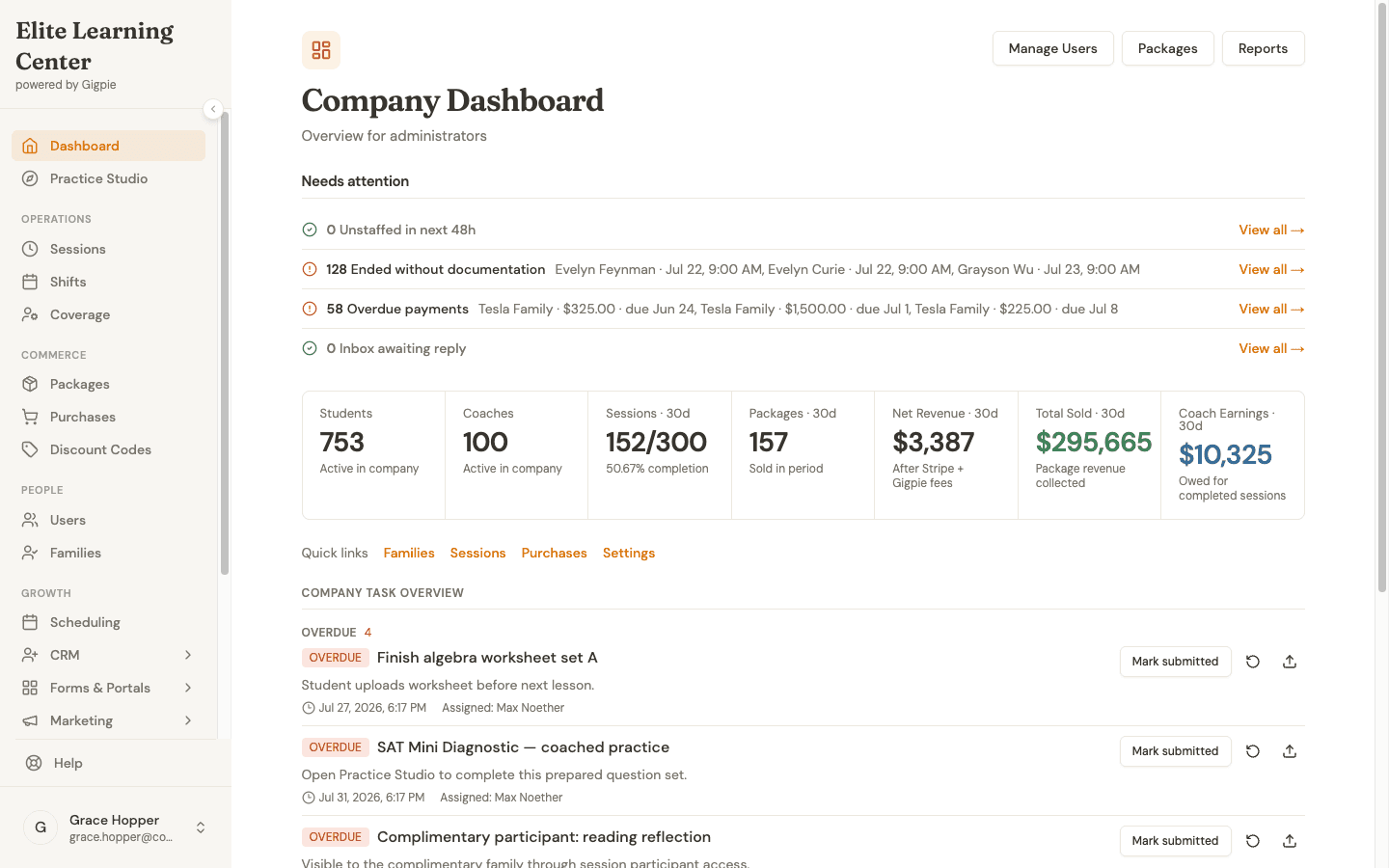
753 students, 100 coaches, and a needs-attention queue of overdue payments and undocumented sessions, on the first screen an admin sees each morning.
Pricing is a flat 2% of collections. No seat fees, no tiers, and it's free until you collect revenue through the platform. Around scheduling and billing sit a payroll engine (pay groups, pay schedules, approval steps, and CSV exports for your payroll processor), a CRM with lead pipelines and multi-step email journeys, and a feedback loop that asks families for a star rating after each completed session and points the happy ones toward your Google or Trustpilot listing. Calendar integration pushes sessions to Google or Outlook calendars and checks them for conflicts at booking time.
Where we don't fit: there's no native mobile app (the web app is responsive), no public API, and support is email only. A true solo tutor should keep a $16.95 TutorBird plan rather than hand us 2%.
TutorBird
TutorBird is the budget pick, and a better product than "budget" usually implies. As of August 2026 it costs $16.95 a month for one tutor plus $4.95 for each additional tutor or staff member, unlimited students included. That price covers two-way Google Calendar and iCal sync, Stripe and PayPal payments with an Auto-Pay option that charges saved cards when invoices go out, automated payroll at flat rates or a percentage of revenue, and a student portal with self-serve booking, online bill pay, and homework submission. The trial runs 30 days, the money-back guarantee 90, and phone support exists in the US, UK, and internationally. Earlier versions of this guide understated all of that; the current product is neither basic nor manual.
Its real limits are scope. There's no native mobile app, the CRM and marketing layer is thin next to the agency platforms, and family accounts consolidate billing with sibling discounts but don't document the pooled hour balances Gigpie is built around.
Best for solo tutors and small teams watching every dollar.
Teachworks
Teachworks (Kitchener, Ontario, founded 2014) now prices by usage. As of August 2026, Starter is $16.49 a month plus $0.32 per student lesson, Growth $47.99 plus $0.189, and Premium $187.99 plus $0.065, with unlimited students, teachers, and user accounts on every tier. Your bill tracks lesson volume rather than headcount, which suits centers running many tutors at moderate hours.
Three details are worth knowing before you commit. Two-way calendar sync covers Google Calendar only and costs extra as an add-on, while Outlook gets a one-way feed. Stripe is the only built-in payment processor. And there is no mobile app: "Make an app" is the top-voted request on Teachworks' own feedback board, marked "Not planned." None of these is disqualifying, and the add-on catalog runs deep, but you assemble your feature set piece by piece. 21-day free trial.
Best for established centers that want lesson-volume pricing and don't mind configuration work.
TutorCruncher
TutorCruncher, founded in London in 2014, is the agency platform. As of August 2026 its US tiers are Pay As You Go at $30 a month plus a revenue fee of roughly 1% (card fees 3.85%), Startup at $80 plus 0.65%, and Enterprise at $240 with API access and unlimited technical support; UK pricing runs £25, £60, and £200. Every tier includes unlimited users and lessons. Earlier versions of this guide listed tiers at $149 and $349; both numbers were wrong.
Its standout capability is automated tutor payouts. When a client pays an invoice, split payments route the tutor's share toward the tutor's own Stripe payouts account. Every other platform in this guide calculates tutor pay; TutorCruncher moves the money. The trade-offs are a one-way iCal calendar feed, no native mobile app, and a configuration surface heavier than a five-tutor shop needs. 2-week free trial.
Best for agencies with dozens of tutors, especially in the UK.
Evallo
Evallo approaches tutoring from test prep. Its Prepwork product pairs an SAT/ACT question bank (the homepage claims 3,000+ questions) with assignment delivery and score analytics, and the company counts 250+ registered tutoring businesses.
Pricing is published and itemized as of August 2026, contrary to what this guide once said. Calendar, Invoicing, and Prepwork are separate products, each with a free tier plus paid tiers for individuals and for teams up to 50; on annual billing an individual pays $10.20 a month for Calendar's mid tier and $41.70 for Prepwork's top tier, with no platform transaction fees. The catch is assembly: your real total is three subscriptions summed at your team size, which takes more work to compare than a single number. No tutor payroll feature is documented, so multi-educator agencies should probe that gap first. 14-day free trial, no card required.
Best for test-prep businesses where the question bank carries real weight.
Calendly
Calendly is scheduling done well, and almost nothing else this category needs. The free plan covers one event type; Standard is $12 per seat per month and Teams $20, both cheaper on annual billing, as of August 2026. It ships native iOS and Android apps, which most tutoring-specific platforms can't claim. Its Meeting Packages feature now lets clients buy a multi-session bundle and book against it on paid plans, though Calendly doesn't document whether the session count is enforced.
What's missing is the layer around the booking: no family concept anywhere in the product, no tutor pay, no session notes. Bill strictly hourly with a handful of students and it's plenty. Sell prepaid hours to households and it stops being simple.
Best for solo tutors who want the least software possible.
Acuity Scheduling
Acuity, owned by Squarespace, is the stronger general-purpose scheduler for a services business. Packages, subscriptions, and gift certificates are built in from the Standard plan up, client accounts track remaining package balances automatically, and calendar sync is genuinely two-way with Google, Outlook, and iCloud. As of August 2026 the tiers are Starter at $20 a month, Standard at $34, and Premium at $61, less on annual billing, with a native admin app plus a separate client booking app.
The missing layer is education-shaped. Client accounts are one person each, with no household grouping documented anywhere, and there's nothing for tutor pay or multi-educator operations beyond per-staff calendars. 7-day free trial.
Best for one- or two-person operations selling simple packages.
Mindbody
Mindbody runs fitness and wellness studios. Older roundups, this one included, dismissed it as class-only with no family support, and that's not accurate: it has a Family Accounts feature (one login books and pays for a household's dependents, where a business enables it) and it auto-tracks package balances and expiration dates. The honest objections are fit and price discovery. The product is organized around classes, memberships, and retail point of sale rather than booked 1-on-1 sessions, and only the Starter tier has a published price, from $79 a month per location as of August 2026; everything else goes through a sales call.
Best for a business that's mostly a studio, with some private instruction on the side.
One platform to cross off: Practice
Practice (practice.do) appeared in most 2025 roundups of this category, including ours. It's gone. The shutdown was announced in October 2025 after an acquisition fell through, reporting places the closure in November 2025, and the domain has returned a 404 for months as of August 2026.
Worth a look for specific situations
Five more platforms are strong inside a narrower lane.
| Platform | Pricing (August 2026) | When it makes the shortlist |
|---|---|---|
| Tutorbase | Free to use; 1% fee when you create an invoice | Lowest fee structure in the category, with automated payroll and a WhatsApp-first CRM |
| Jackrabbit Class | From $49/month, scaling with student count | Class-based enrichment programs; the Plus tier adds a branded parent app |
| Wise | $0.69 per session or per seat | Online-first tutoring that wants white-label native apps and session recording |
| My Music Staff | $16.95/month + $4.95 per added teacher | Music studios; TutorBird's pricing shape with music-specific workflows |
| Regpack | Quote-based subscription; processing from 1.5% | Camps and programs where registration and payment plans outweigh weekly scheduling |
What a real month costs
Here's the arithmetic for one concrete scenario: a center with 4 tutors collecting $15,000 a month across roughly 300 student lessons at $50 each. Card processing fees are excluded everywhere, since every platform passes those through separately. Vendor prices are the published August 2026 figures cited above.
| Platform | Software cost that month | How it's computed |
|---|---|---|
| TutorBird | $31.80 | $16.95 + 3 × $4.95 |
| Acuity (Standard) | $34 | Flat tier |
| Calendly (Teams) | $80 | 4 seats × $20 |
| Teachworks (Growth) | ~$105 | $47.99 + 300 lessons × $0.189 |
| TutorCruncher (Pay As You Go) | ~$180 | $30 + ~1% of $15,000 |
| Gigpie | $300 | 2% of $15,000 |
| Evallo | Varies | Three per-product subscriptions at your team size |
| Mindbody | Quote | Starter from $79 per location; other tiers unpublished |
Gigpie is the most expensive row, and we published the table anyway. The percentage cuts both ways: at $3,000 collected the fee is $60, and a month with no collections costs nothing, while the flat fees hold steady. Against TutorBird's four-tutor price, break-even sits near $1,600 a month in collections; above that, TutorBird is cheaper on paper. What the difference buys is the family-level billing, the payroll engine, and the CRM described above. Whether that's worth $268 a month depends on what those chores cost you in hours today.
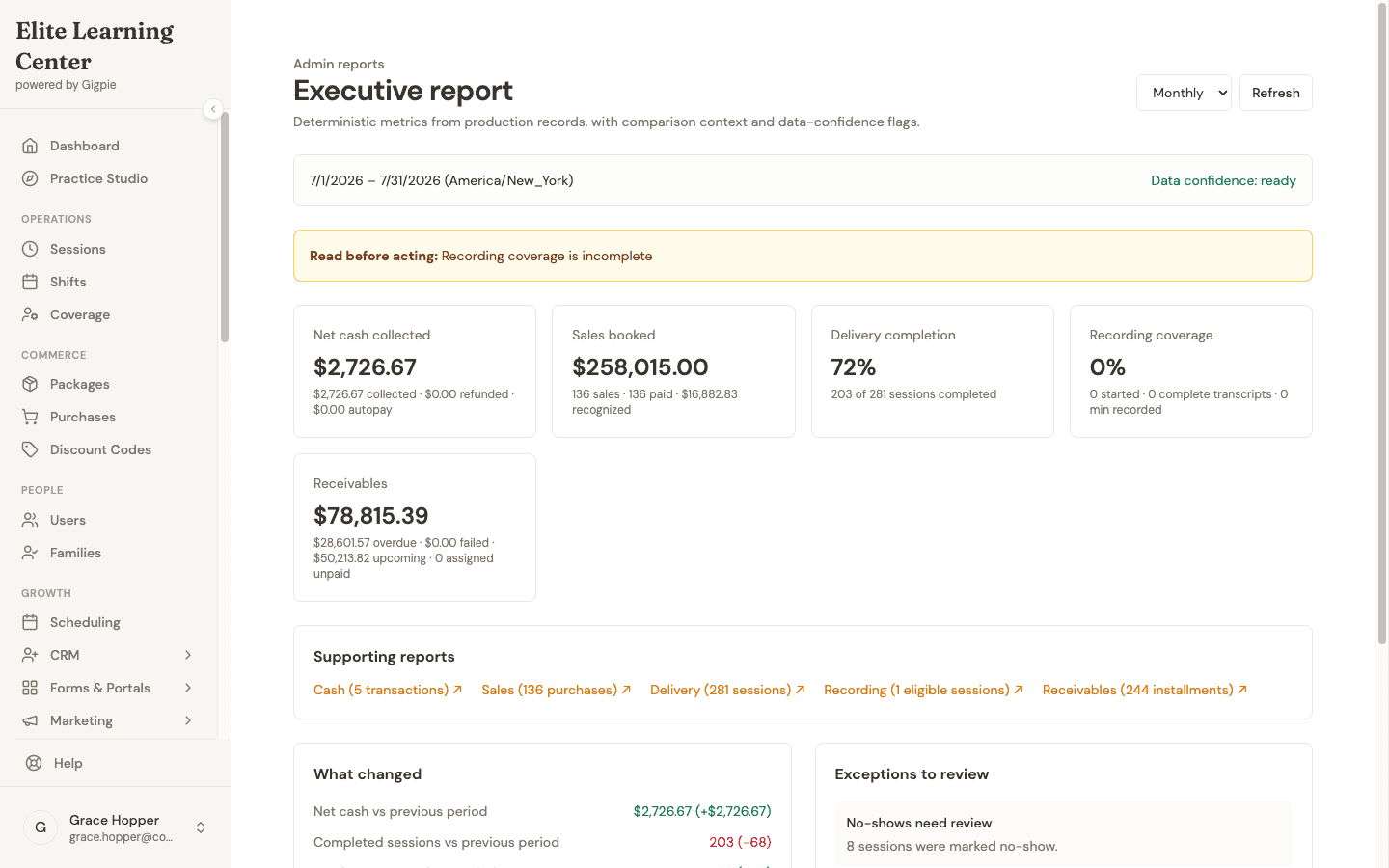
$258K booked, 72% of sessions delivered, and a receivables ledger that flags what's overdue: the reporting layer the 2% pays for.
Frequently asked questions
Can I switch platforms later if I choose wrong?
Yes, with planning. TutorCruncher documents CSV exports for students, lessons, and invoices, and Teachworks documents spreadsheet imports for students, families, and employees. For most platforms, assume you can get a student list out and will rebuild schedules and automations by hand. Budget a real stretch of running both systems in parallel, and move package balances first, because that's the data families notice.
Is a general scheduler like Calendly or Acuity enough?
It depends on two counts: prepaid packages sold and educators besides you. If both are zero, a scheduler is enough and cheaper, and Acuity even tracks per-client package balances. Once you sell hours to families with siblings and owe other educators pay, you want package tracking, family billing, and tutor pay in one system, which is what the tutoring-specific tools exist for.
Which of these platforms is actually free?
Free means three different things here. Trials: TutorBird gives 30 days, Teachworks 21, Evallo and Calendly 14, Acuity 7. Permanent free tiers: Calendly's free plan and Evallo's Explorer tiers stay free at low usage. Usage-based: Tutorbase charges nothing until you create an invoice, then 1%, and Gigpie is free until you collect revenue, then a flat 2% of collections. There's no trial clock on Gigpie; you pay when money moves.
Is percentage pricing more expensive than a subscription?
Above a revenue threshold, yes, on paper. Two percent of $15,000 a month is $300 while TutorBird's four-tutor bill is about $32, and the break-even sits near $1,600 a month collected. Below that threshold, and in every slow month, the percentage wins because it falls with revenue. Compare your worst quarter rather than your best month, then price the admin hours the bigger platform saves you.
Which platforms have a native mobile app?
As of August 2026: Calendly, Acuity, and Mindbody ship native iOS and Android apps, Wise offers white-label native apps, and Jackrabbit's Plus tier adds a branded parent app. TutorBird, Teachworks, TutorCruncher, Evallo, My Music Staff, and Gigpie are responsive web apps with no native app. If a phone-first parent experience decides your purchase, that's the dividing line to shop on.
What happened to Practice.do?
It shut down. The closure was announced in October 2025 after an acquisition fell through, reporting places the shutdown in November 2025, and the site now returns a 404.
Which platforms pay tutors, rather than just calculating what I owe?
Only TutorCruncher moves money to tutors: when a client pays, split payments route each tutor's share toward the tutor's own Stripe payouts account. TutorBird, Teachworks, and Tutorbase calculate pay automatically at your configured rates. Gigpie runs structured payroll with pay groups, approval steps, and CSV exports formatted for an external payroll processor. If hands-off payouts are a hard requirement, the field narrows to one.
Put Gigpie on the shortlist
Free until you collect revenue, then a flat 2% of collections. Set it up next to your current tool and run one real week through it.
Get startedRelated Resources
- How to choose tutoring software - The decision framework behind this guide, with a longer walk through requirements gathering
- Family management in Gigpie - What family-as-the-billing-unit means in practice: shared balances, one payer, sibling hours from one pool
- Gigpie vs TutorBird - The budget-pick comparison in full, including where TutorBird wins