
HoneyBook Alternatives: 4 Options Compared (2026)
Switching off HoneyBook? Four real alternatives, priced from August 2026 vendor pages, plus the real gap between its project model and an ongoing coaching relationship.
HoneyBook prices in three annual-billed tiers, Starter at $29 a month, Essentials at $49, and Premium at $109, as of August 2026, plus payment processing on top of every tier: 2.9% plus $0.25 per cardholder-entered charge, 1.5% flat for ACH, and 3.4% plus $0.09 for Amex, Discover, or any card kept on file for recurring billing, the rate a tutoring package running on saved cards would actually hit. It runs a dedicated "Tutor Management Software" landing page, so tutoring and coaching businesses are a real part of who it markets to, not an afterthought. But the product underneath was built for photographers, event planners, and designers running discrete, payable projects, and people searching for a replacement are usually the ones who feel that mismatch directly: a tutoring package that doesn't behave like a wedding contract, a coaching relationship that keeps going long after the first invoice clears, or a calendar that syncs to only one place at a time.
Every fact below comes from HoneyBook's own site and help center, or from an independent review that's cited by name where it's the source, checked August 6, 2026.
What HoneyBook Gets Right
HoneyBook's calendar sync reaches further than most tools in this category: two-way integration with Google Calendar, Microsoft Outlook, and Apple iCloud, checking a synced calendar's busy times before the Scheduler shows a client any open slot. Payment processing is transparent about what it costs, with no separate platform fee layered on top of the card or ACH rate. The trial and guarantee are both real and generous: 30 days free with no card required, and a 60-day money-back guarantee from the start of a paid membership, refundable by chatting a support request rather than filling out a form. Native iOS and Android apps exist and carry a reported 4.7 rating on the App Store, something several tutoring-specific tools in this category still don't offer. And HoneyBook Payroll genuinely moves money: it pays 1099 contractors by direct deposit and handles 1099-MISC reporting, which is more than a calculation tool. It's worth being precise about what that payroll does and doesn't do, since it's easy to overstate in either direction: it pays contractors, not W-2 staff, and it doesn't calculate pay from attendance or hours worked the way a tutoring-specific payroll engine does. Round-robin lead distribution and per-team-member pipeline tracking round out a genuinely capable tool for a small creative team.
What to Look For in an Alternative
Does it model an ongoing relationship, or just a project? An independent review of HoneyBook for coaching, published by coachingbriefs.com, put it plainly: "no concept of recurring engagements. A 12-session coaching package doesn't map cleanly onto HoneyBook's project model." Before you sign anywhere, find out whether a package is a real object with a running balance, or whether it's being emulated out of invoices and recurring-billing line items.
How many calendars can stay connected at once? HoneyBook's own help docs are direct about this: "You can sync only one external calendar with HoneyBook at a time." If you keep a personal calendar separate from your business one, or juggle more than one Google account, that's a real constraint to test before you commit.
What does "payroll" actually mean in the product you're evaluating? HoneyBook Payroll pays 1099 contractors by direct deposit, which is real money movement, but it isn't attendance-linked staff compensation. Ask any vendor whether "payroll" means paying people, calculating what to pay them, or both, because the category uses the word loosely.
Where do session notes live? The same coachingbriefs.com review found that in HoneyBook, notes "live alongside invoices, contracts, and timeline events" with no structured template built for ongoing session documentation. If you're tracking a student's or client's progress over months, test that specific flow in a trial before assuming it'll hold up.
The Alternatives
1. Gigpie
Gigpie treats the family, not the project, as the billing unit: a package belongs to a household, and any sibling in it draws against the same balance without extra setup. That's the direct answer to the "12-session package doesn't map" problem above.
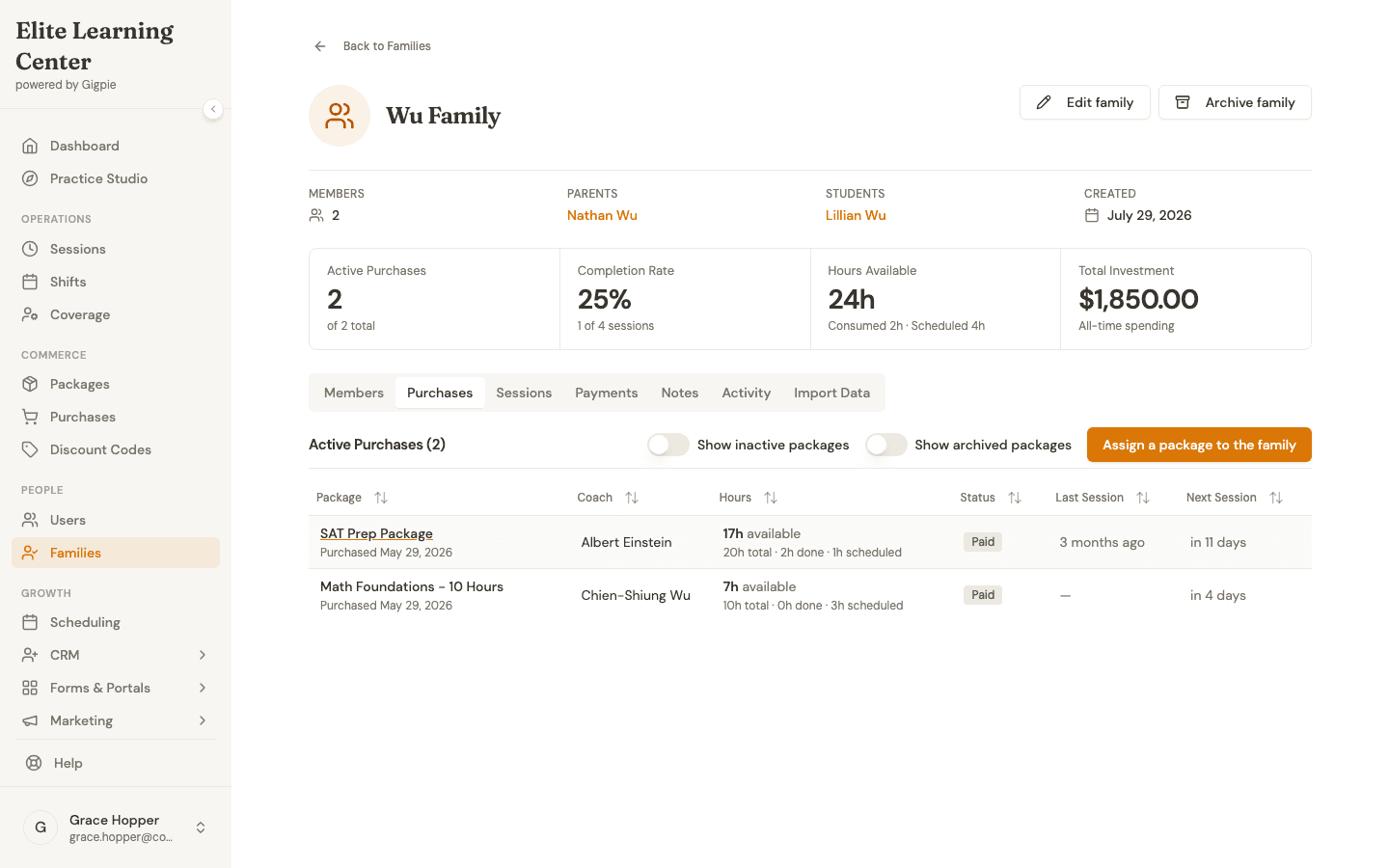 A relationship that outlives any single invoice: 24 hours across 2 packages, tracked as one running balance instead of a series of separate projects.
HoneyBook wins outright in three places: it has native mobile apps and Gigpie doesn't, it syncs to three calendar providers where Gigpie pushes to two (Google and Outlook, with an on-demand conflict check at booking, not iCloud), and its 1099 payroll actually deposits money into a contractor's account, where Gigpie's payroll run ends in a CSV export for your own processor. If mobile access and moving contractor pay directly matter more than a family-billing model, HoneyBook is the stronger fit as it stands today.
The fee is a flat 2% of collections, free until you collect revenue. Set it against HoneyBook's Essentials tier, $49 a month with room for two team members, and $2,450 a month in collections is the point where the two land on the same number. Under that, HoneyBook wins on price. HoneyBook's Premium tier, $109 a month with no team-member ceiling, pushes that same crossover out to $5,450. Gigpie earns the percentage past those figures when the package-as-relationship model, the CRM, and multi-coach payroll outweigh HoneyBook's lower flat fee and its stronger mobile story.
2. TutorBird
TutorBird charges $16.95 a month plus $4.95 per additional tutor, unlimited students, as of August 2026. Calendars sync both directions with Google and iCal, and Auto-Pay bills a saved card through Stripe or PayPal the moment an invoice goes out, all inside the single plan. Its Family Account handles consolidated billing directly, the concept HoneyBook's project model doesn't have room for at all. A 90-day money-back guarantee lowers the risk of testing it against your current setup.
3. Teachworks
Teachworks bills by lesson volume rather than by project or seat count: $16.49 a month buys the Starter tier at $0.32 a lesson, falling to $0.065 a lesson once you're paying $187.99 on Premium, tutors and students uncapped at every level, as of August 2026. Payroll pulls hours straight off the calendar with wage tiers for different rates on the same service, a depth of built-in staff pay HoneyBook doesn't attempt at all. A client booking their own session without emailing an admin first, or having that session push both directions to Google, both cost extra here, so price the configuration you'd actually run before comparing totals.
4. Paperbell
Paperbell is the pure solo-coach swap: a single plan at $57 a month (or $47.50 a month billed annually), no tiers, unlimited clients and packages, and no cut taken from what a client pays, since that money never routes through Paperbell at all, as of August 2026. It shares HoneyBook's one-calendar-at-a-time limit across Google, Outlook, and iCal, but adds a dedicated group-coaching feature HoneyBook has no equivalent for. If your HoneyBook account is really one coach running individual and group programs, not a small creative team, this is worth pricing against it directly.
Getting Your Data Out of HoneyBook
The self-service piece is real but narrow: Clients → Contacts → the "⋯" menu → Download spreadsheet produces a CSV of names, emails, phone numbers, addresses, notes, and creation dates. What isn't documented as exportable is everything downstream of that contact record: project history, invoices, payment history, contracts, and booking history. There's no evidence either way of a fuller account export on cancellation, so ask HoneyBook support directly what else they can provide before you commit to a date.
None of it moves on its own. Project and session history stays in HoneyBook for your own records, invoices stay there too, and saved cards or autopay agreements have to be rebuilt from scratch on whatever platform you land on next.
Gigpie has no automated importer for any outside platform today. A HoneyBook move means using that contacts CSV as your starting list and entering families, packages, and schedules by hand, which makes a term break a much better time to cut over than the middle of an active season.
Frequently Asked Questions
Why do people search for HoneyBook alternatives?
The most common reason is structural: HoneyBook's data model is built around discrete, payable projects, and an ongoing coaching or tutoring relationship with recurring package hours doesn't map onto that cleanly. Others are hunting for a lower flat fee, a second calendar connection, or attendance-linked staff payroll instead of 1099 contractor payments.
Does HoneyBook work for tutoring or coaching businesses?
It runs a dedicated marketing page for tutors, so HoneyBook does position itself for the category. The gap independent reviewers point to is structural rather than cosmetic: no dedicated package or session-balance object comparable to a tutoring-specific platform, and no family or household billing concept anywhere on honeybook.com as of August 2026.
Can I sync more than one calendar to HoneyBook?
No. HoneyBook's own help center states it directly: you can sync only one external calendar at a time, whether that's Google, Outlook, or iCloud. A second Google account or a separate business calendar has to be handled outside that sync.
Does HoneyBook Payroll pay my staff automatically?
It pays 1099 independent contractors by direct deposit and handles 1099-MISC reporting, which is real money movement. It doesn't calculate W-2 employee pay or derive compensation from attendance or hours worked, so it's a payment tool for contractors rather than an attendance-linked payroll engine.
Can I export my data from HoneyBook?
Contacts, yes, self-service: a CSV with name, email, phone, address, notes, and creation date, downloadable from the Contacts list. Projects, invoices, payment history, and contracts aren't documented as exportable, so contact HoneyBook support directly about anything beyond the contact list before planning a move.
Is there a free trial or refund if HoneyBook doesn't work out?
Both. A 30-day free trial with no credit card required, and a 60-day money-back guarantee from the start of a paid membership, requested by chatting support rather than through a self-serve button, as of August 2026.
Is Gigpie cheaper than HoneyBook?
Below roughly $2,450 a month in collections, HoneyBook's Essentials tier at $49 a month is cheaper. Against its Premium tier at $109 a month, the crossover moves to about $5,450 a month. Above those figures Gigpie costs more in raw dollars, priced to replace the project-model mismatch and add family billing, not to undercut HoneyBook line for line.
Does Gigpie import HoneyBook data automatically?
No. Gigpie has no automated importer for HoneyBook or any other outside platform as of August 2026. A HoneyBook migration means using the exportable contacts CSV as a starting point and entering families, packages, and schedules by hand.
What does HoneyBook do that Gigpie doesn't?
Native iOS and Android apps, three-way calendar sync across Google, Outlook, and iCloud, and 1099 contractor payments by direct deposit are all real HoneyBook capabilities Gigpie doesn't currently match. Gigpie's payroll produces a CSV export for your own processor instead of moving money directly.
Which HoneyBook alternative fits a solo coach specifically?
Paperbell. It's a single $57-a-month plan built for one coach, with zero platform fee on client payments and a dedicated group-coaching feature, though it shares HoneyBook's one-calendar-at-a-time limit. It's a closer match for a solo practice than a multi-tutor tool like TutorBird or Teachworks.
See if the family model fits before HoneyBook's next renewal
There's no fee until money moves through the platform. Bring over one family's package, run it through a real week, and see whether the total beats your HoneyBook tier plus processing on that same activity.
Get started freeRelated Resources
- Family Management - The package-as-household-balance model HoneyBook's project structure doesn't have a place for.
- Educator Payroll - Attendance-linked pay runs, set next to HoneyBook's 1099 direct-deposit tool for what each one actually moves.
- Best Tutoring Software 2026 - How Gigpie and tutoring-specific platforms stack up beyond HoneyBook's general-purpose model.