
How to Pay Tutors: Pay Structures, No-Show Math, and Payroll Runs That Reconcile
The operational guide to paying tutors: choosing a pay structure, handling reschedules and no-shows without disputes, and running payroll as calculate, approve, export.
By the last Friday of the month, you owe three people money. Maya taught 22 sessions, except one was a no-show and you can't remember whether you agreed to pay for those. Devon's sessions are 90 minutes, so his hours never match his session count. Priya gets half of whatever the parent paid, which means her pay depends on which family booked her. You know roughly what each of them earned. Roughly is the problem.
Paying tutors is a solved problem at one tutor (you pay yourself) and a genuinely hard one at three or more. This guide covers the decisions in order: which pay structure to use, what to do about reschedules and no-shows before they turn into disputes, and how to run payroll as a repeatable process instead of an evening of reconstruction.
The Three Pay Structures (and When Each Fits)
Hourly
You pay a rate per hour taught. A 90-minute session at $40/hour pays $60. This is the simplest structure to explain and the easiest to verify: hours taught times rate equals pay. It fits businesses where session lengths vary, and it makes raises legible ("you're moving from $38 to $42").
The catch is that hourly pay is disconnected from what you charge. If a tutor's rate is $40 and you bill families $65 for their subject, your margin is thinner than for the tutor at $40 whose families pay $90. Hourly works best when your parent rates are fairly uniform.
Per-Session Flat Rate
You pay a fixed amount per session delivered, regardless of small variations in length. $50 per session, 16 sessions, $800. This structure rewards efficiency and removes minute-counting, but it needs a clear definition of what counts as a delivered session. That definition is exactly what breaks when a student shows up 25 minutes late or a parent cancels an hour before. Write those rules down first (more on this below).
Percentage of the Parent Rate
The tutor gets a fixed share of what the family pays for their sessions: if the family's rate is $80/hour and the split is 50%, the tutor earns $40/hour. The appeal is alignment. When you raise parent rates, tutor pay rises automatically, and expensive specialists cost you proportionally, never more than the revenue they generate.
The trade-off is variance: the same tutor earns different amounts per hour depending on which family booked, and explaining a paycheck requires explaining your price list. Percentage splits suit businesses with a wide spread of parent rates, like test prep alongside elementary reading. If you're deciding what the split itself should be, that's a pricing question as much as a payroll one; we've written a separate guide to setting tutor pay rates.
Salaries exist too, but they're for full-time staff with admin duties, not the part-time tutors most businesses under 20 educators employ. And before you pay anyone anything, settle whether they're a contractor or an employee. The 1099 vs. W-2 decision changes your costs, your paperwork, and how much you're allowed to control how tutors work.
What Changes at Three Tutors
With one tutor (you), pay is arithmetic you do in your head. With three or more, four things break at once.
First, you now have multiple rates, possibly multiple structures. Maya is hourly, Devon is per-session, Priya is on a split. Every pay period, you're running three different calculations against three different session lists.
Second, you didn't watch the sessions happen. Your record of what Devon taught is whatever Devon wrote down, cross-referenced against a calendar that may or may not reflect the reschedule his student's mom texted him about. When his number and your number disagree, there's no record to settle it, so the dispute costs you either money or trust. This is why session completion should be recorded by the tutor at session time, with a note, not reconstructed at the end of the period. (In Gigpie, that's part of closing out each session; see how coaches mark a session complete.)
Third, edge cases multiply. One tutor generates a no-show or an awkward reschedule occasionally. Five tutors generate several every week, and each one is a small pay decision.
Fourth, the stakes rise. Underpay a tutor twice and they quietly start looking at your competitors' job posts. Overpay and you may never find out.
The Reschedule and No-Show Problem
Here is the pay-math question nobody prices in when they start: when a session doesn't happen as planned, who absorbs it?
A reschedule is the easy case, and it still trips up spreadsheets. If Tuesday's session moves to Thursday, it's one session and it gets paid once, under the date it actually happened. Spreadsheets get this wrong in both directions: the session gets logged under both dates and paid twice, or it gets deleted from Tuesday, never re-entered, and paid never.
No-shows are the hard case, because "who pays" splits three ways: the family (do they lose the package hour?), the tutor (do they get paid for holding the slot?), and you (do you eat the difference?). There is no universally right answer, but there is a universally wrong approach, which is deciding case by case after it happens, in front of an annoyed parent or an annoyed tutor.
Write the policy before you need it. For what it's worth, here's the default logic Gigpie encodes, which we think matches how the incentives run: when a student no-shows or cancels late, the family's package hour is still consumed and the tutor is still paid, because the tutor showed up and the slot is gone. When the tutor no-shows, both reverse: the family isn't charged, the tutor isn't paid, and any commission the tutor had accrued on that engagement is voided. The tutor reports a student no-show from the session itself, so the pay consequence and the package-hour consequence come from one record instead of two people's memories.
Whatever policy you pick, the test is the same: a parent and a tutor should both be able to predict the outcome of a missed session without calling you.
Running Payroll: Calculate, Approve, Export
A payroll run has three stages, and it's worth being precise about where software ends and your payroll processor begins.
Calculate. Pull every session in the pay period, apply each tutor's rate and structure, apply the no-show rules, and produce a per-tutor total. This is the stage where spreadsheets consume your evening and where software should be doing all the work, because the inputs (sessions, statuses, rates) already exist as records.
Approve. A human looks at the draft, catches the thing software can't know ("that Wednesday session was a makeup we agreed to comp"), makes adjustments, and signs off. In Gigpie, payroll runs move through draft, approved, and paid states; you can add manual adjustments to a draft, but once a run is marked paid it locks, so the record of what you actually paid can't drift afterward. Sessions in a locked run can't be rescheduled either, which closes the loop from the other side: history that has been paid out stops being editable.
Export. Money movement belongs to a payroll processor or your bank, not your tutoring software. Gigpie calculates what you owe and hands it off: a summary CSV, a session-by-session breakdown, or a Justworks-formatted timecard, depending on what your processor wants. To be clear about the boundary, Gigpie does not transfer money to tutors. "Mark paid" records that you paid, so the run locks and the ledger stays truthful. The paying happens in Justworks, Gusto, your bank's bill pay, or however you already move money.
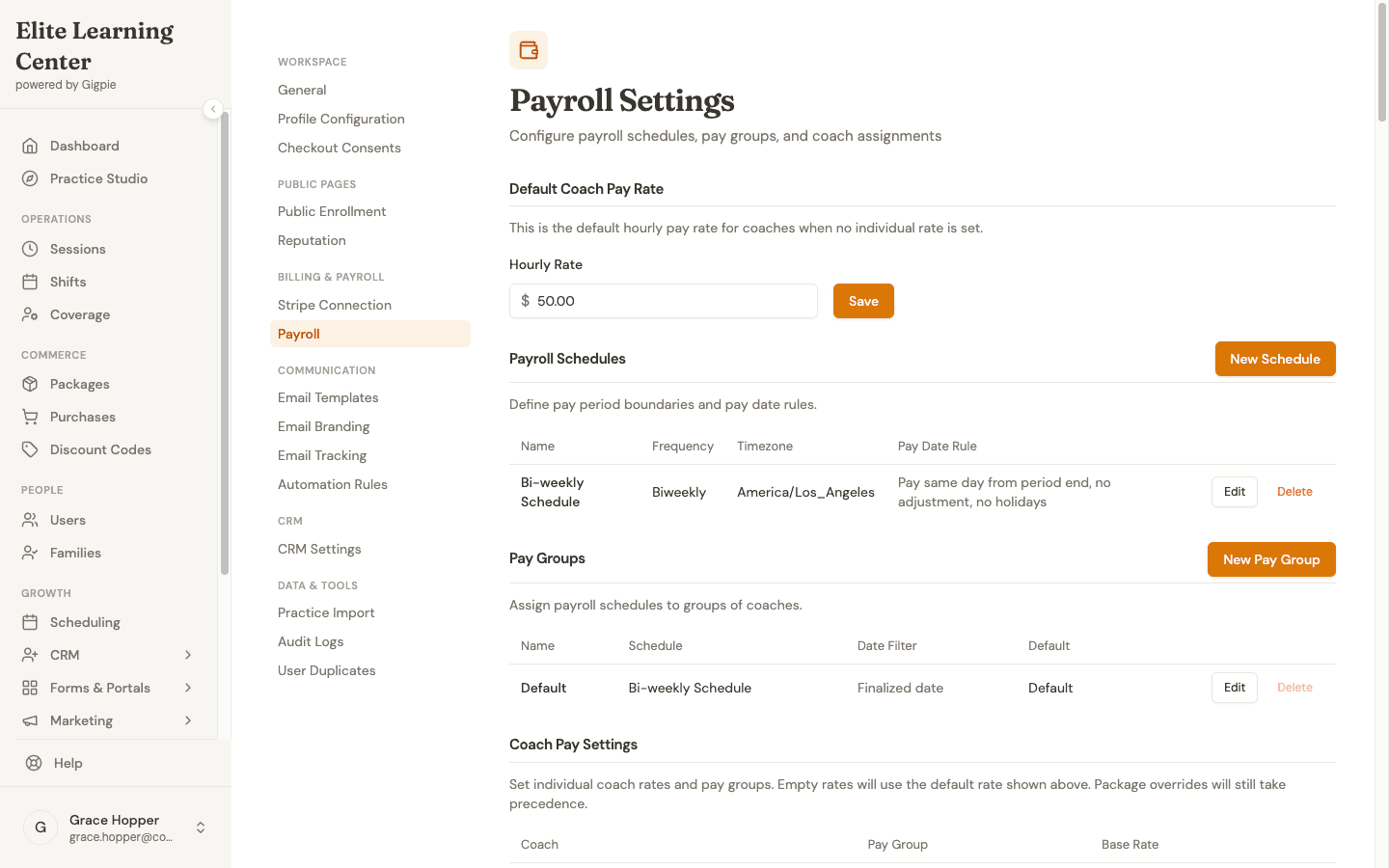
A biweekly schedule, a default rate, and per-coach overrides: the configuration that replaces the rates tab of your spreadsheet.
Pay groups matter once your tutors aren't uniform: contractors paid monthly and employees paid biweekly can live in different groups with different schedules, and each run only picks up its own group.
A Worked Pay Period
Two-week period, three tutors, one wrinkle each.
| Tutor | Structure | Delivered | Math | Pay |
|---|---|---|---|---|
| Maya | Hourly, $45/hr | 22 one-hour sessions | 22 × $45 | $990.00 |
| Devon | Per-session, $52.50 | 16 sessions (90 min each) | 16 × $52.50 | $840.00 |
| Priya | 50% of $80/hr parent rate | 18 hours | 18 × $40 | $720.00 |
| Total | $2,550.00 |
The wrinkles: one of Maya's 22 sessions was a Thursday student no-show. Under the policy above, it pays anyway, so it's already in her 22, and the family's package hour was consumed. One of her other sessions was moved from Tuesday to Thursday; it appears once, under Thursday, and pays once. Devon negotiated a raise to $56 per session mid-period, effective next period. Because payroll items snapshot the rate that applied when each session was delivered, this run pays all 16 sessions at $52.50, and the new rate takes over cleanly on the next run instead of half-applying to this one.
Total owed: $2,550.00. Approve, export the CSV, pay through your processor, mark the run paid. Every input was recorded when it happened, so nothing needs reconstructing.
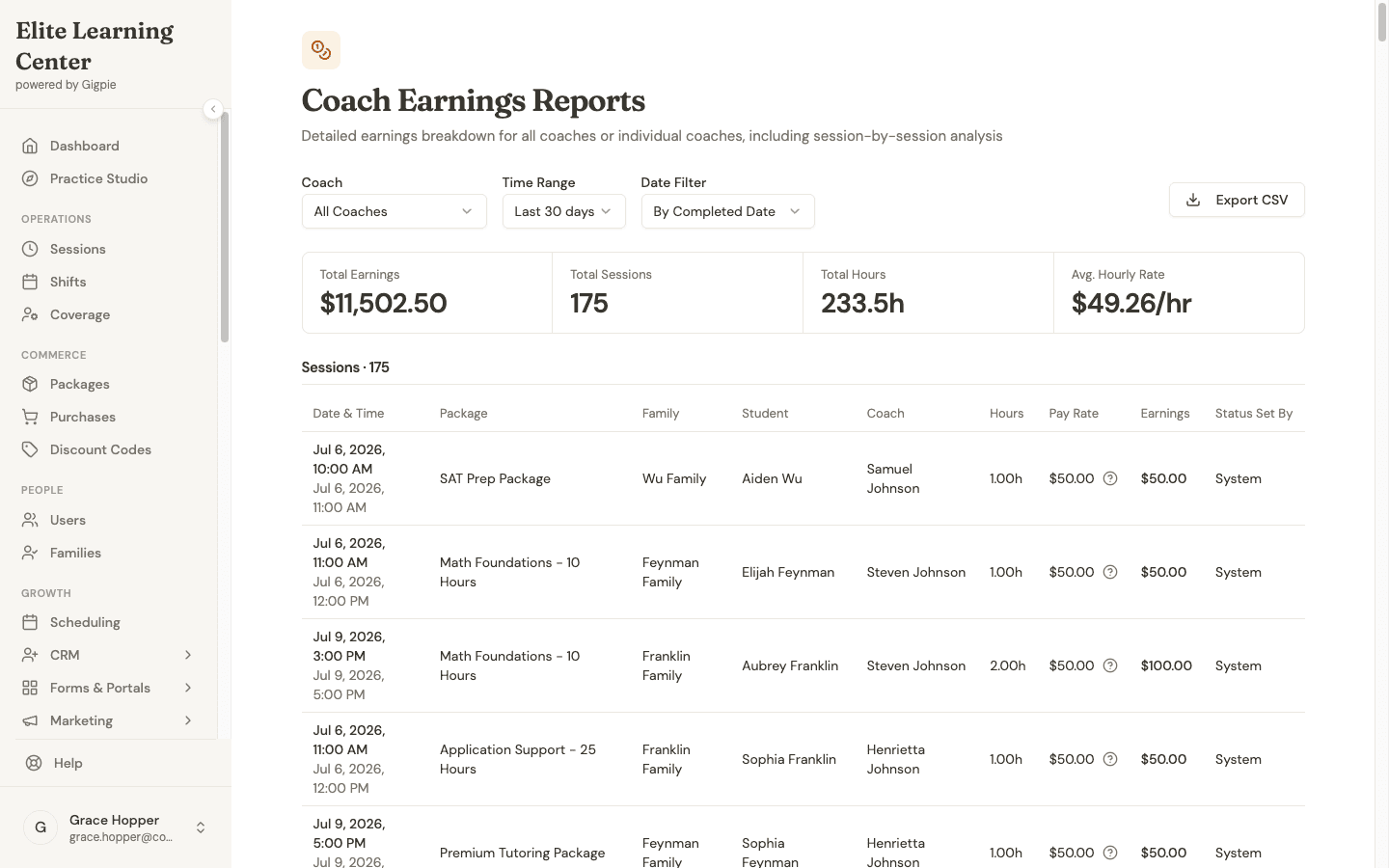
$11,502.50 across 175 sessions in a month: the per-coach, per-rate breakdown a payroll run starts from, already assembled.
Where Gigpie Fits (and Where It Doesn't)
Gigpie's educator payroll is the calculate-and-approve engine: pay groups, schedules, rate snapshots, the no-show rules, run states, and the processor-ready exports. It exists because the session records payroll needs (who taught what, when, at which rate, with what status) already live in the scheduling system, so payroll stops being a second bookkeeping project.
What it isn't: a bank. If you want a tool that deposits money into tutors' accounts, that's a payroll processor, and you'll still want one. What Gigpie removes is the part where you rebuild the pay period from a calendar, a text thread, and memory.
Frequently Asked Questions
Should I pay tutors per hour or per session?
Pay hourly if your session lengths vary or you want raises to be simple to communicate. Pay per session if your sessions are uniform and you want to stop counting minutes. Pay a percentage of the parent rate if your prices vary a lot by subject and you want tutor pay to scale with them automatically. The structure matters less than applying it consistently with written no-show rules.
Do I have to pay a tutor when a student doesn't show up?
Legally that depends on your agreement with the tutor. Operationally, most policies that survive contact with reality pay the tutor for student no-shows and late cancellations, because the tutor reserved the time, and charge the family's package hour for the same reason. Gigpie's defaults encode exactly that, and reverse both when it's the tutor who no-shows.
What about prep time, travel, and admin work?
Decide explicitly rather than by omission. Common approaches: build prep into the session rate (a $45 rate that assumes 15 minutes of prep), pay a separate flat amount per student per week, or pay hourly for approved non-teaching time. What breaks trust is tutors silently doing unpaid work while assuming you know.
How often should I pay tutors?
Biweekly is a sensible default: frequent enough that tutors aren't floating you a month of labor, infrequent enough that running payroll isn't a weekly chore. Monthly works for contractors who invoice. In Gigpie, pay groups let different tutors run on different schedules, so you don't have to force one cadence on everyone.
Does Gigpie actually send the money to my tutors?
No. Gigpie calculates what each tutor is owed from delivered sessions, lets you review and adjust the run, then exports a summary, per-session detail, or a Justworks-format timecard for your processor or bank. Marking a run paid locks the record; the transfer itself happens outside Gigpie, and any payroll tool that's vague on that distinction deserves a follow-up question.
What happens if I change a tutor's rate mid-period?
In Gigpie, each payroll item snapshots the rate in effect when the session was delivered, so a mid-period raise doesn't retroactively rewrite sessions already taught. The clean pattern is to make raises effective at a period boundary; the snapshot just protects you when life doesn't cooperate.
Can I fix a mistake after payroll is done?
Before a run is marked paid, yes: add a manual adjustment with a note and the run recalculates. After it's marked paid, the run locks and can't be edited, so corrections happen as an adjustment on the next run. That lock is deliberate. A payroll history that can be quietly edited after the fact is worse than no history.
Payroll from records, not recollection
Free until you collect revenue, then a flat 2% of what you collect. Pay groups, rate snapshots, no-show rules, and processor-ready exports included.
Get started freeRelated Resources
- 1099 or W-2 for Your Tutors? - The classification decision that determines your real cost per tutor hour
- What to Pay Tutors: A Rate-Setting Framework - Working backward from your parent rate to a pay rate that holds up
- Educator Payroll - The pay groups, payroll runs, and exports described in this guide
Ready to grow your tutoring business?
Free until you collect revenue. Put these insights into action with Gigpie.
Get started free