
Parent Portal for Tutoring Businesses
Give families one login to book sessions, check shared package hours, track payment plans, and read progress notes. Self-service that takes the owner out of the loop.
It's 7:40 on a Tuesday morning, ten minutes before your first session of the day, and the same two emails are waiting: one asking how many hours are left on the package, one asking whether Thursday's session can move to 5pm. You know both answers. The problem is that you're the only one who does, so every family's question sits in your inbox until you get to it.
Gigpie's parent portal gives families their own login to those answers: upcoming sessions, shared package hours, payment plans, and the note the coach wrote after each session. Parents book and reschedule themselves inside rules you set, and the questions that used to queue on you stop arriving.
One Login for the Whole Family
Packages in Gigpie belong to the family, not to an individual student. That architecture shows up the moment a parent logs in: one dashboard covers every child in the household, their upcoming sessions, the hours remaining across every package, and the next payment due. Siblings draw from the same pooled balance, so a parent with three kids sees one number instead of reconciling three accounts.
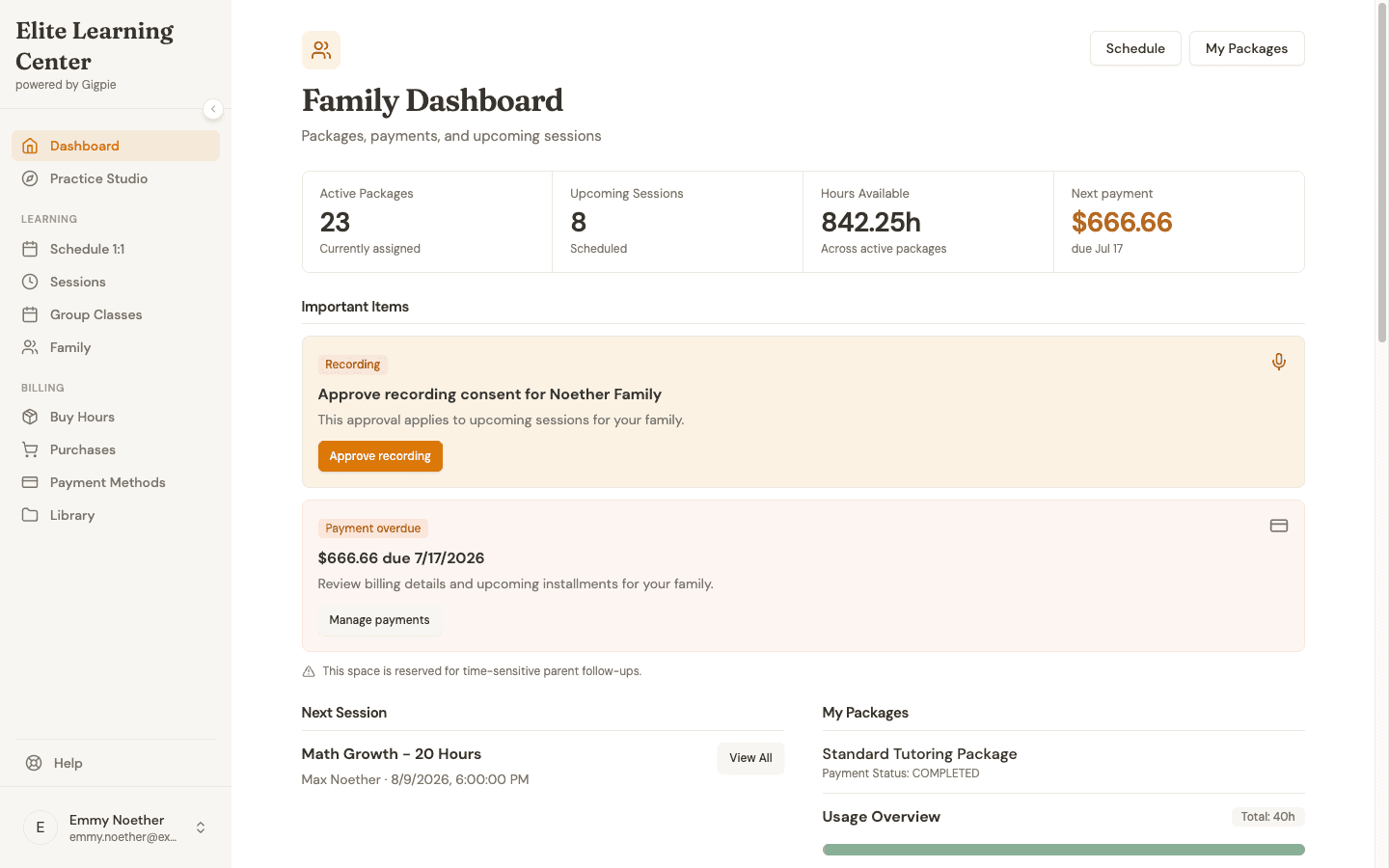 The family dashboard at login: 23 active packages, 842 hours available, and the next payment due, all on one screen.
Booking Without the Email Thread
Here is what booking one session over email actually costs. The parent writes to ask about Tuesday. You check the calendar. You reply with a time. They confirm. You add it to your calendar. You send a confirmation. Six touchpoints and 15 to 20 minutes of attention, usually spread across a day, for a single session.
In the portal, the same booking is a five-step wizard a parent finishes in one sitting: pick a duration, choose one-time or recurring, pick a date, pick a time, then review and confirm. About two minutes, and none of that time is yours. The slots a parent sees come from the coach's actual availability, so they can only book times the coach can take, and any reschedule or cancellation follows the rules you set.
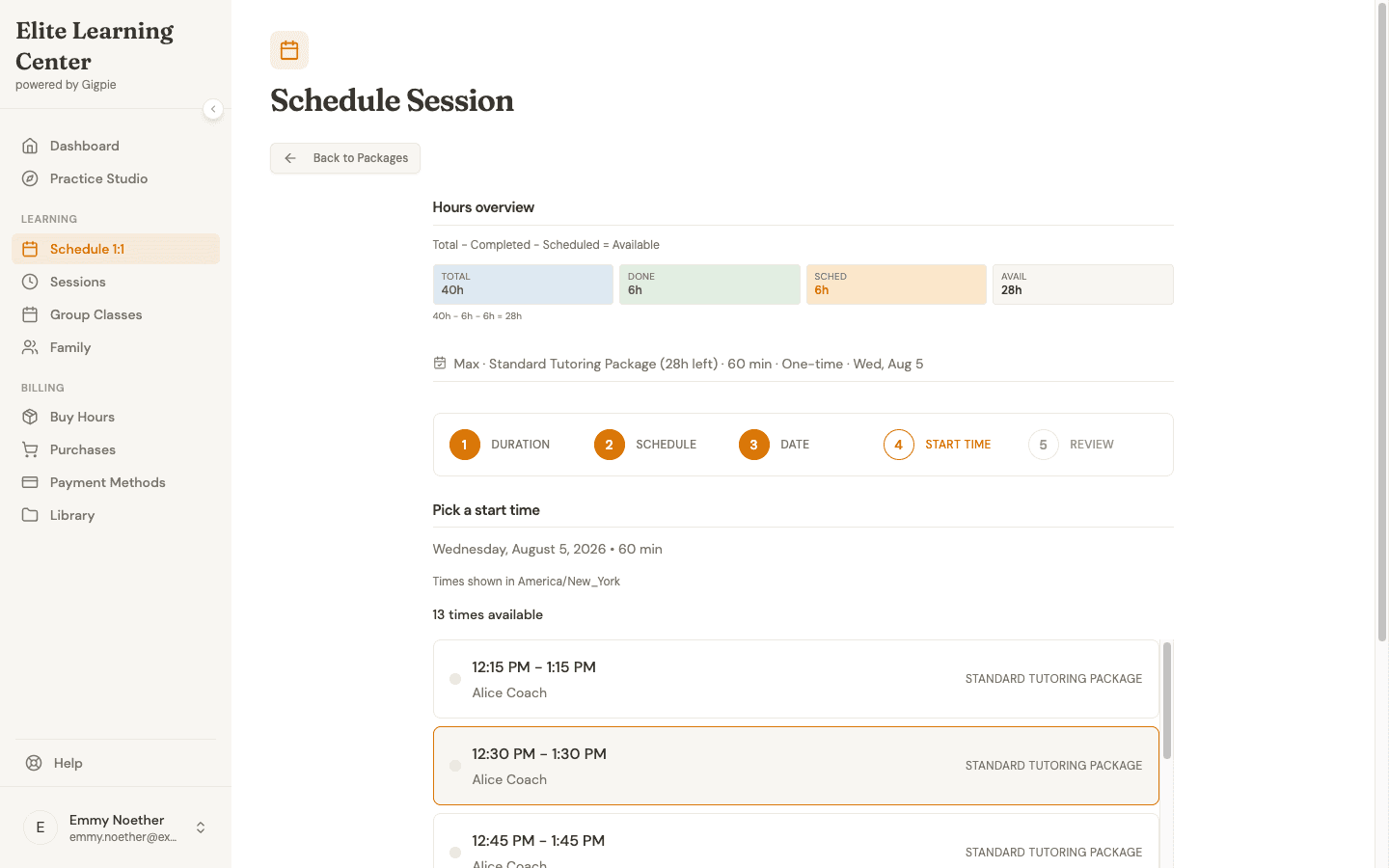 Step four of five in the parent booking flow: 13 open slots pulled from one coach's real schedule for that date.
The Hours Question Answers Itself
"How many hours do we have left?" has a permanent answer in the portal. The Purchases & Payment Plans page lists every package the family has bought, the hours still available on each, its payment status, and the next payment date. Families on installment plans see what has been paid and what is scheduled next, and autopay collects on schedule without anyone chasing it.
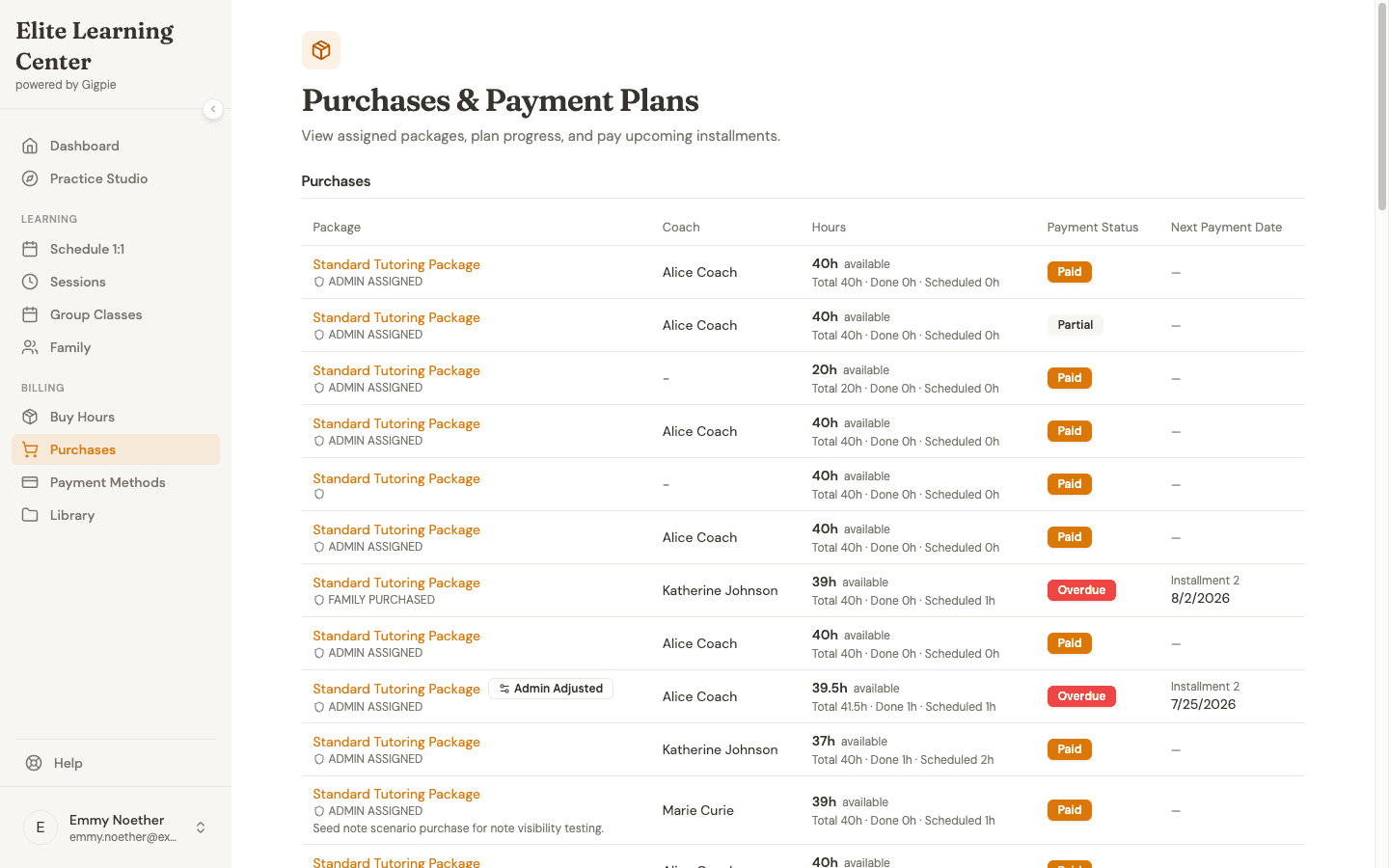 Every package the family has bought, with hours remaining and the next payment date in one list.
No account needed to buy
A new family doesn't need a login to make their first purchase. Gigpie's public checkout verifies the parent with an email address and a 6-digit code, so you can send a purchase link to a family that has never signed in.
Progress Notes Parents Actually Read
After a session, the coach writes a progress note and the family sees the whole thing, not a truncated preview. It is one free-text note per session: what the lesson covered and what to practice before the next one. Gigpie also asks the family for feedback after every completed session, a 1-to-5 star rating with a comment, and points five-star respondents (a settings dropdown can widen that to four) toward your Google and Trustpilot review links.
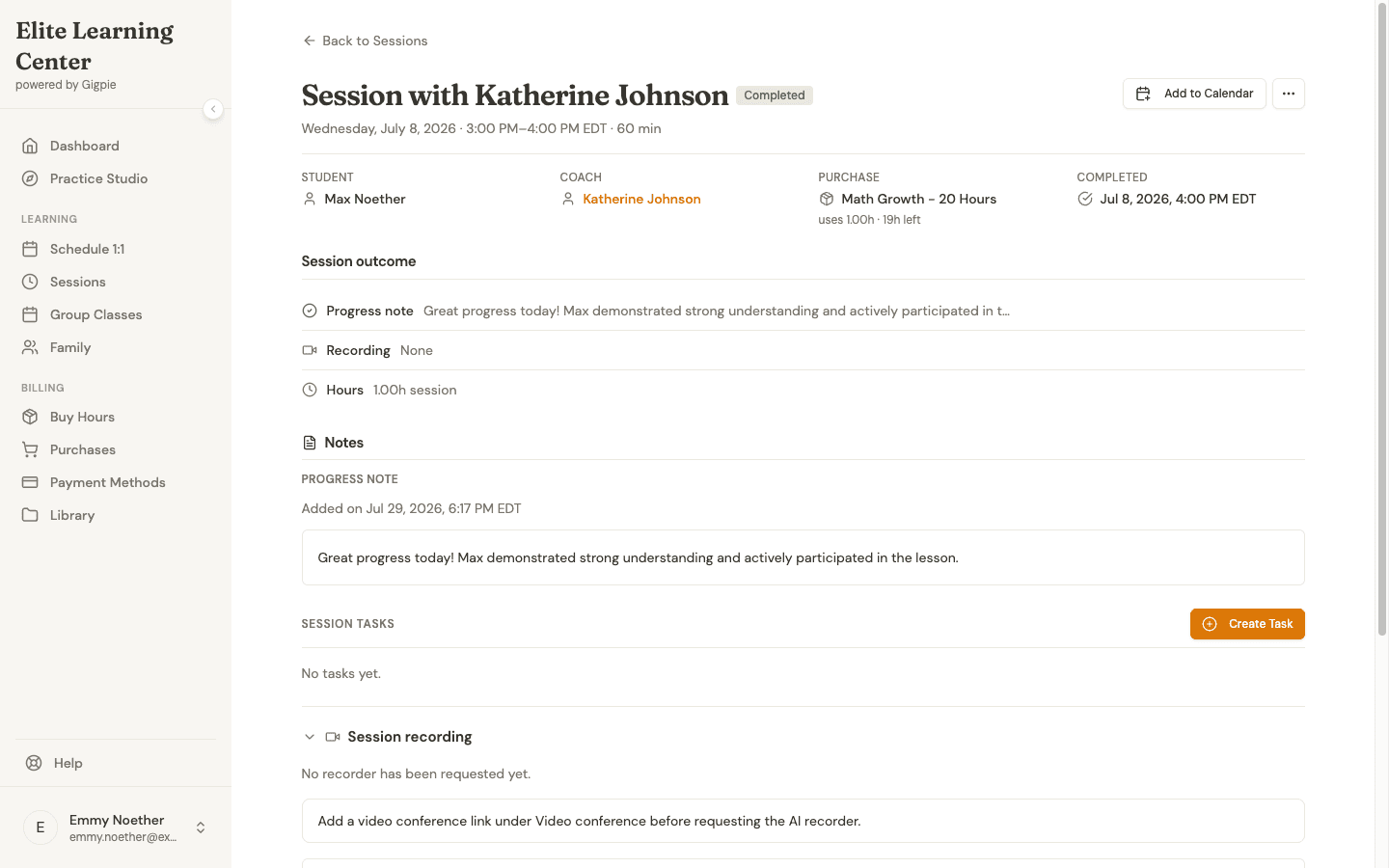 The same note the coach wrote, in full, on the parent's view of a completed session.
Notes cover the week; goals cover the semester. A coach can set a measurable goal for a student, with a baseline and a target, then record dated snapshots as the work moves. The portal shows each goal as a before-to-after timeline, and when the coach attaches a scored Practice Studio attempt as evidence, the snapshot links to the student's actual result. For parents and students, the timeline is read-only.
Who This Helps
A solo tutor with five families who already text you directly may not need any of this; a shared calendar and a payment link cover it. The portal matters most once you have several educators and a few dozen families, because that is when booking requests and balance questions stop being occasional and start being your evenings. Families with siblings get the most visible win: one login and one pooled balance replace per-child bookkeeping. Older students can also get their own separate student login, with a view distinct from the parent's.
Getting Started with the Parent Portal
Step-by-step guides for the flows families use most:
- Purchase a Package - Buy coaching hours
- Schedule an Appointment - Book sessions
- Join a Session - Access video sessions
- Review Progress Notes - Track student progress
- Reschedule or Cancel Sessions - Manage appointments
- Report an Educator No-Show - Handle issues
Frequently Asked Questions
Do all families have to use the portal?
No. You can keep handling some families by email or phone and manage their sessions and packages from the admin side. The portal is there for families who want self-service, and nothing forces the rest to switch.
Do parents need an account before they can pay?
No. The public checkout verifies a parent with an email address and a 6-digit code, so a brand-new family can buy a package from a link before they have ever logged in.
Can siblings share one package?
Yes. Packages belong to the family, and every student in the household draws from the same pooled balance. Hours are shared across the family rather than capped per child.
Can parents see everything a coach writes?
Parents see the full progress note on each session, not an excerpt. Coaches write those notes knowing the family will read them.
What happens if a coach doesn't show up?
The family can report a coach no-show from the portal. The family's package hour is not consumed and the coach is not paid for that session, so the accounting matches what actually happened.
Is there a mobile app?
There's no native app to install. The portal works in any mobile browser and looks and feels like a native app, so parents can book, check balances, and read notes from their phone.
Can another parent or guardian have their own login?
Yes. You can invite additional parents or guardians to a family. Each gets their own login and sees the same family data.
What does the portal cost?
It's included. Gigpie is free until you collect revenue, then a flat 2% of what you collect. There's no separate portal fee or per-family charge.
Give families their own front door
Free until you collect revenue, then a flat 2% of what you collect. The parent portal is included from day one.
Get started freeRelated Resources
- Family Management - The family-as-billing-unit architecture the portal is built on
- Smart Scheduling - Where coach availability and the booking rules parents see come from
- Billing & Payments - Installments, autopay, and the flat 2% fee behind the portal's payment views