
Tutoring Center Management Software
Run a tutoring center on one system: family intake, walk-in check-in, room boards, session notes, review funnels, and payroll exports. Flat 2% of collections, no seat fees.
You run eight tutors across math, reading, and SAT prep. Weekday afternoons are the rush: three families arriving at once and a parent emailing to ask how many hours her kids have left, while a tutor out sick leaves six sessions to cover. The stack holding it together is Calendly for booking, Stripe for charging, and a spreadsheet for everything else, and none of the three know about each other. You carry every number between them by hand, usually on Sunday.
Gigpie replaces that stack with one system built around a structural choice: the family, not the student, is the account. A package of hours belongs to the household, siblings draw from the same pooled balance, and every session, payment, and progress note attaches to that one record. Here is what an ordinary week looks like.
Monday: A New Family Signs Up
A parent calls after a school open house. Two kids, one needing algebra help and one reading support. In Gigpie that is one flow on one screen: enter the parent and students, pick the package, assign a coach, and watch the payment summary update as you go. Because the purchase belongs to the family, you never have to decide up front how to split 20 hours between two kids. Both draw from the same balance and the ledger keeps score.
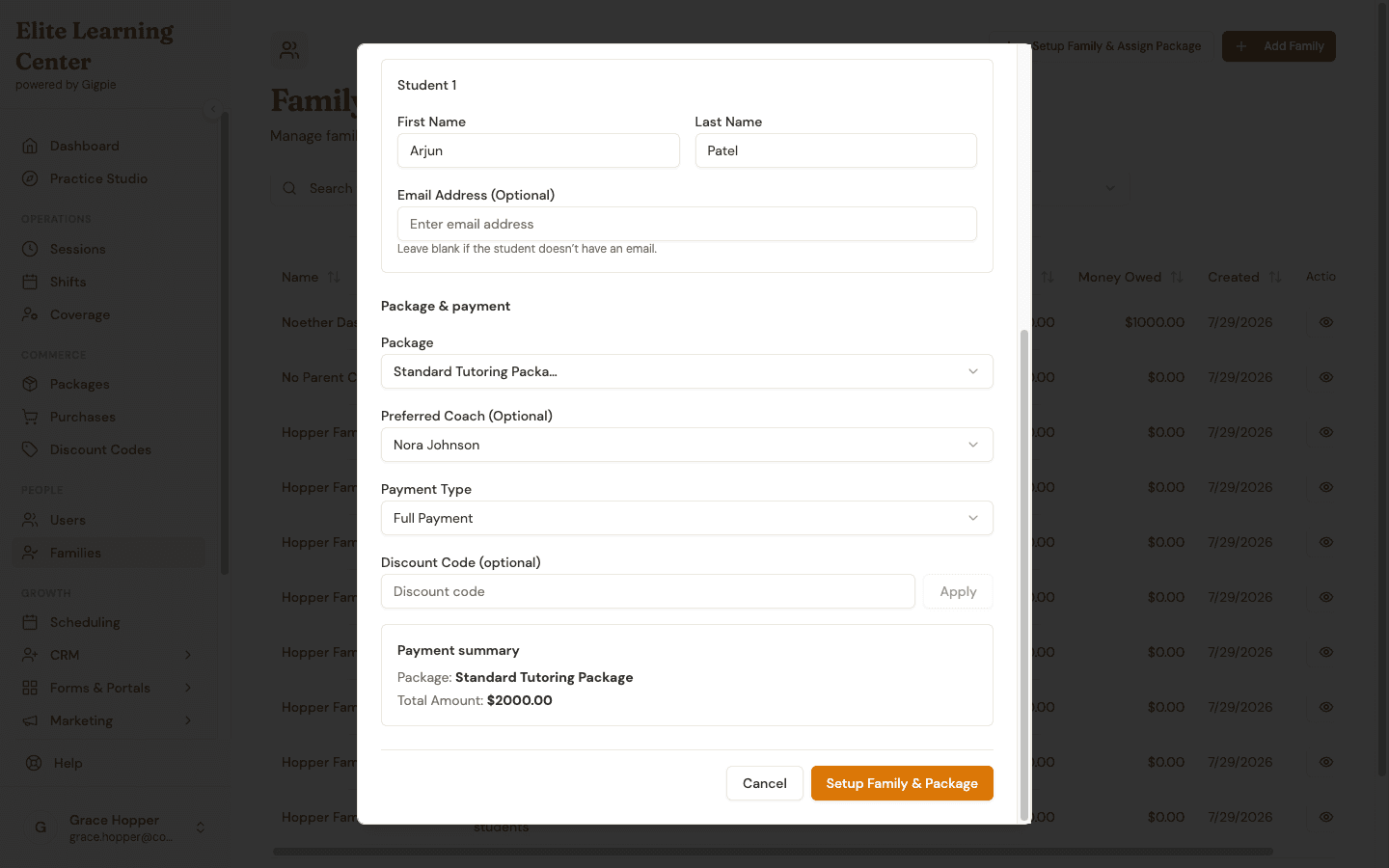 Parent, student, package, and coach on one screen, with the payment summary updating live: $2,000 for the Standard Tutoring Package.
Families who find you online can skip you entirely. The purchase flow works without an account, using an email address and a six-digit verification code, and you can set an intake form to send automatically the moment a purchase completes.
Tuesday: The Walk-In at Ten to Four
A mother comes through the door at 3:50 with her ninth grader, asking about geometry help, right as the four o'clock students start arriving. The Front Desk view is built for that minute. Check the student in as a guest with a name and phone number, or pick an existing record and let the details fill in. Walk-ins sit in a live queue that runs from waiting to assigned to in session, and moving one into Room 2 when it frees up early is a dropdown on the same table.
If she wants to enroll before she leaves, generate a payment QR code for any publicly shared package; that action mints its own walk-in record to carry the code, apart from the one she was checked in under. She scans it and pays on her own phone through the same checkout online families use; the code works once, expires after four hours, and the completed purchase claims the walk-in record the code created.
The same screen carries the room board and today's schedule, every session row in the admin views shows its physical room, and an admin can print the day sheet for the front-desk clipboard before the afternoon rush. The full tour of the front desk is on the in-person operations page.
Wednesday: Staffing the Week
The sessions list is the whole week in one place: every booking across every tutor, filterable by status, package, or coach. Regulars sit in real recurring series, Tuesdays at 5 until further notice, so nobody re-books them by hand each week.
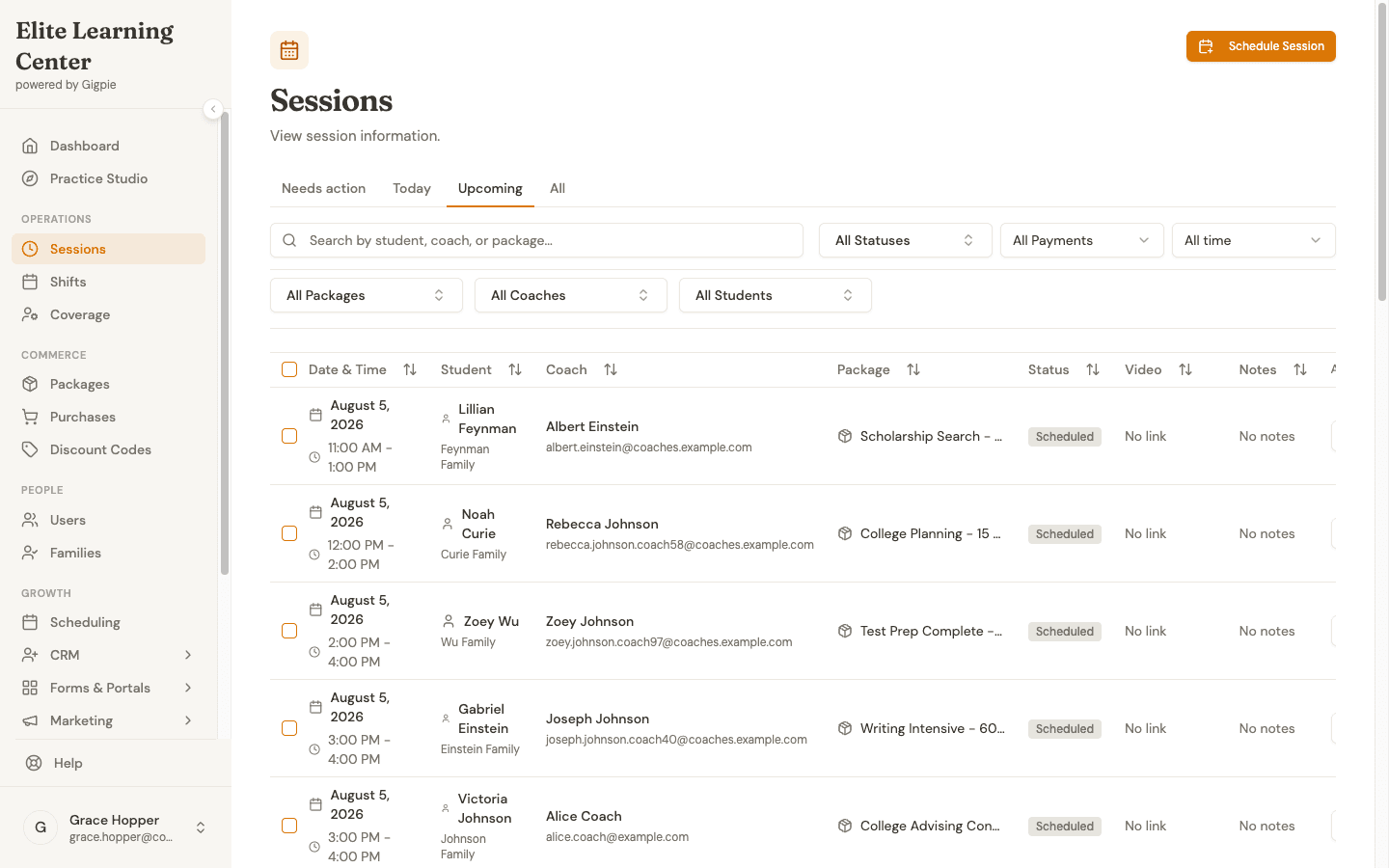 One day across the whole center: every booking with its student, coach, package, and status in a single filterable list.
The most useful view shows what is not scheduled. Filter purchases to "No Coach Assigned" and you get the queue of families who have paid for hours nobody is teaching yet. When a tutor requests time off, Gigpie counts the affected sessions, and you can post them as open shifts that tutors claim from a list already filtered against their own conflicts.
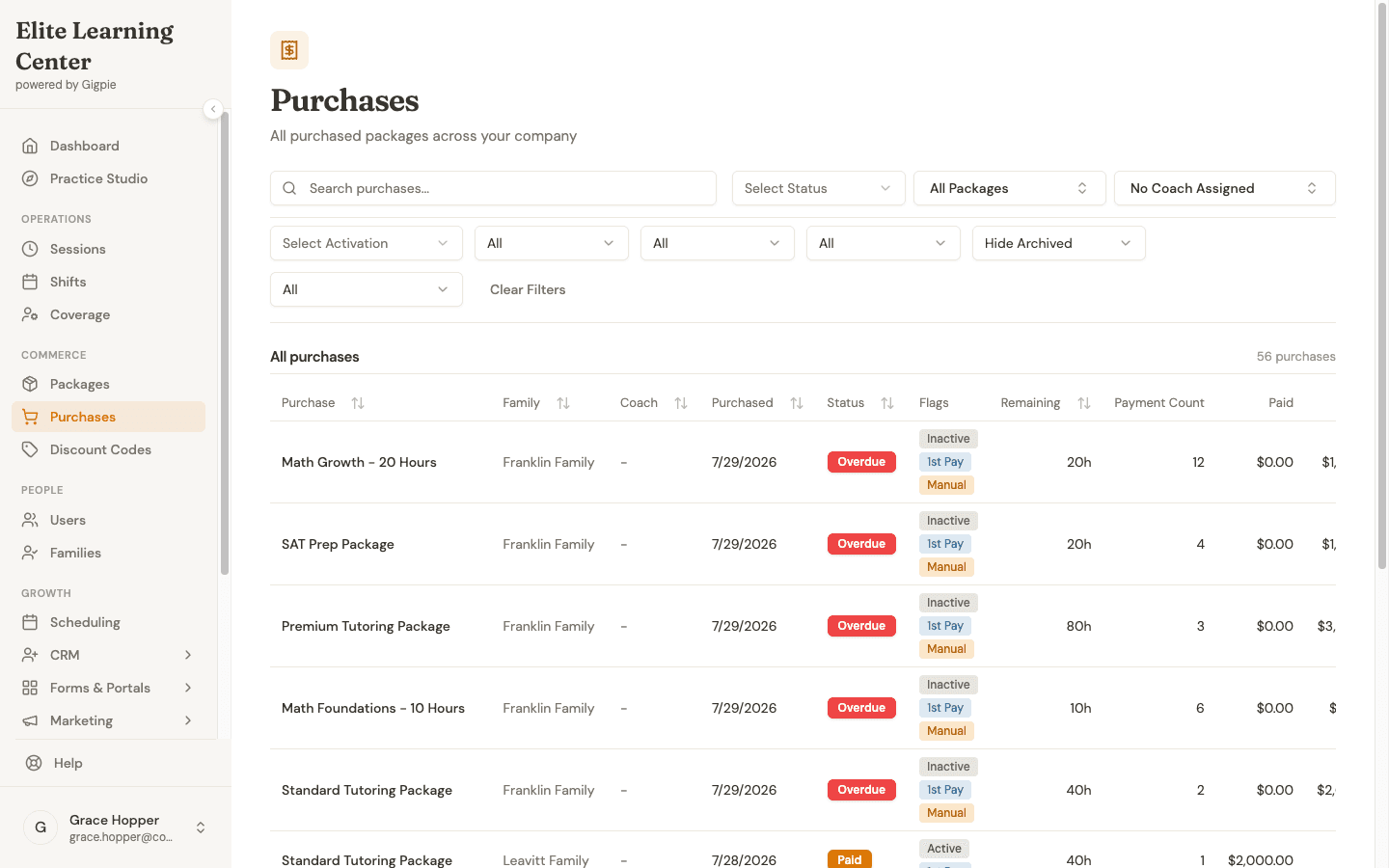 56 purchased packages with no coach assigned: families who have already paid, waiting on staffing.
No-shows follow enforced rules instead of case-by-case judgment calls. A student no-show still consumes the package hour and still pays the tutor. A tutor no-show reverses both: the family is not charged and the tutor is not paid. The policy lives in the software, so you stop adjudicating each incident from memory.
Thursday: The Note the Parent Actually Reads
A tutor finishes a session, marks it complete, and writes the progress note in the same step. The parent sees the full note in the portal, not a truncated teaser. On your side, the dashboard's needs-attention queue flags sessions that ended without a note, so "write it up" stops depending on your follow-up texts.
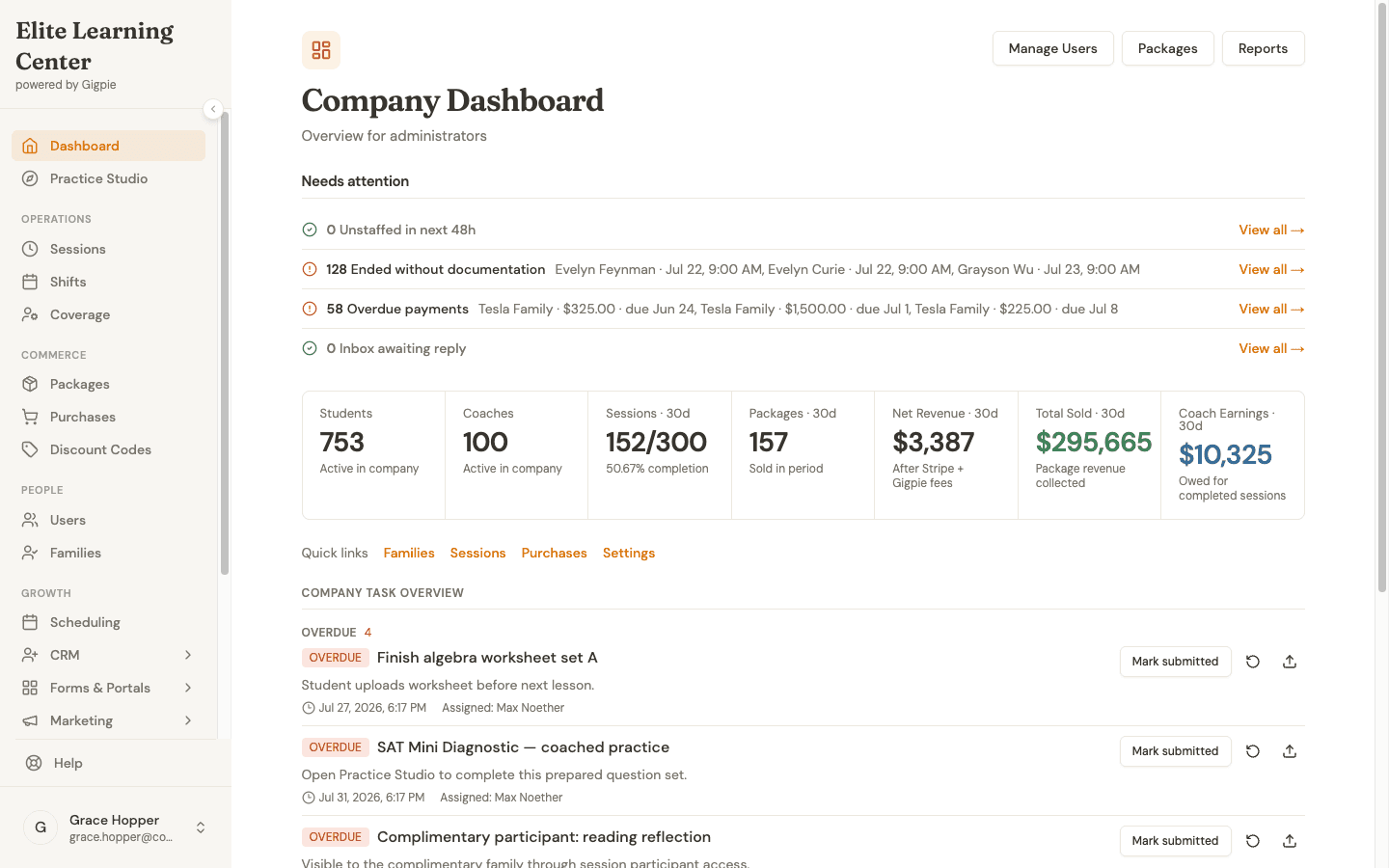 The needs-attention queue flags undocumented sessions and overdue payments before they age; the 30-day numbers sit underneath.
After every completed session, Gigpie also asks the family for a rating: one to five stars plus a comment. Ratings feed a reputation report, and respondents who leave four or five stars are pointed at your Google, Trustpilot, or Thumbtack review page while they are still happy. Collecting reviews stops being a twice-a-year email blast and becomes a byproduct of teaching well.
Friday: Payroll Is a Report, Not a Project
Payroll runs are built from the sessions that actually happened. Pay groups and schedules handle tutors on different cadences and rates, each run snapshots the pay rate per session, and a run locks against edits once it is paid. When a run is approved, you export the CSVs (a summary, session-level detail, and a Justworks-formatted timecard) and hand them to your payroll processor.
To be precise about the money: Stripe deposits what families pay into your company account. Paying your tutors is your payroll processor's job. Gigpie's job is making the numbers you hand it correct.
The executive report closes the week: cash collected, sessions delivered against sessions booked, and a receivables ledger that flags what is overdue.
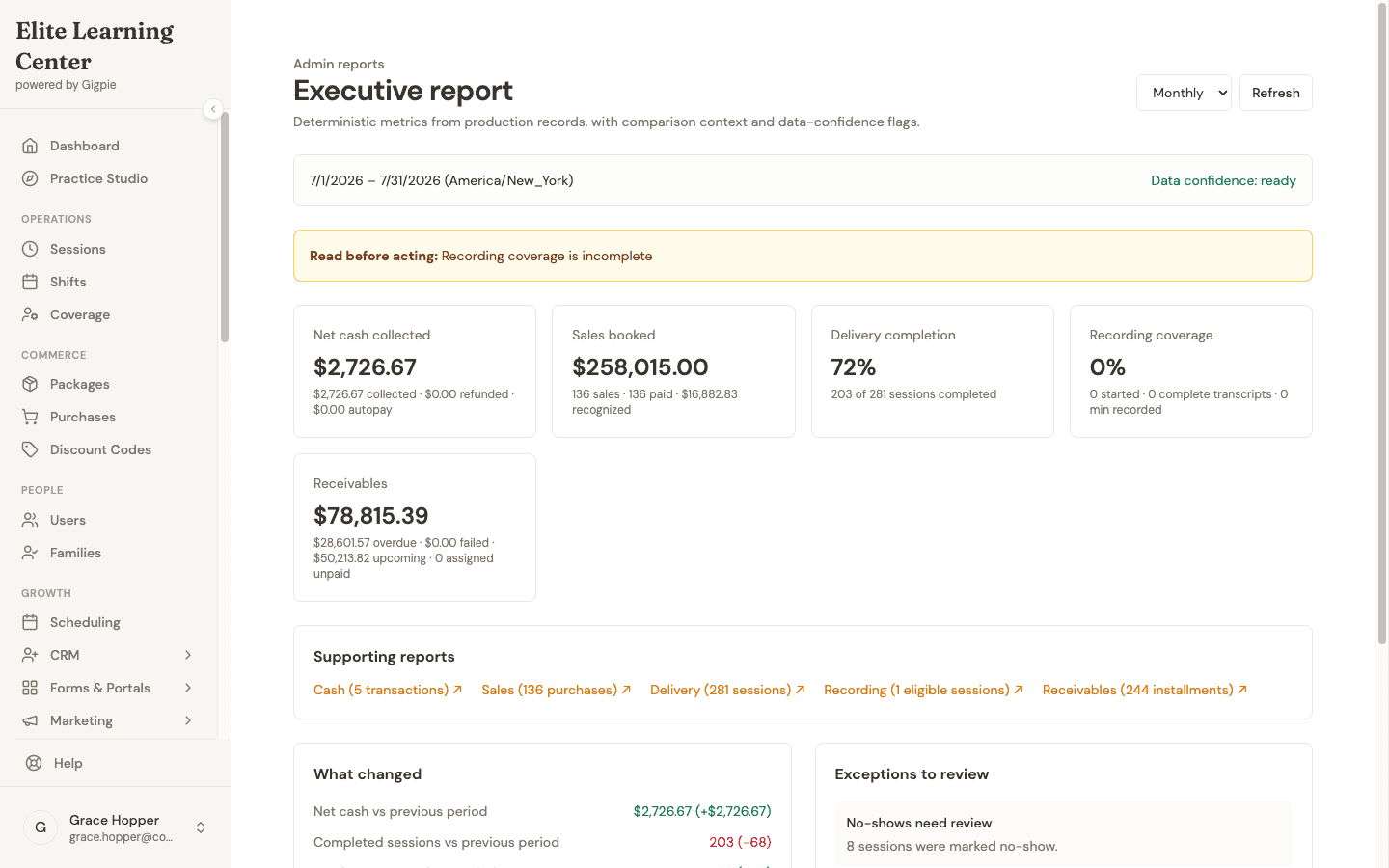 $258,015 booked this month, 72% of sessions delivered, and $78,815 in receivables with the overdue portion flagged.
The fee math is flat: 2% of what you collect. A month where families pay you $8,000 costs $160. A slow August where you collect nothing costs nothing, and your tenth tutor costs the same to add as your first, because there are no per-seat fees.
What Each Side of the Desk Gets
The same session record serves both audiences:
| For Tutors | For Administrators |
|---|---|
| Weekly availability editor with a live preview of bookable times | Every session across every tutor in one filterable list |
| Open shifts to claim, pre-filtered against their conflicts | A needs-attention queue for overdue payments and undocumented sessions |
| Mark complete and write the progress note in one step | Bulk edits across up to 100 sessions, each with an audit reason |
| Their own earnings and pay dates | Payroll runs that end in processor-ready CSVs |
Where Gigpie Stops
There is no native phone app; tutors and parents use the web app, which works in any mobile browser. The front desk is staff-operated by design, not a self-check-in kiosk for the lobby. And room assignments are visibility, not enforcement: nothing stops two sessions from being booked into the same room at the same hour, so catching that clash is still a human's job.
Getting Started
- Create your account and connect Stripe. Onboarding runs through Stripe Connect, and Gigpie is free until you collect revenue.
- Build your packages. Per-subject pricing, fixed-hour or subscription, at whatever price points you charge today.
- Invite tutors. They set weekly availability once, with a live preview of exactly what families can book.
- Add families. Enter them yourself, or send the purchase link and let them buy without creating an account.
These guides show the day-to-day workflows, recorded from the product:
For educators:
- Connect Google Calendar - Push sessions to a tutor's own calendar
- Join a Session - Start sessions with students
- Mark Session Complete & Add Notes - Close out a session and write the note
For parents:
- Purchase a Package - Buy hours online, no account needed
- Schedule an Appointment - Self-service booking
- Review Progress Notes - Read the full note after each session
Frequently Asked Questions
How do I charge different rates for different subjects?
Create a package per subject at its own price point, for example 'Math Tutoring - 10 hours' and 'SAT Prep - 10 hours'. Families buy the ones they need, and each package tracks its own balance and revenue.
Can parents see their child's progress notes?
Yes, and they see the full note the tutor wrote, not an excerpt. Notes appear in the parent portal as soon as the session is marked complete.
What does Gigpie cost?
A flat 2% of what you collect from families. No monthly fee, no per-tutor seat fee, and it is free until you collect revenue, so getting set up costs you nothing.
What happens when a student no-shows?
The session still consumes the family's package hour and the tutor is still paid for showing up. If the tutor is the one who no-shows, it reverses: the family is not charged and the tutor is not paid.
Does Gigpie pay my tutors directly?
No. Stripe deposits family payments into your company account. Payroll runs calculate each tutor's pay from delivered sessions and export CSVs, including a Justworks-formatted timecard, for whatever payroll processor you use.
Does it work with my tutors' calendars?
Yes, Google Calendar and Outlook. Gigpie pushes sessions to a tutor's calendar and checks their busy times when a booking is made. It does not continuously watch their calendar, so an event added there is caught at the next booking check rather than instantly.
Can I run group classes?
Yes. Group sessions support open enrollment, invitation-only, and package-only access, with per-class capacity limits and drop-in pricing alongside package-based enrollment.
Can Gigpie run a front desk with rooms and walk-ins?
Yes. An admin-only Front Desk view has a walk-in queue with staff check-in for existing students or guests, a board of your physical rooms, today's schedule, and a printable day sheet. Staff can also generate a one-use payment QR code, valid for four hours, that lets a walk-in buy a publicly shared package on their own phone. Rooms are for visibility: Gigpie does not block double-booking a room.
Run your center on one system
Free until you collect revenue, then a flat 2% of what families pay you. No seat fees, no monthly minimum.
Get startedRelated Resources
- Gigpie vs TutorBird - How a flat 2% of collections compares with monthly-plus-per-tutor pricing as your team grows
- Family Management - A closer look at the shared-balance architecture this page keeps pointing at
- Best Tutoring Software 2026 - Where Gigpie fits against TutorBird, Teachworks, and TutorCruncher for a multi-tutor center