
Oases Online Alternatives: 4 Options Compared (2026)
Oases Online's tier pricing, checked against four real alternatives with verified August 2026 numbers, the real gaps in its calendar sync and fee structure, and when a flat percentage wins instead.
Oases Online prices in six tiers by active student count, from Starter at $99 a month for up to 25 students through Ultimate at $699 a month for up to 350, with custom Enterprise pricing above that, as of August 2026. The tier adjusts automatically as your roster changes, and it's pro-rated mid-month if you cross a threshold. People searching for a replacement tend to be running a multi-location or franchise operation that's outgrown a tier, watching add-on charges for testing, texting, or email stack on top of the base price, or wanting calendar sync that reaches an external app instead of staying inside Oases.
A note on this genre before the list: Oases doesn't get much coverage on comparison sites, and where it does, the details are often thin. Every claim below comes from Oases's own public pages, checked August 6, 2026, with anything the company hasn't documented marked as such rather than guessed at.
What Oases Gets Right
Oases has run tutoring back offices since 2003, and it shows in the breadth of what it covers. The platform serves dance schools, swim schools, music schools, driving schools, language centers, and test-prep centers alongside general tutoring, which is a wider vertical range than most competitors in this category attempt. Payroll is real and built in rather than sold separately: Oases keeps a running total of sessions owed and lets an admin set different rates by group or by student before closing out a pay period. Billing can split an invoice between different family members or agencies, which matters for programs that bill a grandparent for part of a package and a parent for the rest. Tutor Search helps staff find who's available and qualified for a given slot, and check-in/check-out lets a student or guardian confirm attendance by typing a few letters of a last name on a shared screen, a feature Oases itself is careful to describe as attendance tracking, not pickup security. Reviews on Capterra describe Oases's support as "amazing" and "extremely responsive," even from users who also call the interface dated and full of product-specific jargon. The complaint is about the learning curve, not the people answering the phone.
What to Look For in an Alternative
Real calendar sync, not internal-only. Oases's homepage advertises "real-time calendar sync," but its own Partners page names exactly five integrations: Stripe, Pencil Spaces, Lessonspace, Mailchimp, and Achieve. No Google, Outlook, or iCal integration appears anywhere on oasesonline.com. Read that "real-time" language as staff and admin views staying in sync with each other inside Oases, not a push to anyone's personal calendar app, and confirm directly with sales before assuming otherwise.
The all-in price, not the tier price. Oases's per-tier fee is only the start. Achieve Tests run $13 per student for a pre-test and post-test pack, additional interim tests are $5 each, SMS is $0.05 a message, email costs $1 per 1,000 sends past the first 500 free each month, and Oases adds its own 0.25% surcharge on top of Stripe's card-processing rate. None of it is hidden, but it's worth adding up against your actual usage before comparing sticker prices.
A trial or guarantee you can pin down. Oases's own pricing and homepage don't state a specific trial length anywhere; third-party directories mention 30 days, but that number doesn't appear on oasesonline.com itself. No money-back guarantee was found published anywhere on the site either. If a written guarantee matters to you, ask for it in writing before signing.
How your data comes back out. Oases doesn't publish a self-service export tool. The one documented path for getting data in or out is the Concierge Service, billed at $50 an hour for data entry, imports, and webform setup, which implies moving data is paid, assisted work rather than a button you click yourself.
The Alternatives
1. Gigpie
Gigpie pushes session bookings to both Google and Outlook calendars and checks them for conflicts at the moment a session is scheduled, reaching a tutor's own calendar app in a way Oases's public pages don't confirm for any external provider. Billing is a flat 2% of what you collect, free until you collect revenue, with no separate meter for testing, texting, or email volume. A family's package belongs to the household, so any sibling draws from the same hour balance automatically, and a CRM with lead capture, campaigns, and a post-session review funnel sits around the scheduling core.
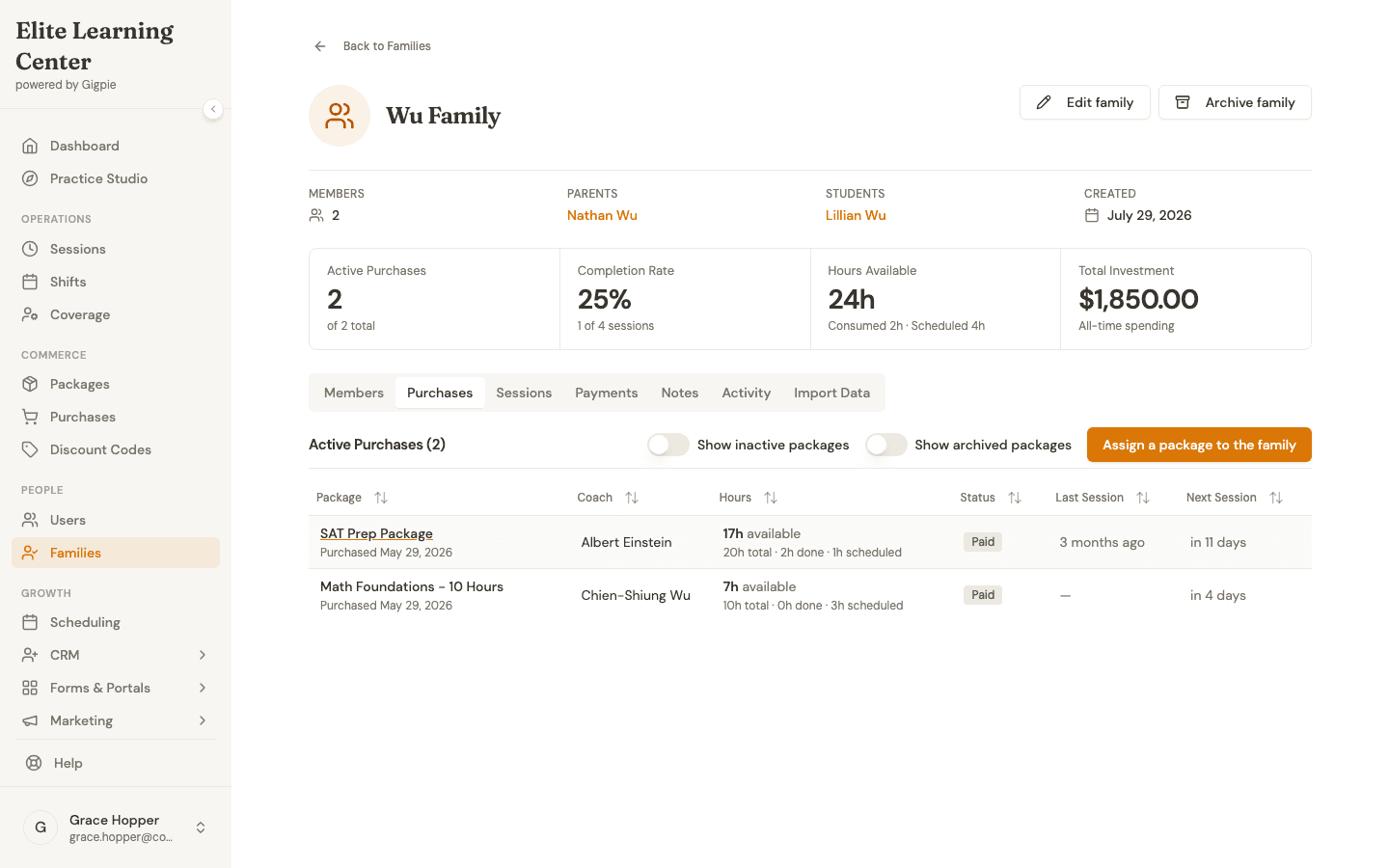 One family balance, 24 hours across 2 packages. Oases counts active students per tier; Gigpie's fee moves with collected revenue instead.
The advantage has a ceiling. Take Oases's Standard tier, $299 a month for up to 100 active students. That price is flat no matter how much those 100 students actually spend. Run the math against Gigpie's 2%, and the two cost the same at $14,950 a month in collections; below that, Oases's tier price wins outright, and by a wide margin at the lower end of a center's revenue. Above it, Gigpie costs more in raw dollars. A center that just wants tutoring management at the lowest fixed monthly bill for its student count should stay on Oases's tier pricing. Gigpie makes sense once the family-shared balance, the CRM, and payroll that isn't a per-student line item are worth paying a percentage for.
2. TutorCruncher
TutorCruncher sets its entry price at $30 a month, adding roughly a 1% cut of revenue in the US or a flat £25 in the UK, and tops out around $240 on its Enterprise plan, which unlocks API access, as of August 2026. What sets it apart is that it actually moves money for an agency: tutor payouts run through Stripe on their own, and a single invoice can be split so agency commission and tutor pay separate automatically, with CSV exports covering students, tutors, lessons, and invoices for reporting. A multi-location Oases customer running a placement-style agency, where the platform needs to route pay rather than just log it, should look here first.
3. Jackrabbit Class
Jackrabbit Class runs $49 a month starting (scaling with total student count up to $245 at the largest tier), or a flat $245 a month on its Enterprise plan regardless of size, as of August 2026, with a 90-day free trial and a 90-day money-back guarantee on top. It's built for the class-based side of Oases's vertical list: dance, swim, and similar programs get an Appointments feature for private lessons alongside group class registration, a branded parent mobile app on the Plus tier ($93 a month starting, plus a one-time $169 setup fee), and real payroll tooling through a staff time clock, configurable pay rates, and export to Express Payroll or QuickBooks Desktop. Like Oases, its calendar reach is limited: the only external sync is a one-way, Zapier-based push to Google Calendar, with no Outlook integration.
4. Teachworks
Teachworks doesn't count active students against a cap at all; it meters lessons instead. The entry Starter tier runs $16.49 a month with a $0.32 charge per student lesson, and the per-lesson rate drops to $0.065 once you're on the $187.99 Premium tier, with unlimited tutors and students throughout, as of August 2026. An established center that's outgrown Oases's student-count ceiling but doesn't want another headcount-based one trades it for a meter tied to sessions delivered. Pushing sessions to Google both ways, and letting a client book a slot without staff doing it for them, are both separate paid add-ons here too, so price your actual configuration first.
Getting Your Data Out of Oases
Oases doesn't document a self-service export for a customer's own live data anywhere on its site. The Concierge Service covers imports at $50 an hour, which tells you Oases-assisted data entry is a real option, but there's no confirmed free, self-serve path for pulling students, families, balances, or session history out on your own. Call support and get a specific written answer about what they can hand you before you commit to a date.
Assume three things don't travel cleanly to any new platform: session and attendance history rarely imports as anything more than a static record, past invoices stay in Oases for your own bookkeeping, and saved cards or autopay setups get rebuilt from scratch, meaning families re-enter payment details once.
Gigpie has no automated importer for any outside platform today. Moving from Oases means entering families, packages with remaining balances, and schedules by hand, so plan the work for a break between terms rather than mid-semester.
Frequently Asked Questions
Why do people search for Oases alternatives?
Three reasons show up most: add-on fees for testing, SMS, and email volume stacking on top of the tier price; no confirmed external calendar sync to a tutor's own Google or Outlook calendar; and a tier structure tied to active student count that some multi-location operators find hard to predict month to month. Oases itself is mature software with real depth across several tutoring-adjacent verticals.
Does Oases sync with Google Calendar or Outlook?
Not as far as Oases documents. Its Partners page lists five integrations, Stripe, Pencil Spaces, Lessonspace, Mailchimp, and Achieve, and none of them is a calendar provider. The homepage's 'real-time calendar sync' language most plausibly describes internal staff and admin views staying in sync with each other, not a push to a personal calendar app, as of August 2026.
Can I export my data from Oases?
There's no documented self-service export on oasesonline.com. The Concierge Service, billed at $50 an hour, covers data entry and imports, which suggests moving data is assisted work rather than a self-serve tool for at least some scenarios. Ask Oases support for a specific written answer before you plan a switch.
Does Oases offer a free trial or money-back guarantee?
A trial of some length appears to exist, corroborated by third-party directories, but Oases's own site doesn't state a specific number of days anywhere it could be checked directly. No money-back guarantee was found published on oasesonline.com as of August 2026, unlike some competitors that advertise one explicitly.
What are Oases's add-on fees?
The confirmed ones: Achieve Tests at $13 per student for a pre-test and post-test pack, additional interim tests at $5 each, a 0.25% Oases surcharge on top of Stripe's own processing rate, SMS at $0.05 per text, email at $1 per 1,000 sends past 500 free a month, and $50 an hour for concierge data work or extra staff training. None of it is hidden, but it adds up on top of the tier price.
Is Gigpie cheaper than Oases?
It depends on revenue relative to tier. Using Oases's Standard tier as an example, $299 a month for up to 100 active students, the two cost the same at $14,950 a month in collections. Below that figure Oases's flat tier price wins clearly; above it, Gigpie's 2% costs more in raw dollars but adds family-shared balances, a CRM, and payroll that isn't priced per student.
Which Oases alternative fits a dance or swim school best?
Start with Jackrabbit Class. It's built specifically for class-based programs, with an Appointments feature for private lessons, group class registration, a branded parent app on its Plus tier, and payroll tooling through a staff time clock and payroll-system exports, all verified on Jackrabbit's own site as of August 2026.
Does Gigpie import Oases data automatically?
No. Gigpie has no automated importer for Oases or any other outside platform. Your roster, active packages, and upcoming schedule all get keyed in by hand, which is a strong argument for cutting over between terms rather than mid-semester.
What does Gigpie include that Oases doesn't?
Push-based Google and Outlook calendar sync that reaches a tutor's own calendar app, a CRM with lead capture and campaigns, and a review-routing step after each session that steers satisfied families toward Google and other review sites. Oases counters with a broader vertical range built up since 2003, real payroll at every tier without a percentage fee, and split billing across multiple payers on one invoice.
Which alternative works for an agency that places tutors with clients?
TutorCruncher, at $30 a month plus roughly 1% of revenue in the US as of August 2026. It's the one option here that actually routes money to tutors on an agency's behalf, through automatic Stripe payouts and invoices that split cleanly between agency commission and tutor pay.
Run the tier math against your own numbers
Nothing is owed until money actually comes in, since the fee is a flat 2% of collections. Build out your roster, then hold the real total up against Oases's tier plus whatever add-ons you'd actually use.
Get started freeRelated Resources
- Family Management - How one package balance serves a whole household, instead of counting active students against a tier.
- Billing & Payments - Autopay, installment plans, and pay-by-bank, priced into the 2% instead of billed separately.
- Best Tutoring Software 2026 - How Oases stacks up against the rest of the category, not just the four picked here.