
Scheduling for Tutoring & Coaching Businesses
Coach availability with a live preview, recurring series, group classes, open-shift coverage, and no-show rules that settle who pays.
Tuesday, 4:40pm. A parent emails to move Thursday's algebra session, and the one coach who could absorb it just asked for next week off. The answer to "can we do Thursday at 5?" currently lives in three tabs: a shared Google Calendar, an availability spreadsheet nobody quite trusts, and the booking link half your coaches set up and half didn't. You are the join between those tabs, and tonight you'll run it by hand.
Gigpie keeps availability, bookings, and coverage in one system, attached to the package hours and pay rates each session touches. Move Thursday's session and the coach's calendar, the parent's portal, and the payroll line underneath it all follow.
Availability Coaches Set Themselves
Every coach gets a day-by-day hours editor under their own login, with a live preview beside it showing what students will be able to book. Time away goes in the same screen, and session durations come from a company-wide default you can override for individual coaches. Once coaches maintain their own hours, the availability spreadsheet retires.
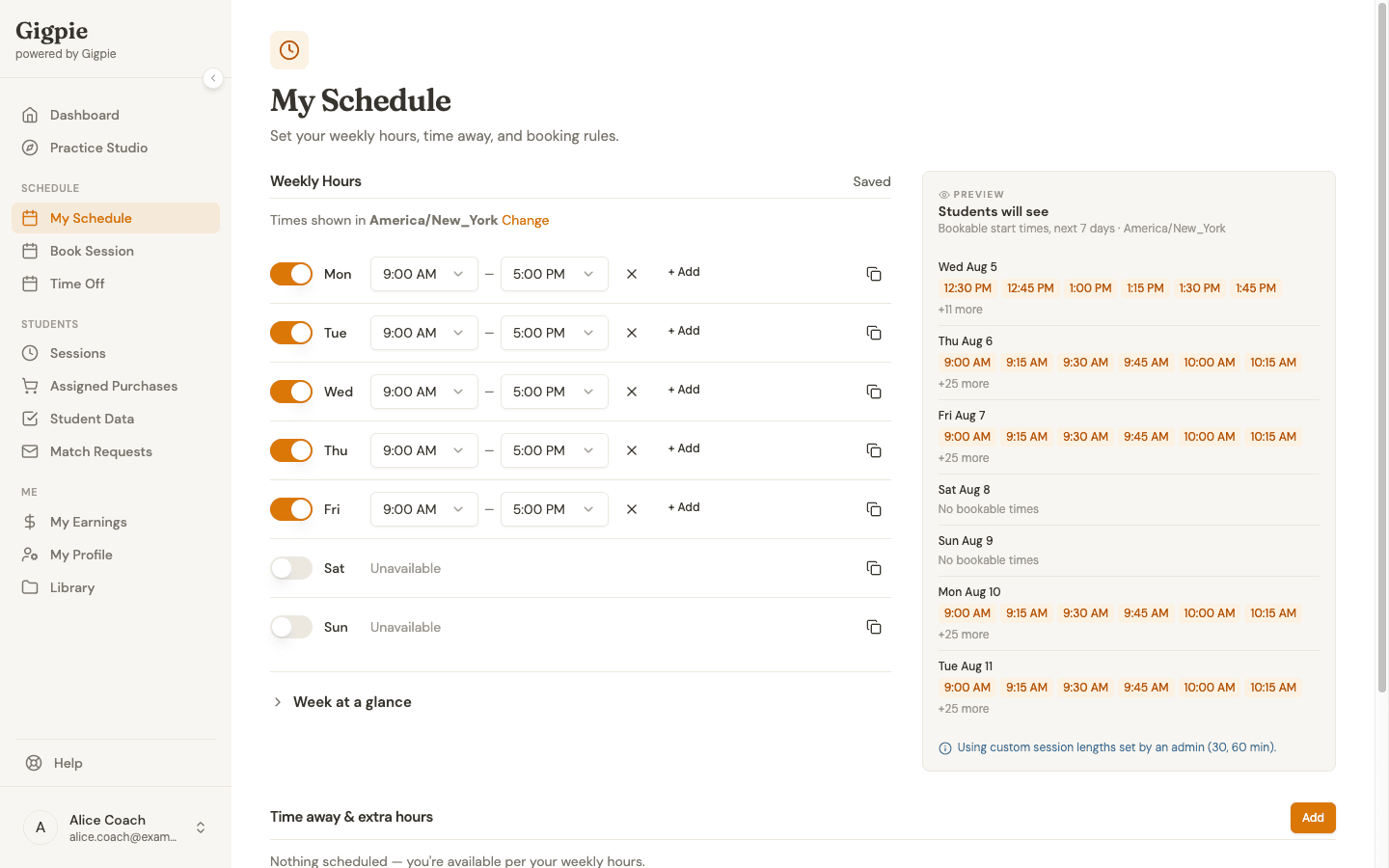
Monday to Friday, 9 to 5, and beside it the "Students will see" preview of exactly what's bookable.
Onboarding tip
A coach who hasn't logged in yet doesn't hold up booking: admins can set hours on a coach's behalf from that coach's user page and hand the editor over later.
Coaches can also connect Google Calendar or Outlook. Gigpie pushes every booked session to the connected calendar as an event and reads busy times at booking, so the dentist appointment a coach only recorded in Google still blocks the 3pm slot. To be precise: that's a push plus a conflict check at booking time, not continuous two-way sync. An event added directly in Google or Outlook is caught at the next booking attempt, not the moment it appears.
Recurring Series and Group Classes
Most tutoring repeats: same student, same slot, every week. Gigpie books it that way. A series takes a cadence and days of the week, then ends after a set number of sessions, on a date, or runs until someone stops it. Parents manage the whole series from their portal instead of emailing you about each occurrence.
Group classes run alongside the 1:1 work. Each class has a capacity cap and an enrollment mode: open to anyone, invitation only, or reserved for package holders. Families can spend package hours on a spot or pay a drop-in price for a single class.
Parents book against all of this themselves, from the parent portal. The flow runs five steps (duration, cadence, date, time, review) and offers only times the coach is free.
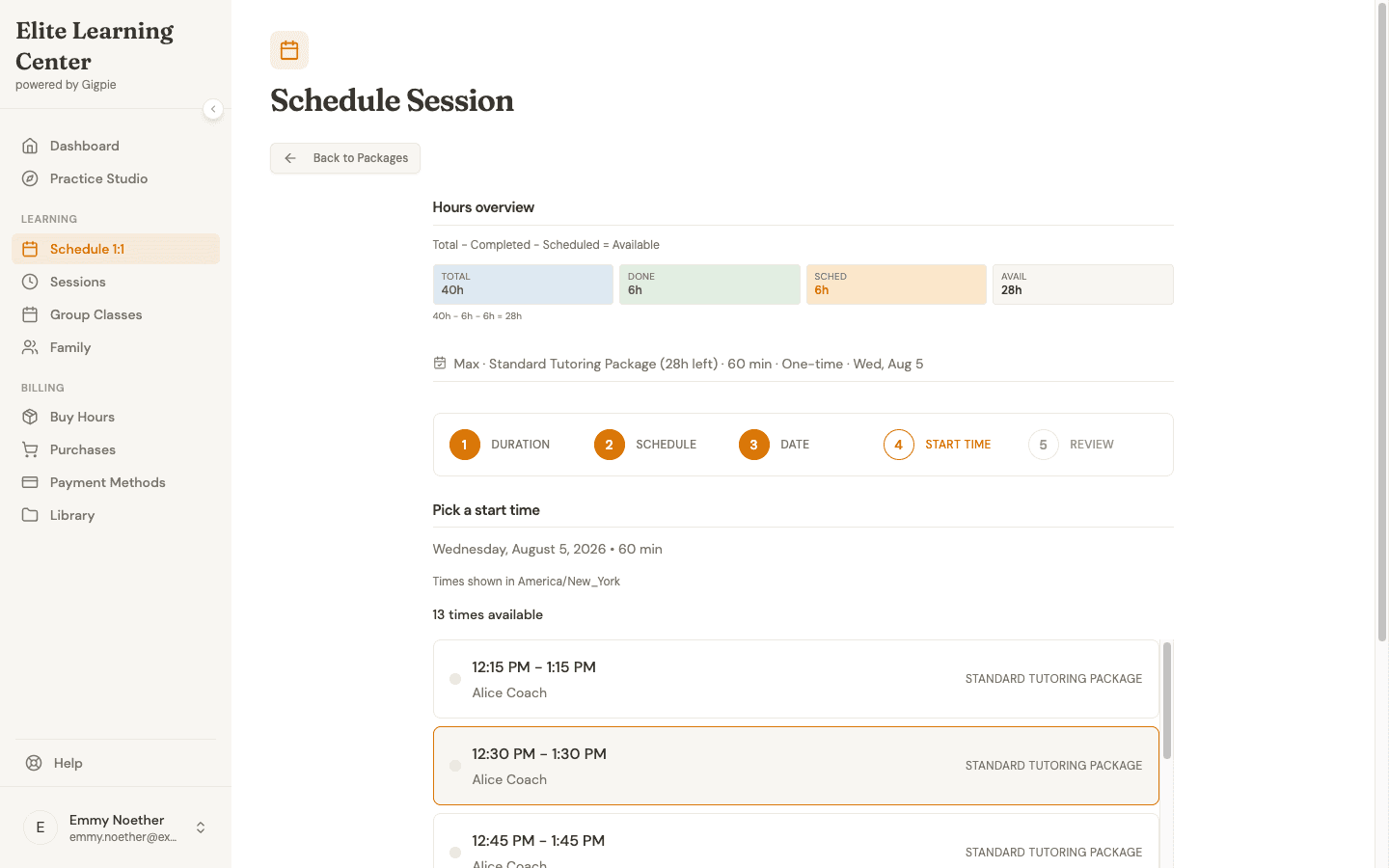
Step four of five: 13 bookable times for one coach on one date, with the family's remaining hours in view above the list.
Coverage When a Coach Is Out
When a coach requests time off, Gigpie records the unavailability and counts the sessions caught inside it, so you know a week in June touches nine bookings before you decide anything.
Sessions that need a new coach go to the open-shift board. Flag a session or a whole series as needing a coach, and every other coach sees it under available shifts, already filtered against their own schedule so nobody picks up a conflict. Claims are transactional: one coach gets the shift, a second claim bounces. Admins follow the pipeline from the shift management and coverage screens.
The same staffing discipline covers new business. A purchases view filters to families who bought a package but have no coach assigned yet, which is how a Saturday-night purchase gets staffed Monday morning instead of surfacing three weeks later in an unhappy email.
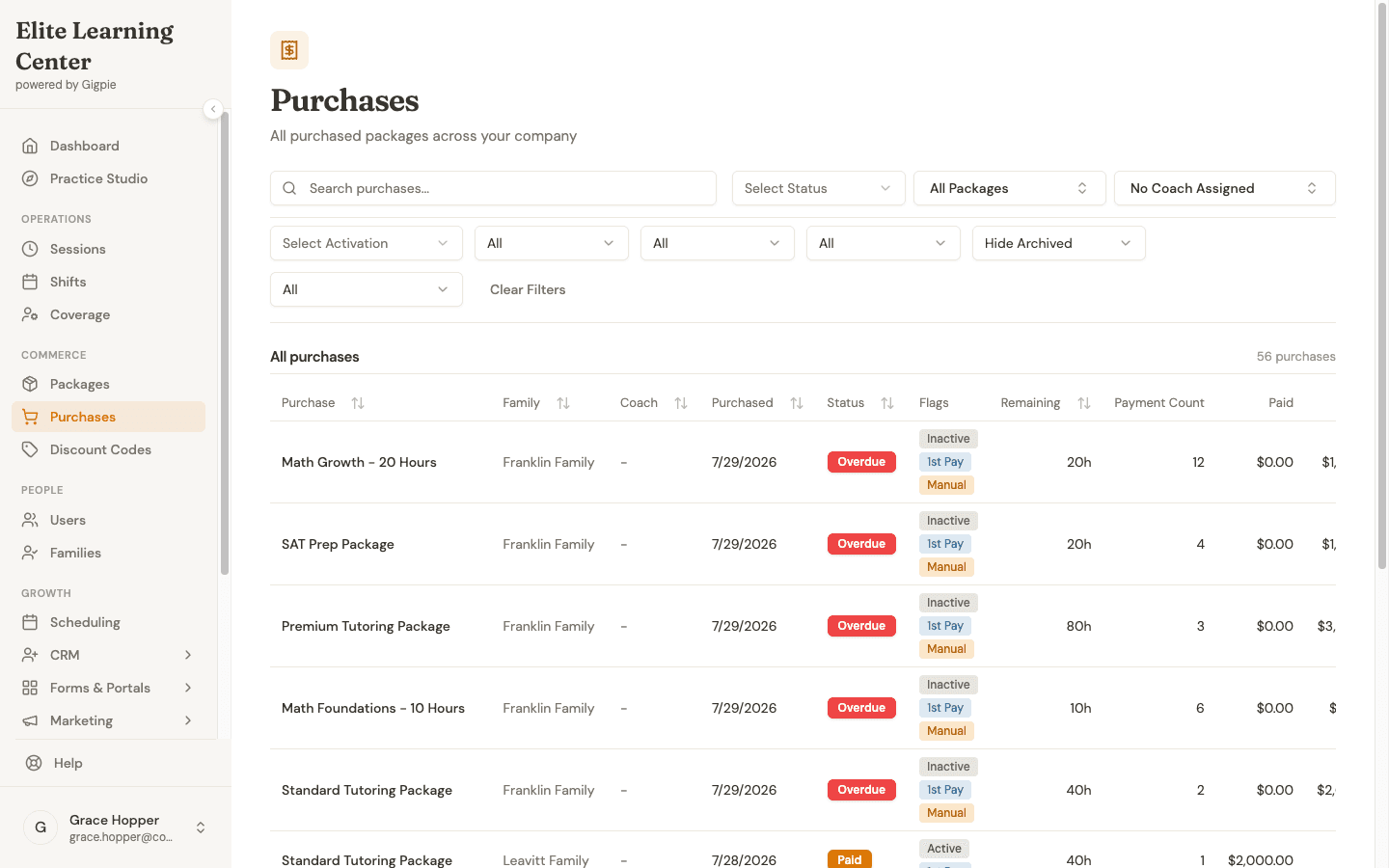
56 purchased packages waiting on a coach assignment, with remaining hours and overdue flags in the same view.
No-Shows and Who Pays
Marking a session as missed is easy in any tool. Deciding what happens to the family's hours and the coach's pay is where the arguments start, so Gigpie ships rules instead of a judgment call. A student no-show or late cancel consumes the package hour and still pays the coach, who held the slot either way. A coach no-show flips both: the family keeps its hour, the coach isn't paid, and any upsell commission already accrued on that session is voided. Those outcomes flow straight into educator payroll, so nobody relitigates them at the end of the month.
The same missed hour, two outcomes. A family has 9 hours left on a 20-hour package, and their coach earns $50 an hour. Nobody shows up on the student side: reported as a student no-show, the balance drops from 9 to 8 and the coach's payroll still gains $50. Reverse it: reported as a coach no-show, the family stays at 9 hours, the $50 never accrues, and commission tied to that session is voided.
Reminders run before any of that becomes necessary: the default automation texts and emails the family 28 hours before each session and again one hour before, with the coach getting the emails on the same schedule. Texts send from your own connected business number; without one, reminders go out by email alone. Every session lands in one list, filterable by status, coach, package, or family.
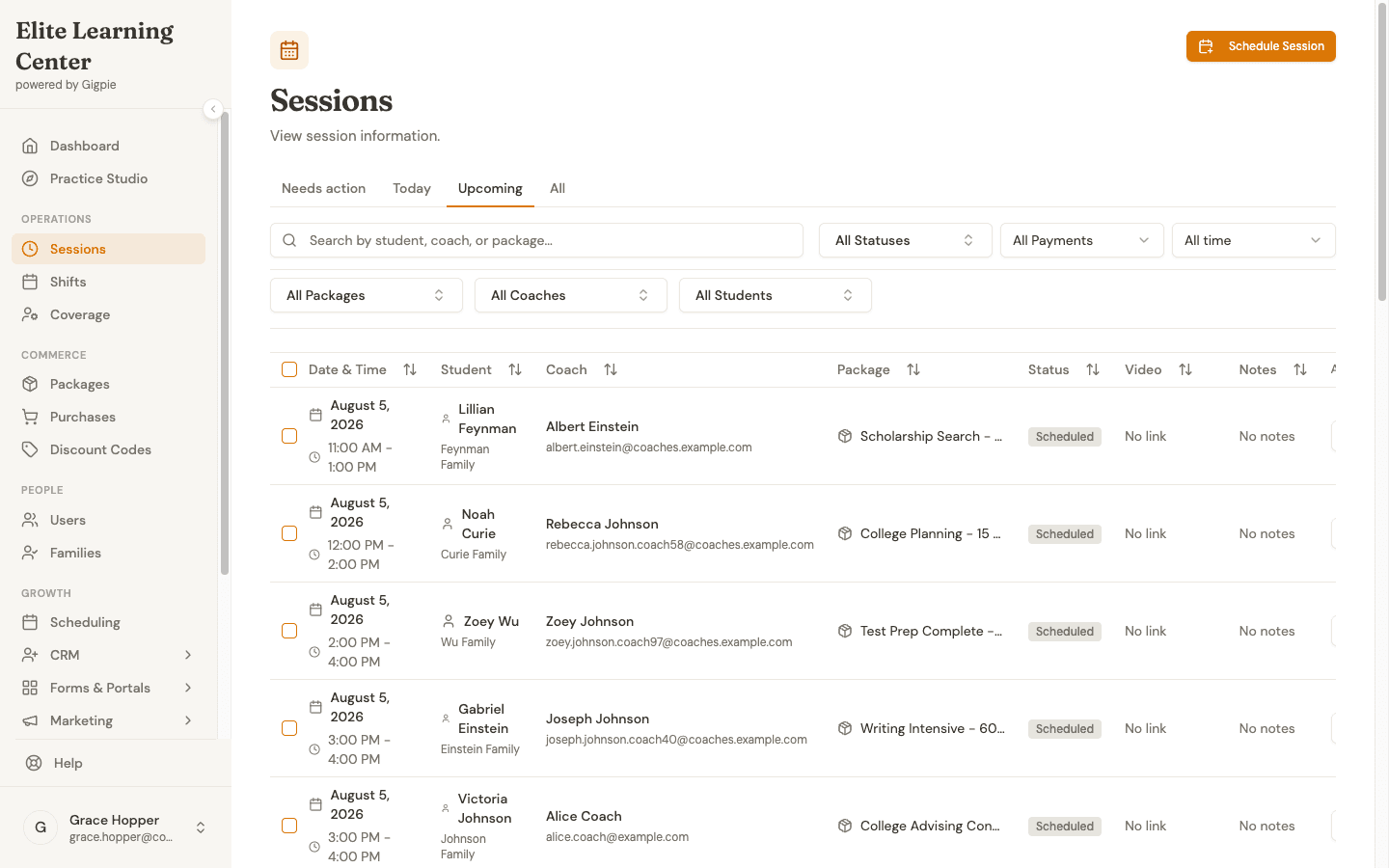
The day's bookings across every coach and family, one status filter away from a no-show report.
Who Needs This
A solo tutor with eight weekly students doesn't. A booking link and a personal calendar are lighter than any platform, and switching won't win back enough hours to matter. Gigpie's scheduling starts paying for itself once calendars start interacting: three or more coaches, group classes with caps, siblings drawing on shared package hours, or coverage gaps when somebody's out. One limitation to know going in: the admin view is a filterable session list, not a drag-and-drop week grid. Coaches who want the color-block calendar get it by connecting Google or Outlook, where their booked sessions land as ordinary events.
How-To Guides
Each workflow above has a step-by-step guide:
For coaches:
- Update calendar availability - Set weekly hours and see the student preview
- Request time off - File time away and see affected sessions
- Claim open shifts - Pick up sessions that need a coach
- Report a student no-show - Trigger the hour and pay rules
For parents:
- Schedule an appointment - The five-step booking flow
- Manage recurring sessions - Adjust a weekly series
- Enroll in a group class - Join with package hours or drop-in
- Report a coach no-show - Keep the hour when a coach misses
Frequently Asked Questions
Does Gigpie sync with Google Calendar or Outlook?
Both, identically. Gigpie pushes booked sessions to the connected calendar as events, and when someone tries to book, it reads the calendar's busy times to catch conflicts. It is not a continuous two-way sync: an event a coach adds directly in Google or Outlook is noticed at the next booking attempt rather than the moment it's created.
Can parents book without going through the front desk?
Yes. Parents book from the portal in a five-step flow that only offers times the coach has free, and they can add a new student to the family mid-booking. Reschedules and cancellations run through the portal too, under the same rules as everyone else; a session already locked into a payroll run can't be rescheduled, for example.
Does a late cancellation still use the family's hours?
Yes. A student late cancel works like a student no-show: the package hour is consumed and the coach is still paid for holding the slot. If the coach is the one who misses the session, the family keeps the hour and the coach isn't paid.
Can another coach take just one session of a weekly series?
Yes. A shift claim covers either a single session or the entire series, and each claim is transactional, so the same shift can't be claimed twice. Coaches browsing open shifts only see the ones that fit around their existing schedule.
A coach is leaving and 40 future sessions need a new coach. One at a time?
No. Bulk edit changes up to 100 sessions in one pass, covering times, coach, student, package, duration, and status, with an audit reason required so there's a record of why. Bulk mark-paid goes up to 500 sessions at a time.
Do families get session reminders automatically?
Yes, by text and email. The family gets both 28 hours before each session and again one hour before, and the coach gets the emails on the same schedule. Texts send from your company's own business number once it's connected; until then, the rule runs on email alone.
Run the whole schedule from one system
Free until you collect revenue, then a flat 2% of what you collect. Availability, recurring series, group classes, and shift coverage included.
Get started freeRelated Resources
- Educator Payroll - Where the no-show pay rules end up: payroll runs built from sessions that actually happened
- Parent Portal - The booking, rescheduling, and balance views families see on their side
- Session Reminders - Text and email reminders 28 hours and 1 hour before every session