
Video Conferencing for Online Tutoring & Coaching
Every session booked in Gigpie comes with its own hosted video room: background blur, tiered noise filtering, a shared whiteboard, and consent-gated recording. Coaches who prefer Zoom or Meet paste their own link instead.
Four minutes before a Wednesday 4pm session, a parent is scrolling a month-old email thread for the right Zoom link. The coach changed her personal meeting room two weeks ago and sent the new one exactly once, in a reply the parent never saved. The session starts six minutes late, and nobody did anything wrong.
Gigpie's fix is to host the call itself. Every session comes with its own video room and join page, and the Join button sits next to the session time for coach, parent, and student. A coach who wants to keep Zoom or Meet pastes that link onto the session instead; reminders and recording consent work the same either way.
Every Session Gets Its Own Room
When a session is booked, Gigpie creates a room for it. A weekly series gets a fresh room per occurrence, so Tuesday's link can never let someone into Thursday's call. The join page is built around the session: it names the session and its time, shows a camera preview with mic and camera pickers, and has one Join button. There is nothing to install; the whole call, screen sharing and chat included, runs in the browser.
Parents and students join from the session in the parent portal, and the same link rides in every reminder email for families who never open the portal. Consultations work without an account at all: the booking confirmation carries a guest link that opens the room straight from the browser, and it stops working a couple of hours after the session ends.
Worked example: A session is booked for Tuesday at 4:00pm. The default reminder rule emails the family Monday at 12:00pm, 28 hours ahead, and again Tuesday at 3:00pm, 1 hour ahead. Both reminders carry the session's current join link, and both timings are defaults you can change.
Blur and Noise Filtering, Sized to the Machine
The join page and the in-call settings panel carry two switches: "Blur my background" and "Reduce background noise." Blur hides the kitchen behind whoever is teaching from home; the control only appears on browsers that can run it.
The noise filter has more going on underneath. Turn it on and Gigpie benchmarks the device, then picks the strongest filter that machine can run, from the browser's basic filtering up to a studio-grade tier. The toggle's subtitle tells you which one you got: "Studio filtering, running on this device." The filtering happens on the participant's own machine, served from Gigpie's servers, so audio is never shipped to a third-party cleanup service. If the machine gets busy mid-call, a screen share on an aging laptop for instance, the filter steps down a tier rather than letting the audio glitch.
The Whiteboard Opens Beside the Video
Press Whiteboard in the room header and the shared board takes most of the stage while the video tiles collapse into a rail. The toggle is per participant: opening the board does not rearrange the student's screen.
This is the same whiteboard Practice Studio uses, not a lookalike. One board exists per session, with the same saves whether it was opened inside the call or from the session page afterward. Sketch a proof during Tuesday's call and it is still there for Thursday's review, with a PDF export when someone wants a copy.
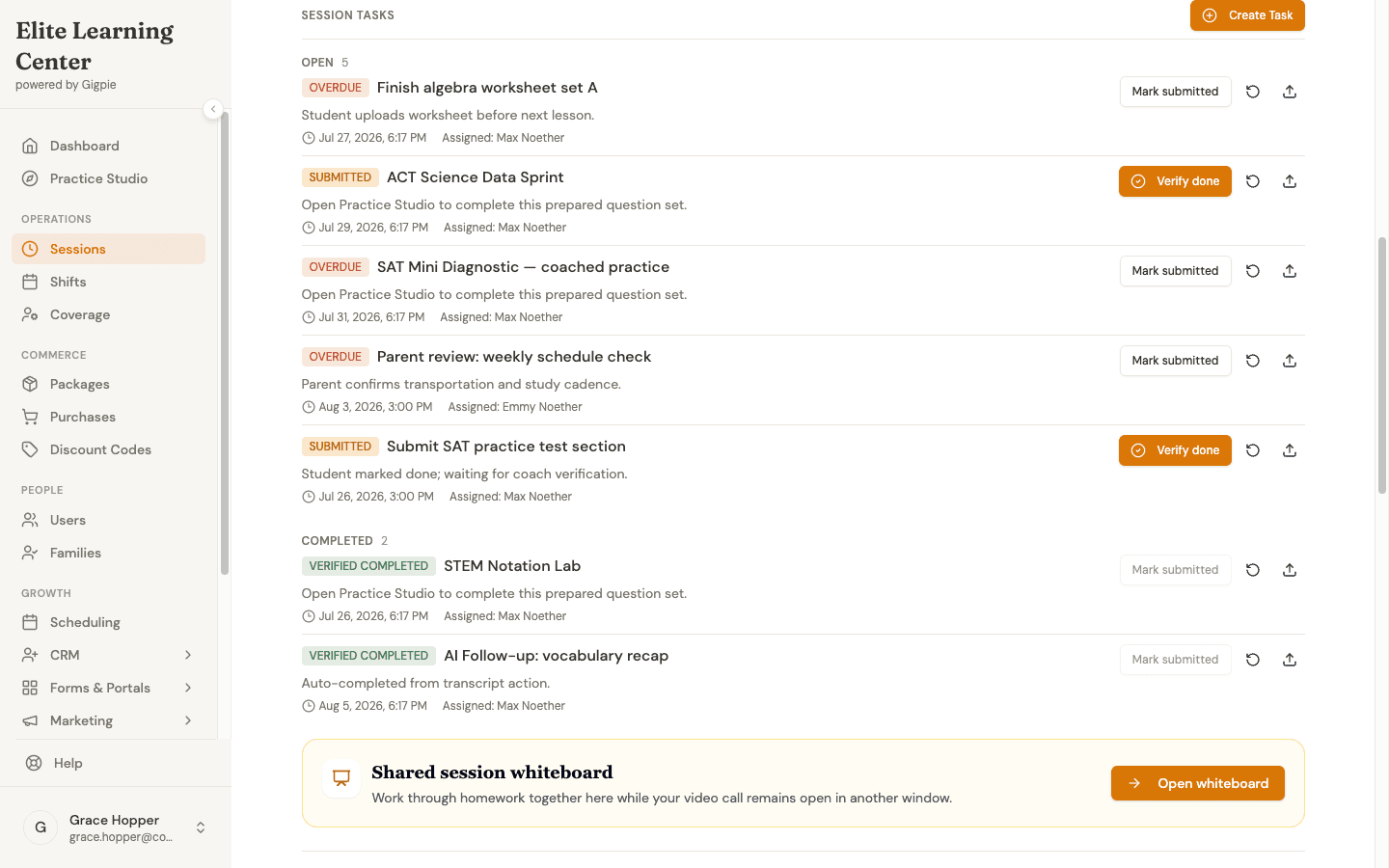
The session detail page after a call: the task list, and one click into the same whiteboard the call opened.
A second device joins by scanning a code, and there are two separate codes depending on what it should join. "Add a device" in the room header mints a QR code that pairs a phone or tablet straight into the call; the whiteboard has its own "Other device" code, opened from inside the board itself, for pairing a device onto just the drawing surface. A tablet paired into the call arrives muted with its speaker off so it cannot echo the laptop beside it, and it gets the whiteboard too: the tablet becomes the drawing surface while the laptop carries the faces. Either code is single use and expires within minutes.
One boundary to know: the live-session whiteboard is a working surface for the coach and student. Parents see progress notes, recordings, and transcripts on the session, but they are not participants on the board itself.
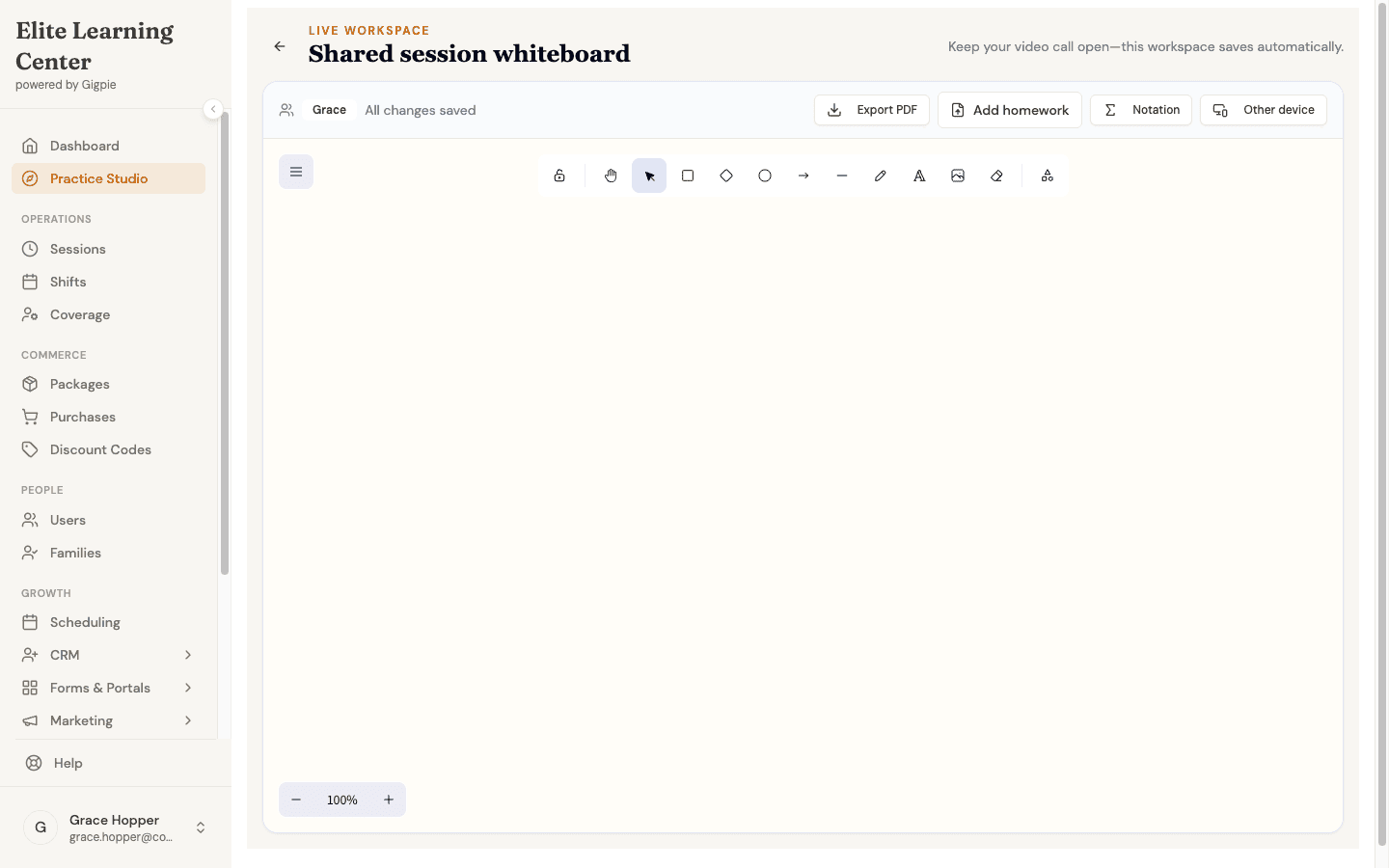
The board itself: a full drawing toolbar, PDF export, an Add homework action, and a pairing code for a second device.
Recording That Asks the Family First
Gigpie never records by default. Recording is requested per session and only starts once the family's consent is on file: a parent approves it in the portal, or an admin applies a written override for a family with no parent account. Inside the room, a session expected to be recorded shows a persistent notice before anything starts, and a red Recording pill while capture is live. When the call ends, the recording and transcript attach to the session's detail page, next to the progress note the family already reads.
Coaches running sessions on Zoom, Meet, or Teams can get recording a different way: Gigpie sends a meeting recorder into the call. It joins like another participant, under the same consent rule. On those recorded calls, Gigpie's AI reads the transcript for homework the coach assigned out loud and creates the assignment automatically when it is confident about what it found. That homework capture works on external-platform calls the recorder attended; a Gigpie-hosted call gets its recording and transcript on the session, and homework there comes from the coach's own assignment tools.
Keep Your Own Platform If You Prefer
Nobody is forced onto Gigpie's rooms. Open the session, paste any meeting URL, and that becomes the session's join link. Zoom, Meet, and Teams links get a matching icon and Join button on the session lists; a link from a less common platform still saves, still travels in reminder emails, and shows as a plain Join link on the parent's dashboard.
Coaches who connect Google Calendar can skip the paste. Gigpie creates the calendar event at booking, Google attaches a Meet link to it, and that link lands on the session automatically. Teams works the same way through a connected Outlook calendar. These links come from the calendar event, not from a separate video integration; the calendar connection itself is covered in Smart Scheduling.
Two limits are worth knowing. Gigpie has no Zoom API integration: pasting a Zoom link works every day, asking Gigpie to create a Zoom meeting does not. And pasted links are not verified; Gigpie reads the hostname to pick an icon, so open a new link once before the first session that uses it.
Who This Is For
A fully online company gets the most from hosted video: every family joins the same way, and recordings land on the session instead of in a coach's personal cloud account. A coach with a paid Zoom plan and years of habit loses nothing by pasting links. A company teaching exclusively in person has no use for any of this, and a solo tutor with three families can keep texting a Meet link. The value shows up when "which link is it this week?" happens across many coaches and many families at once.
How-To Guides
For coaches:
- Join a session - Where the Join button lives on the sessions list
- Add or change a session's meeting link - For coaches bringing their own platform
- Connect Google Calendar - The connection that can generate Meet links
For parents:
- Join a session - Finding the Join button in the family portal
Frequently Asked Questions
Do I have to use Gigpie's video?
No. The meeting link is set per session, so a coach can paste a Zoom, Meet, Teams, or any other URL and families get the same Join button in the same places. Gigpie's hosted rooms are the built-in option, not a requirement.
Does Gigpie integrate with Zoom?
Not at the API level. There's no Zoom account connection, and Gigpie can't create Zoom meetings for a coach. Zoom-based coaches paste a Zoom link, often a personal meeting room, onto their sessions, and families get the same join button either way.
Do parents or students need to install anything?
Not for Gigpie-hosted calls; the room runs in the browser, and the join page asks for camera and microphone permission right there. If the coach pasted an external link instead, that platform's own rules apply; Zoom, Meet, and Teams each handle browser joins differently.
Is every session recorded?
No. Recording has to be requested for a session, and it only starts once the family's consent is on file, from a parent's approval or a written admin override when no parent account exists. The room shows a notice when a session is expected to be recorded and a red pill while recording is live.
Who can use the whiteboard during a call?
The coach and the student, plus any device they pair in by QR code. Parents are not whiteboard participants; they see progress notes, recordings, and transcripts on the session instead. The board is the same one Practice Studio uses, and it keeps its contents after the call ends.
Where does the noise filtering actually run?
On the participant's own device. Gigpie serves the filter from its own servers, benchmarks the machine, and runs the strongest tier it can handle locally; audio is never sent to a third-party cleanup service. Under load mid-call, the filter steps down a tier instead of letting audio break up.
Can a recorded call really turn into homework assignments?
On external-platform calls the meeting recorder attended, yes. Gigpie's AI reads the transcript for tasks the coach assigned during the call and creates homework assignments when it's confident about what it found, for the coach to review. Gigpie-hosted calls get a recording and transcript on the session, but homework capture there is manual today.
What happens on a slow computer or an unsupported browser?
The blur switch only appears on browsers that can run it, so it never silently fails. The noise filter always has a floor: at minimum it uses the browser's own built-in filtering, and if the machine gets busy mid-call it steps down a tier rather than degrading the audio.
Run the whole session in one tab
Free until you collect revenue, then a flat 2% of what you collect. Hosted video, the shared whiteboard, and consent-gated recording are all included.
Get started freeRelated Resources
- Practice Studio - The whiteboard's other home, alongside question banks, practice sets, and coach review
- Parent Portal - Where families find the Join button, and later the recording and progress note
- Smart Scheduling - Booking, calendar push, and the reminder emails that carry the join link